配置 nginx 开机自启的核心做法是创建一个 systemd 服务单元文件,将其注册为系统服务并启用。你需要在 /etc/systemd/system/ 目录下新建一个以 .service 结尾的文件,写入启动命令、用户权限和重启策略,然后运行 systemctl enable nginx 即可实现开机自动拉起。

如何编写 Nginx 的 Systemd 服务文件
直接回答:通过创建 /etc/systemd/system/nginx.service 文件并定义 [Service] 段落的 ExecStart 参数来实现。
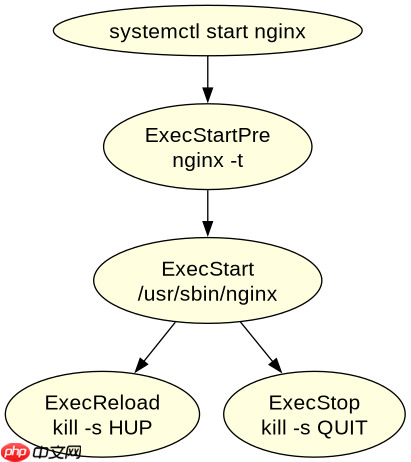
[Unit]
Description=The NGINX HTTP and reverse proxy server
After=syslog.target network-online.target remote-fs.target nss-lookup.target
Wants=network-online.target

[Service]
Type=forking
PIDfile=/run/nginx.pid
ExecStartPre=/usr/sbin/nginx -t -c /etc/nginx/nginx.conf
ExecStart=/usr/sbin/nginx -c /etc/nginx/nginx.conf
ExecReload=/bin/kill -s HUP $MAINPID
ExecStop=/bin/kill -s QUIT $MAINPID
PrivateTmp=true

[Install]
WantedBy=multi-user.target
上述代码中,ExecStartPre 用于在启动前检查配置文件语法是否正确,避免错误配置导致服务启动失败。ExecStart 指定了实际的启动命令,这里假设 Nginx 二进制文件位于 /usr/sbin/nginx,配置文件位于 /etc/nginx/nginx.conf。如果你的安装路径不同,请修改对应的路径。ExecReload 定义了重载配置的信号,ExecStop 定义了停止服务的信号。完成文件编写后,执行 systemctl daemon-reload 重新加载守护进程配置,接着使用 systemctl start nginx 启动服务,并使用 systemctl enable nginx 设置开机自启。验证是否生效可以重启服务器后检查 systemctl status nginx 的状态。
如何验证 Nginx 开机自启是否成功
直接回答:通过检查服务状态、查看日志以及模拟重启来确认自启配置已正确应用。

Nginx 配置与调优技能。支持反向代理、负载均衡、SSL/TLS 终止、高性能静态资源服务。触发词:Nginx 配置、代理设置、SSL 证书、性能调优、负载均衡、反向代理。

# 检查服务是否被设置为开机自启
systemctl is-enabled nginx

# 查看当前服务运行状态
systemctl status nginx

# 查看服务启动日志(如果启动失败)
journalctl -u nginx -e
执行 systemctl is-enabled nginx,如果返回 enabled,说明开机自启配置已注册到系统目标中。执行 systemctl status nginx 可以看到服务当前的运行状态,包括主进程 ID(PID)、内存占用以及最近的活动记录。如果服务未运行或启动失败,journalctl -u nginx -e 会显示最近的日志条目,帮助排查配置错误或权限问题。为了彻底验证开机自启功能,建议重启服务器(reboot),然后在系统启动完成后再次运行 systemctl status nginx,确认服务处于 active (running) 状态。此外,可以通过浏览器访问服务器 IP 或域名,确认 Nginx 默认页面是否正常加载,从而从应用层确认服务已成功启动并监听端口。
当 Nginx 配置文件存在语法错误时服务会怎样
直接回答:如果配置文件存在语法错误,ExecStartPre 中的测试命令会失败,导致服务启动中止,不会进入运行状态。
# 故意制造一个错误的配置文件
sudo bash -c 'echo "invalid_directive;" >> /etc/nginx/nginx.conf'

# 尝试启动服务
sudo systemctl start nginx

# 查看状态,应显示 failed
systemctl status nginx

# 查看日志,应包含配置测试失败的错误信息
journalctl -u nginx -n 20
在上述代码中,我们向 /etc/nginx/nginx.conf 追加了一行无效指令。当执行 systemctl start nginx 时,Systemd 会先执行 ExecStartPre 定义的 nginx -t 命令。由于配置文件语法错误,该命令返回非零退出码,Systemd 判定前置条件不满足,因此终止启动流程。此时 systemctl status nginx 会显示 failed 状态,且 journalctl 日志中会明确提示 nginx: [emerg] ... invalid command。修复配置文件后,再次执行 systemctl start nginx 即可正常启动。这种机制确保了只有配置正确的 Nginx 才会被启动,避免了因配置错误导致的静默失败或服务不可用。