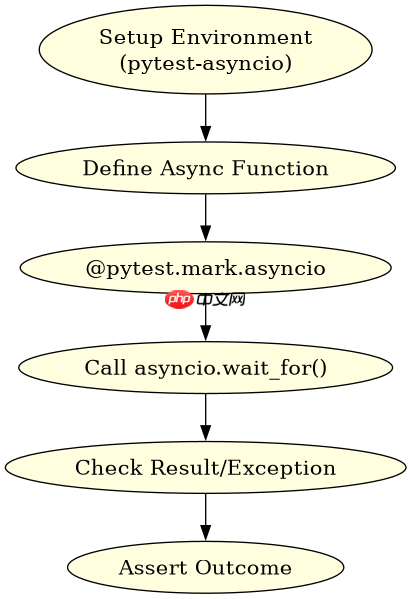
在python 3.12中测试协程超时取消逻辑,核心做法是调用 asyncio.wait_for() 包裹待测协程并设置 timeout 参数。当触发超时时,该函数会抛出 asyncio.timeouterror 异常,同时底层任务会被自动取消。通过 pytest-asyncio 插件运行异步测试用例,使用 pytest.raises 捕获异常即可验证这一行为。

如何配置环境并编写基础异步测试用例
首先需要安装 pytest、pytest-asyncio 和 python-dotenv(如需加载环境变量)。在测试文件中,使用 @pytest.mark.asyncio 装饰器标记异步测试函数。对于需要模拟特定输入或环境的场景,可以使用 pytest.fixture 提供依赖项。例如,测试一个从API获取数据的协程时,可以注入一个模拟的HTTP客户端。
import asyncio
import pytest
import pytest_asyncio
from unittest.mock import AsyncMock, patch

# 假设这是我们要测试的业务逻辑
async def fetch_data_with_timeout(url: str, timeout: float) -> dict:
    """模拟一个可能超时的网络请求"""
    # 模拟网络延迟
    await asyncio.sleep(0.5)
    return {"status": "ok", "data": "result"}

@pytest.mark.asyncio
async def test_fetch_data_timeout_raises_error():
    """测试当请求超过指定时间时,应抛出 TimeoutError"""
    url = "http://example.com/api"
    timeout = 0.1  # 设置极短的超时时间以触发取消

    with pytest.raises(asyncio.TimeoutError):
        await asyncio.wait_for(fetch_data_with_timeout(url, timeout), timeout=timeout)

@pytest.mark.asyncio
async def test_fetch_data_success_within_timeout():
    """测试当请求在超时时间内完成时,正常返回结果"""
    url = "http://example.com/api"
    timeout = 1.0  # 设置足够长的超时时间

    result = await asyncio.wait_for(fetch_data_with_timeout(url, timeout), timeout=timeout)
    assert result == {"status": "ok", "data": "result"}
如何验证被取消的任务状态及清理资源
除了捕获 TimeoutError,有时还需要验证被取消的任务是否处于正确的状态,或者确保在取消后没有残留的资源泄漏。可以通过检查任务的 cancelled() 状态或使用 asyncio.Task 对象来监控。此外,如果协程内部有资源清理逻辑(如关闭数据库连接),需要确保这些逻辑在取消发生时也能正确执行,通常通过 try...finally 块实现。
立即学习“Python免费学习笔记(深入)”;

import asyncio
import pytest

async def resource_manager_task(duration: float):
    """模拟一个持有资源的任务"""
    resource_acquired = True
    try:
        await asyncio.sleep(duration)
        return {"resource": "active"}
    finally:
        if resource_acquired:
            print("Resource released")
            resource_acquired = False

@pytest.mark.asyncio
async def test_task_cancellation_and_cleanup():
    """测试任务被取消时,finally块中的清理逻辑是否执行"""
    task = asyncio.create_task(resource_manager_task(10.0))

    # 等待一小段时间让任务开始
    await asyncio.sleep(0.1)

    # 取消任务
    task.cancel()

    try:
        await task
    except asyncio.CancelledError:
        pass  # 预期会抛出 CancelledError

    # 验证任务确实被取消
    assert task.cancelled()

@pytest.mark.asyncio
async def test_wait_for_cancellation_triggers_cleanup():
    """测试 wait_for 超时取消时,协程内部的 finally 块是否执行"""
    with patch('builtins.print', new_callable=AsyncMock) as mock_print:
        with pytest.raises(asyncio.TimeoutError):
            await asyncio.wait_for(resource_manager_task(10.0), timeout=0.1)

        # 验证 finally 块中的打印语句被执行
        mock_print.assert_called_once_with("Resource released")
如何处理嵌套协程中的超时传播与错误处理
在实际应用中,超时逻辑往往涉及多个嵌套的协程。例如,一个主协程调用多个子协程,任何一个子协程超时都可能导致整个操作失败。此时,需要确保超时异常能正确地从子协程传播到父协程,并且父协程能妥善处理这种异常,避免静默失败。可以使用 asyncio.gather() 配合 return_exceptions=True 来收集所有异常,然后单独检查是否有超时发生。
import asyncio
import pytest

async def sub_task(name: str, delay: float):
    """模拟子任务"""
    await asyncio.sleep(delay)
    return f"{name} completed"

async def main_workflow(tasks: list):
    """主工作流:并行执行多个子任务"""
    results = await asyncio.gather(*tasks, return_exceptions=True)
    errors = [r for r in results if isinstance(r, Exception)]
    if errors:
        raise RuntimeError(f"One or more tasks failed: {errors}")
    return results

@pytest.mark.asyncio
async def test_nested_timeout_propagation():
    """测试嵌套协程中超时异常的传播"""
    tasks = [
        asyncio.create_task(sub_task("task1", 0.1)),
        asyncio.create_task(sub_task("task2", 10.0)),  # 这个会超时
        asyncio.create_task(sub_task("task3", 0.1)),
    ]

    # 使用 wait_for 包裹整个工作流
    with pytest.raises(RuntimeError) as exc_info:
        await asyncio.wait_for(main_workflow(tasks), timeout=1.0)

    # 验证异常信息中包含超时相关的错误
assert "task2" in str(exc_info.value)