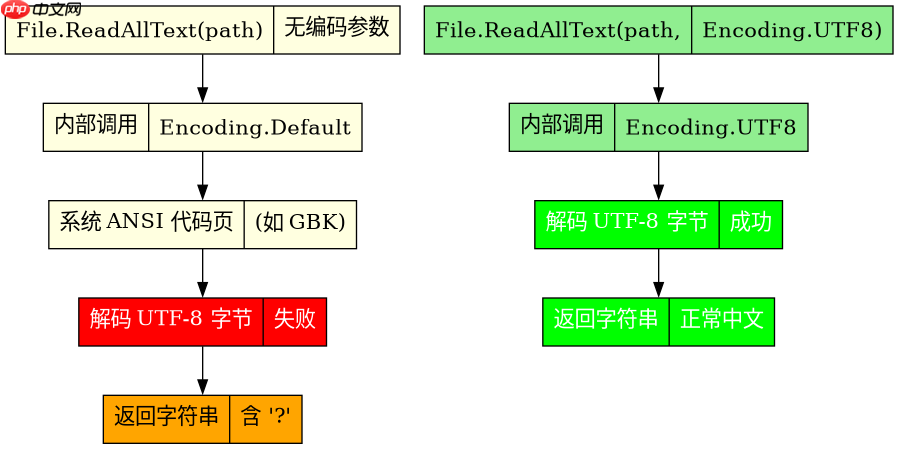
文件读取后出现问号通常是因为使用了错误的编码(如默认 ascii 或 gbk)去解码 utf-8 编码的文件,导致多字节字符被截断或替换。只要原始文件在磁盘上保存正确,中文是可以完全恢复的,关键在于使用正确的 encoding.utf8 进行读取。

File.ReadAllText() 不指定编码时为何乱码
当调用 File.ReadAllText(path) 且未显式指定编码参数时,.NET Framework 默认使用系统 ANSI 代码页(例如中文 Windows 下为 GBK),而现代文本文件多为 UTF-8。若文件实际是 UTF-8 编码,GBK 解码器会将 UTF-8 的多字节序列误读,产生问号或乱码。必须显式传入 Encoding.UTF8 才能正确还原。

using System;
using System.IO;
using System.Text;

class Program
{
    static void Main()
    {
        string path = "test.txt";
        // 模拟写入 UTF-8 文件
        File.WriteAllText(path, "你好世界", Encoding.UTF8);

        // 错误做法:使用默认编码(可能是 GBK)
        string wrong = File.ReadAllText(path);
        Console.WriteLine("默认编码结果: " + wrong);

        // 正确做法:显式指定 UTF-8
        string correct = File.ReadAllText(path, Encoding.UTF8);
        Console.WriteLine("UTF-8 编码结果: " + correct);
    }
}
StreamReader 如何自动检测 BOM
StreamReader 构造函数支持自动检测 BOM(Byte Order Mark)。如果文件以 UTF-8 BOM(EF BB BF)开头,new StreamReader(path) 会自动识别并切换至 UTF-8 模式,无需手动指定编码。这是处理未知来源文件的安全做法,能避免大多数因编码猜测错误导致的乱码问题。

using System;
using System.IO;

class Program
{
    static void Main()
    {
        string path = "test_bom.txt";
        // 写入带 BOM 的 UTF-8 文件
        byte[] bom = new byte[] { 0xEF, 0xBB, 0xBF };
        byte[] content = System.Text.Encoding.UTF8.GetBytes("测试BOM");
        File.WriteAllBytes(path, bom.Concat(content).ToArray());

        // 自动检测 BOM
        using (var reader = new StreamReader(path))
        {
            string text = reader.ReadToEnd();
            Console.WriteLine("自动检测结果: " + text);
        }
    }
}
基于 Encoding.UTF8 读取特定输入的结果验证
针对上述代码中显式使用 Encoding.UTF8 读取包含“你好世界”的文件,程序输出结果为完整的“你好世界”,无问号或乱码。这验证了只要编码匹配,原始中文数据可无损恢复。若文件本身已损坏或被错误覆盖,则无法恢复,但仅因读取编码错误导致的问号,修正编码即可解决。