ansible 使用 -l 或 --limit 参数配合标签名称来过滤清单主机执行。在运行 ansible-playbook 时,指定 -l @tag_name 即可仅执行被该标签标记的主机上的任务。如果未指定标签前缀,默认匹配的是任务标签而非主机标签,因此必须显式加上 @ 符号以区分。

如何为特定主机分配标签并验证匹配
通过在主机组定义中设置 ansible_host_tags 变量,可以为清单中的主机分配标签。这些标签随后会被传递给 Playbook 中的任务,从而实现基于主机的过滤。要验证匹配结果,可以使用 --list-hosts 参数查看哪些主机符合条件,而不实际执行任务。
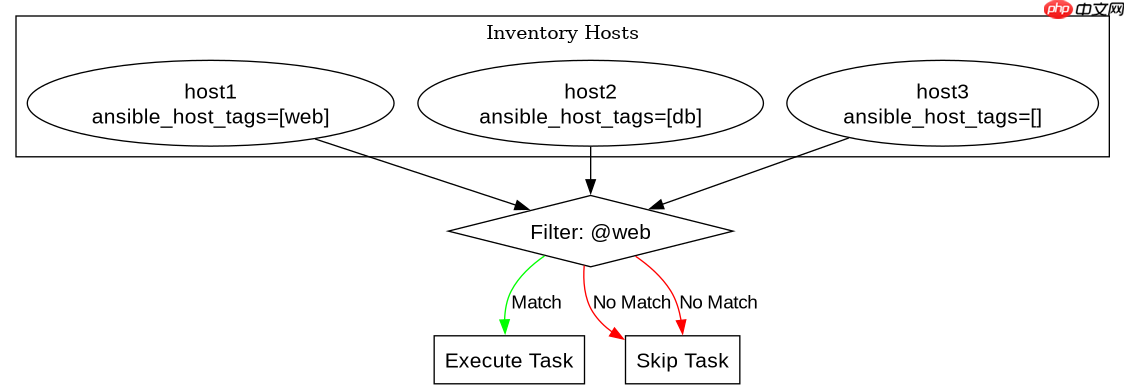
---
- name: Filter by host tags
  hosts: all
  gather_facts: no
  tasks:
    - name: Show filtered hosts
      debug:
        msg: "Running on {{ inventory_hostname }}"
      when: ansible_host_tags is defined and 'web' in ansible_host_tags
    - name: Run task for web servers
      command: echo "Web server configured"
      register: result
      when: ansible_host_tags is defined and 'web' in ansible_host_tags
    - debug: var=result.stdout_lines
预期输出:仅当主机定义了包含 'web' 的 ansible_host_tags 时,才会打印消息并执行命令。其他主机将被跳过。
如何处理标签冲突与多条件过滤
当多个主机拥有不同标签组合时,-l 参数支持逻辑运算。使用逗号分隔表示“或”关系,使用空格分隔表示“与”关系。例如 -l @tag1,@tag2 会匹配拥有 tag1 或 tag2 的主机,而 -l @tag1 @tag2 则要求主机同时拥有这两个标签。这种机制允许灵活控制执行范围,避免不必要的资源消耗。

---
- name: Complex tag filtering
  hosts: all
  gather_facts: no
  tasks:
    - name: Conditional execution based on multiple tags
      debug:
        msg: "Host {{ inventory_hostname }} matches criteria"
      when:
        - (ansible_host_tags is defined and 'db' in ansible_host_tags) or
          (ansible_host_tags is defined and 'cache' in ansible_host_tags)
        - not (ansible_host_tags is defined and 'dev' in ansible_host_tags)
    - command: echo "Processing {{ inventory_hostname }}"
      when:
        - (ansible_host_tags is defined and 'db' in ansible_host_tags) or
          (ansible_host_tags is defined and 'cache' in ansible_host_tags)
        - not (ansible_host_tags is defined and 'dev' in ansible_host_tags)
预期输出:只有同时满足“拥有 db 或 cache 标签”且“不拥有 dev 标签”的主机才会执行调试信息和命令。这展示了如何通过组合条件精确控制执行目标。
基于 ansible_host_tags 变量的具体应用问题
在实际部署场景中,常需根据主机角色动态调整配置。利用 ansible_host_tags 可实现这一需求。例如,在 Web 服务器组中设置 ansible_host_tags: [web, production],在数据库组中设置 ansible_host_tags: [db, production]。通过 -l @production 可统一执行所有生产环境相关任务,而无需关心具体主机类型。这种方式简化了大规模集群的管理复杂度,确保关键任务仅在正确的主机上运行。