java nio 中通过 mappedbytebuffer 实现内存映射文件,核心做法是调用 filechannel.map() 方法将文件区域直接映射到堆外内存。这样做能避免传统 i/o 中的多次数据拷贝,让应用直接操作内存地址来读写文件内容,特别适合处理大文件或需要高性能随机访问的场景。

FileChannel.map() 的三种模式有什么区别
FileChannel.map() 支持 READ_ONLY、READ_WRITE 和 PRIVATE 三种映射模式,分别对应不同的读写权限和修改可见性。选择哪种模式取决于你是否需要修改文件内容以及是否希望修改立即反映到磁盘文件中。
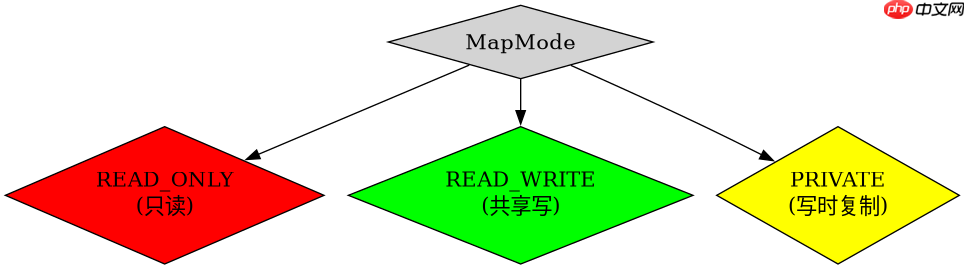
import java.io.RandomAccessFile; import java.nio.MappedByteBuffer; import java.nio.channels.FileChannel; public class MapModeDemo { public static void main(String[] args) throws Exception { // 创建测试文件 RandomAccessFile raf = new RandomAccessFile("test.txt", "rw"); FileChannel channel = raf.getChannel(); // 映射整个文件为 READ_WRITE 模式 MappedByteBuffer rwBuffer = channel.map(FileChannel.MapMode.READ_WRITE, 0, 1024); // 映射整个文件为 READ_ONLY 模式 MappedByteBuffer roBuffer = channel.map(FileChannel.MapMode.READ_ONLY, 0, 1024); // 映射整个文件为 PRIVATE (写时复制) 模式 MappedByteBuffer privateBuffer = channel.map(FileChannel.MapMode.PRIVATE, 0, 1024); // 清理资源 channel.close(); raf.close(); } }在 READ_ONLY 模式下尝试写入会抛出 ReadOnlyBufferException;READ_WRITE 模式下的修改会直接同步到磁盘文件;而 PRIVATE 模式下的修改仅对当前进程可见,不会污染原文件,关闭缓冲区后修改丢失。

OpenAI Agents SDK JavaScript 工作流工具包
下载
一个基于源码的 OpenAI Agents SDK JavaScript 和 TypeScript 技术文档。涵盖了代理编排、工具、转接、追踪以及实际安装路径。
立即学习“Java免费学习笔记(深入)”;
如何确保 MappedByteBuffer 的数据安全刷新到磁盘
虽然操作系统通常会在后台自动管理映射页面的脏页刷新,但为了确保数据持久化,应显式调用 MappedByteBuffer.force() 或 FileChannel.force()。这会将所有未提交的更改强制写入底层存储设备,防止系统崩溃导致数据丢失。

import java.io.RandomAccessFile; import java.nio.MappedByteBuffer; import java.nio.channels.FileChannel; public class ForceFlushDemo { public static void main(String[] args) throws Exception { RandomAccessFile raf = new RandomAccessFile("data.bin", "rw"); FileChannel channel = raf.getChannel(); MappedByteBuffer buffer = channel.map(FileChannel.MapMode.READ_WRITE, 0, 1024); // 写入数据 buffer.put((byte) 'A'); // 显式强制刷新到磁盘 channel.force(true); // 确保元数据和内容都落盘 channel.close(); raf.close(); } }映射超过 Integer.MAX_VALUE 的大文件如何处理
由于 MappedByteBuffer 的大小受限于 Java 整数范围(最大约 2GB),无法直接映射大于此限制的文件。解决方案是将大文件分割成多个块,循环映射每个块进行处理,或者使用 FileChannel 的直接读写方式替代内存映射。
import java.io.RandomAccessFile; import java.nio.MappedByteBuffer; import java.nio.channels.FileChannel; public class LargeFileHandler { private static final long CHUNK_SIZE = 1024L * 1024 * 500; // 500MB chunks public static void processLargeFile(String path) throws Exception { RandomAccessFile raf = new RandomAccessFile(path, "r"); FileChannel channel = raf.getChannel(); long fileSize = channel.size(); long position = 0; while (position < fileSize) { long size = Math.min(CHUNK_SIZE, fileSize - position); MappedByteBuffer chunk = channel.map(FileChannel.MapMode.READ_ONLY, position, size); // 处理 chunk... position += size; } channel.close(); raf.close(); } }