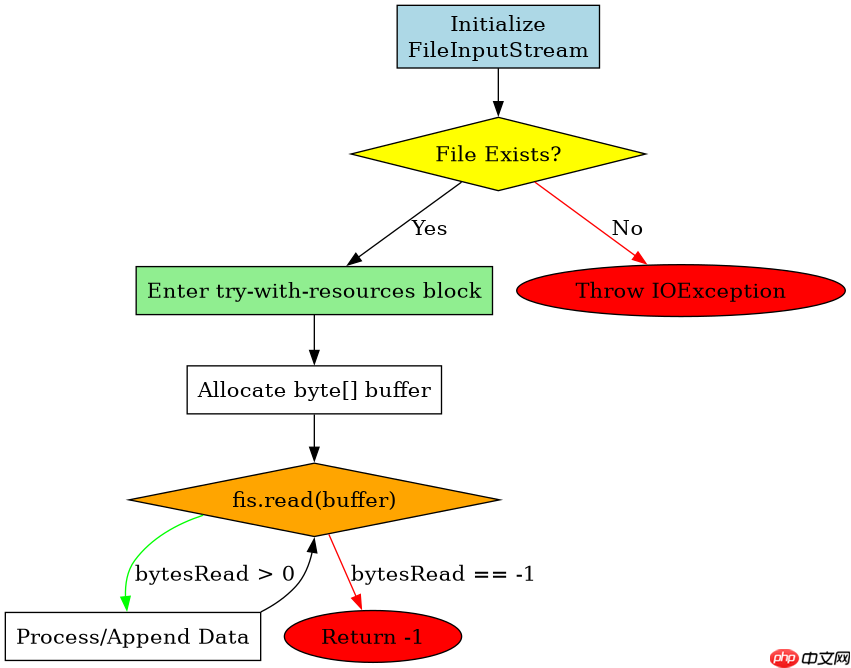
java 中使用 try-with-resources 读取字节时,只需将 fileinputstream 的实例化语句放在 try 后的括号中,jvm 会自动在代码块结束时调用其 close() 方法。具体做法是定义一个字节数组作为缓冲区,通过 read() 方法循环读取数据直到返回 -1,最后处理或打印这些字节。这种方式避免了手动关闭流可能导致的资源泄漏,且代码更简洁。

如何初始化并声明 FileInputStream
在使用 try-with-resources 时,必须确保 FileInputStream 实现了 AutoCloseable 接口,而它确实实现了该接口。初始化时,需要传入文件路径或 File 对象。如果文件不存在,会在进入 try 块之前抛出 FileNotFoundException。因此,第一步是正确构造流对象。
import java.io.FileInputStream;
import java.io.IOException;

public class ReadBytesExample {
    public static void main(String[] args) {
        // 假设有一个名为 "data.bin" 的文件,包含字节序列
        String filePath = "data.bin";

        try (FileInputStream fis = new FileInputStream(filePath)) {
            byte[] buffer = new byte[1024];
            int bytesRead;
            StringBuilder result = new StringBuilder();

            while ((bytesRead = fis.read(buffer)) != -1) {
                result.append(new String(buffer, 0, bytesRead));
            }
            System.out.println("Read content: " + result.toString());
        } catch (IOException e) {
            System.err.println("Error reading file: " + e.getMessage());
        }
    }
}上述代码中,FileInputStream 在 try 括号内声明。当 try 块正常结束或发生异常时,fis.close() 会被自动调用。缓冲区大小为 1024 字节,每次读取的数据存入 buffer,并通过 new String 转换为字符串追加到结果中。如果文件为空,read 立即返回 -1,循环不执行。
立即学习“Java免费学习笔记(深入)”;

一个基于源码的 OpenAI Agents SDK JavaScript 和 TypeScript 技术文档。涵盖了代理编排、工具、转接、追踪以及实际安装路径。
如何处理读取过程中的异常和结束条件
读取过程中主要关注两个点:一是 read() 方法的返回值,二是可能抛出的 IOException。read(byte[] b) 方法返回实际读取的字节数,如果到达文件末尾则返回 -1。这是判断读取结束的唯一直观标志。任何 I/O 错误都会导致 IOException,这会被 catch 块捕获。

import java.io.FileInputStream;
import java.io.IOException;

public class CheckEndCondition {
    public static void main(String[] args) {
        String filePath = "empty.txt"; // 空文件

        try (FileInputStream fis = new FileInputStream(filePath)) {
            byte[] buffer = new byte[5];
            int count = 0;
            int readResult;

            while ((readResult = fis.read(buffer)) != -1) {
                count++;
                System.out.println("Iteration " + count + ": read " + readResult + " bytes");
            }
            if (count == 0) {
                System.out.println("File was empty or read immediately returned -1.");
            }
        } catch (IOException e) {
            System.err.println("IO Error: " + e.getMessage());
        }
    }
}
在这个例子中,使用了一个较小的缓冲区(5 字节)和一个空文件来演示边界情况。对于空文件,第一次调用 read 就会返回 -1,因此 while 循环体不会执行,count 保持为 0。程序会输出 "File was empty..."。如果文件存在但无法访问,则会进入 catch 块。这种结构确保了无论成功还是失败,资源都会被正确释放。
基于读取到的字节数组内容的具体问题
当从文件中读取字节后,得到的 byte[] 数组包含的是原始二进制数据。如果这些数据代表文本(如 UTF-8),直接打印数组会得到类似 [B@hashcode 的输出,这不是我们想要的可读内容。必须使用 String 构造函数或 StandardCharsets 将其解码。此外,如果读取的不是完整字符(例如 UTF-8 的多字节字符被截断在缓冲区边界),直接转换可能会产生乱码。但在大多数简单场景下,按块读取并即时转换是可行的。
import java.io.FileInputStream;
import java.io.IOException;
import java.nio.charset.StandardCharsets;

public class DecodeBytes {
    public static void main(String[] args) {
        String filePath = "text.txt"; // 包含 "Hello"

        try (FileInputStream fis = new FileInputStream(filePath)) {
            byte[] buffer = new byte[10];
            int bytesRead;

            while ((bytesRead = fis.read(buffer)) != -1) {
                // 关键步骤:只转换实际读取的部分
                String chunk = new String(buffer, 0, bytesRead, StandardCharsets.UTF_8);
                System.out.print(chunk);
            }
        } catch (IOException e) {
            e.printStackTrace();
        }
    }
}
这段代码展示了如何将读取的字节安全地转换为字符串。使用 new String(buffer, 0, bytesRead, StandardCharsets.UTF_8) 可以指定编码格式,避免平台默认编码带来的不一致性。注意第二个参数是偏移量 0,第三个参数是实际读取的字节数 bytesRead,这样可以正确处理最后一次读取不足缓冲区大小的情况。如果不指定编码,在某些系统上可能会导致中文等字符显示为乱码。