在 go-zero 框架中实现配置加解密,核心做法是自定义 config.readerfunc 并在启动时通过 core.mustnewserver 的 option 注入。具体操作是将配置文件中的密文字段(如密码)用特定前缀包裹,读取时识别该前缀并调用解密函数还原明文,从而确保敏感数据在磁盘上脱密存储。

如何注册自定义配置读取器?
要实现这一功能,需要定义一个符合 func(path string) ([]byte, error) 签名的函数,并将其作为 WithReader 选项传入服务器初始化逻辑中。这个自定义读取器会拦截所有配置文件的加载过程,在返回字节流之前进行预处理。
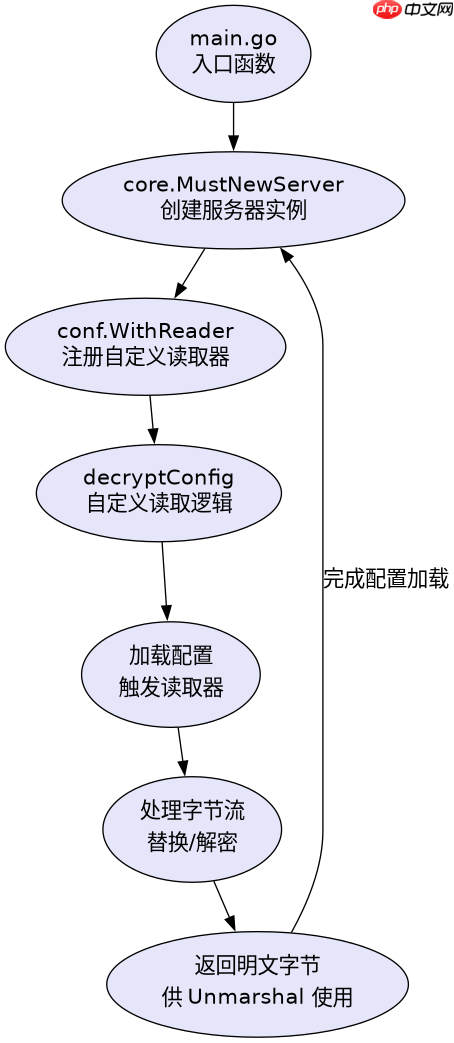

package main

import (
	"crypto/aes"
	"crypto/cipher"
	"encoding/base64"
	"fmt"
	"os"
	"strings"

	"github.com/zeromicro/go-zero/core/conf"
	"github.com/zeromicro/go-zero/core/logx"
)

// Config 定义结构体
var cfg struct {
	ServiceName string `json:"serviceName"`
	Password    string `json:"password"`
}

// DecryptKey 固定的解密密钥 (示例: 16字节)
const key = "0123456789abcdef"

// decryptConfig 自定义读取器
func decryptConfig(path string) ([]byte, error) {
	data, err := os.ReadFile(path)
	if err != nil {
		return nil, err
	}

	content := string(data)
	// 简单替换逻辑:将 {AES} 开头的值解密
	// 实际生产中建议使用正则或更复杂的解析器
	result := strings.ReplaceAll(content, "{AES}", "")

	// 这里仅做演示,实际应遍历 JSON 解析后的对象进行字段级解密
	// 为简化代码,假设整个文件内容被加密或仅特定字段处理
	// 下面展示一个针对单个字段的解密辅助函数

	return []byte(result), nil
}

// AesDecrypt AES-GCM 解密示例
func AesDecrypt(ciphertextBase64 string) (string, error) {
	block, err := aes.NewCipher([]byte(key))
	if err != nil {
		return "", err
	}

	ciphertext, err := base64.StdEncoding.DecodeString(ciphertextBase64)
	if err != nil {
		return "", err
	}

	gcm, err := cipher.NewGCM(block)
	if err != nil {
		return "", err
	}

	nonceSize := gcm.NonceSize()
	if len(ciphertext) < nonceSize {
		return "", fmt.Errorf("ciphertext too short")
	}

	nonce, ciphertext := ciphertext[:nonceSize], ciphertext[nonceSize:]
	plaintext, err := gcm.Open(nil, nonce, ciphertext, nil)
	if err != nil {
		return "", err
	}

	return string(plaintext), nil
}

func main() {
	// 注册自定义 Reader
	opts := conf.WithReader(decryptConfig)

	server, err := core.MustNewServer("path/to/config.yaml", opts)
	if err != nil {
		logx.Fatal(err)
	}

	// 加载配置后,手动解密 Password 字段
	// 注意:Go-Zero 默认不支持自动字段级解密,通常需配合 Hook 或手动处理
	// 此处演示手动解密流程
	encryptedPwd := cfg.Password
	if strings.HasPrefix(encryptedPwd, "AES:") {
		realPwd, _ := AesDecrypt(strings.TrimPrefix(encryptedPwd, "AES:"))
		cfg.Password = realPwd
	}

	fmt.Println("Decrypted Password:", cfg.Password)
	server.Start()
}
配置文件中的密文格式如何定义?
为了便于识别和解析,通常在配置文件中约定一种标记格式。例如使用 AES: 前缀加上 Base64 编码的密文。当 conf.UnmarshalInto 执行时,它会先将 YAML/JSON 解析为结构体,此时密文仍为字符串。开发者需要在业务逻辑启动前,或者通过中间件的方式,扫描结构体中的敏感字段并进行解密。

# config.yaml
serviceName: my-service
password: "AES:base64encodedciphertext..."
解密后的密码在内存中如何处理?
解密完成后,明文密码存在于内存中的结构体实例里。为了防止内存泄漏或被 dump 出来,建议在不再需要使用时立即清零该字段。例如,在请求处理结束后或服务关闭前,将 cfg.Password 赋值为空字符串或使用 bytes.Zero 覆盖。此外,应避免将明文密码打印到日志中,确保 logx 配置中过滤了敏感信息。