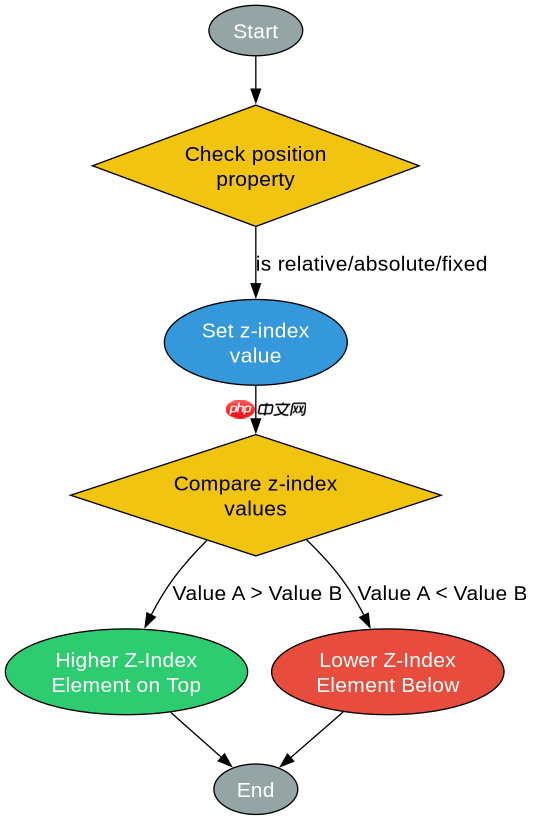
同级 relative 定位元素默认按 html 源码顺序分层,后出现的元素层级更高。要让特定元素显示在最上层,只需显式设置 z-index 属性并赋予一个比同级其他元素更大的数值即可。

z-index 的默认行为是怎样的
在 CSS 中,如果没有显式指定 z-index,元素的堆叠顺序(Stacking Context)严格遵循文档流中的物理顺序。这意味着,在 HTML 结构中位于下方的元素,其渲染层级会自动高于上方的元素。这种机制对于大多数常规布局是合理的,但在需要覆盖或遮挡时,开发者往往需要打破这一默认规则。
<!DOCTYPE html>
<html lang="en">
<head>
    <meta charset="UTF-8">
    <title>z-index Default Behavior</title>
    <style>
        .container {
            position: relative;
            width: 300px;
            height: 300px;
            background-color: #f0f0f0;
        }
        .box {
            position: relative;
            width: 150px;
            height: 150px;
            padding: 10px;
            color: white;
            font-weight: bold;
        }
        /* 第一个盒子,HTML 中先出现 */
        .box-a {
            background-color: #e74c3c;
            top: 20px;
            left: 20px;
        }
        /* 第二个盒子,HTML 中后出现,默认 z-index 为 auto */
        .box-b {
            background-color: #3498db;
            top: 60px;
            left: 60px;
        }
    </style>
</head>
<body>
    <div class="container">
        <div class="box box-a">Box A (First)</div>
        <div class="box box-b">Box B (Second)</div>
    </div>
</body>
</html>
运行上述代码,尽管 Box A 在视觉上可能看起来更“靠前”或者占据左上角位置,但 Box B 因为出现在 DOM 树的后面,且两者都未设置 z-index(即默认为 auto),所以 Box B 会覆盖在 Box A 之上。这是浏览器渲染引擎处理层叠上下文的基本逻辑。
立即学习“前端免费学习笔记(深入)”;

htmlq 是一个命令行工具,使用 CSS 选择器从 HTML 中提取内容,相当于 jq 的 HTML 版本。该工具使用 Rust 编写,允许你通过 CSS 选择器将 HTML 管道化,直接从终端提取文本、属性和结构化内容。
如何修改同级元素的堆叠顺序
要改变默认的堆叠顺序,必须给元素设置具体的 z-index 值。该属性接受整数作为参数,数值越大,层级越高。需要注意的是,z-index 只有在元素的 position 属性值为 relative、absolute、fixed 或 sticky 时才生效。如果 position 为 static(默认值),设置 z-index 无效。
<!DOCTYPE html>
<html lang="en">
<head>
    <meta charset="UTF-8">
    <title>z-index Override</title>
    <style>
        .container {
            position: relative;
            width: 300px;
            height: 300px;
            background-color: #f0f0f0;
        }
        .box {
            position: relative;
            width: 150px;
            height: 150px;
            padding: 10px;
            color: white;
            font-weight: bold;
        }
        .box-a {
            background-color: #e74c3c;
            top: 20px;
            left: 20px;
            /* 显式设置较低的 z-index */
            z-index: 1;
        }
        .box-b {
            background-color: #3498db;
            top: 60px;
            left: 60px;
            /* 显式设置较高的 z-index,使其覆盖 Box A */
            z-index: 2;
        }
    </style>
</head>
<body>
    <div class="container">
        <div class="box box-a">Box A (z-index: 1)</div>
        <div class="box box-b">Box B (z-index: 2)</div>
    </div>
</body>
</html>
在上述代码中,通过给 Box A 设置 z-index: 1,给 Box B 设置 z-index: 2,我们强制改变了它们的堆叠顺序。即使 Box A 在 HTML 中排在前面,由于它的层级数值较低,最终渲染时会被层级数值较高的 Box B 遮挡。这种基于数值的比较在同级元素之间非常直观且有效。
父元素 z-index 对子元素的影响是什么
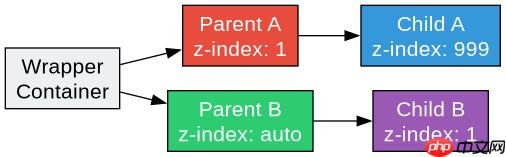
当同级元素被包裹在不同的父容器中时,情况会变得复杂。CSS 的层叠上下文(Stacking Context)规定,如果一个父元素设置了 z-index(且不为 auto),那么该父元素及其所有子元素构成了一个独立的层叠上下文。此时,子元素的 z-index 只能在父容器内部进行比较,无法突破父容器的限制去覆盖其他同级父容器中的元素。
<!DOCTYPE html>
<html lang="en">
<head>
    <meta charset="UTF-8">
    <title>z-index Parent Limitation</title>
    <style>
        .wrapper {
            position: relative;
            width: 300px;
            height: 300px;
            background-color: #f0f0f0;
        }
        .parent-a {
            position: relative;
            width: 150px;
            height: 150px;
            background-color: #ddd;
            top: 20px;
            left: 20px;
            /* 父容器 A 设置了 z-index */
            z-index: 1;
        }
        .parent-b {
            position: relative;
            width: 150px;
            height: 150px;
            background-color: #ccc;
            top: 60px;
            left: 60px;
            /* 父容器 B 没有设置 z-index,保持 auto */
            z-index: auto;
        }
        .child {
            position: absolute;
            width: 100px;
            height: 100px;
            color: white;
            display: flex;
            align-items: center;
            justify-content: center;
        }
        .child-a {
            background-color: #e74c3c;
            /* 子元素 A 设置了极高的 z-index */
            z-index: 999;
        }
        .child-b {
            background-color: #3498db;
            z-index: 1;
        }
    </style>
</head>
<body>
    <div class="wrapper">
        <div class="parent-a">
            <div class="child child-a">Child A (z-index: 999)</div>
        </div>
        <div class="parent-b">
            <div class="child child-b">Child B (z-index: 1)</div>
        </div>
    </div>
</body>
</html>
运行这段代码会发现,尽管 Child A 的 z-index 高达 999,但它仍然被 Child B 遮挡。这是因为 Parent A 的 z-index 为 1,而 Parent B 的 z-index 为 auto(相当于 0)。在比较这两个层叠上下文时,Parent A 整体位于 Parent B 之下。因此,Child A 无论设置多高的 z-index,都无法跳出 Parent A 的限制去覆盖 Parent B 内部的元素。要解决此问题,通常需要提高 Parent A 的 z-index,或者将需要置顶的元素移出当前父容器,置于更高层级的兄弟节点中。