在python中tensorflow数据管道导致gpu饥饿,通常是因为cpu预处理速度跟不上gpu计算速度,或者i/o读取瓶颈限制了数据供给。要解决这个问题,需要启用并行数据加载、使用预取机制以及优化输入管道的数据格式。通过调整tf.data的配置参数,可以显著减少gpu的空闲等待时间,确保其持续满载运行。

如何配置tf.data实现并行加载与预取
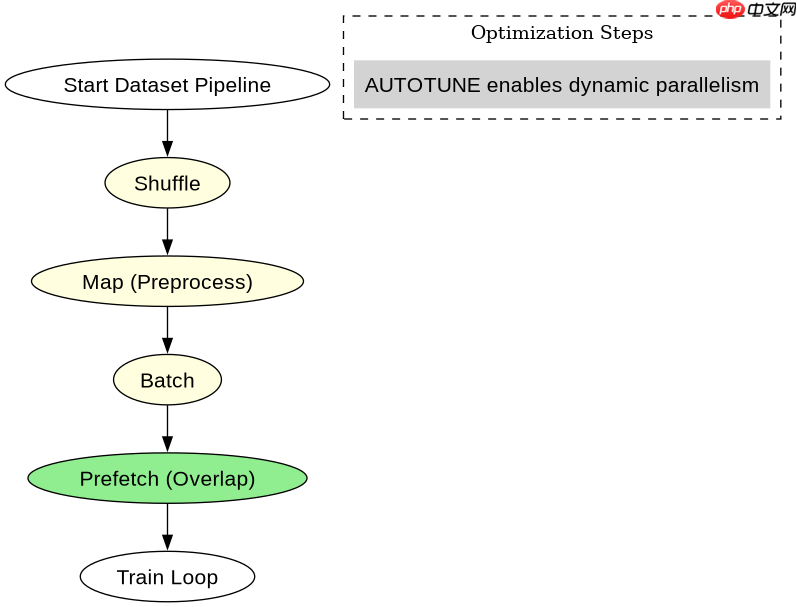
解决GPU饥饿的核心在于让数据准备与模型训练重叠执行。这可以通过设置num_parallel_calls进行并行处理,并利用.prefetch()将下一批数据提前加载到内存中。这样当GPU正在处理当前批次时,CPU已经在后台准备下一批次的数据,从而消除等待间隙。
import tensorflow as tf
import numpy as np

# 模拟大量数据
def create_dataset():
    data = np.random.rand(1000, 28, 28, 1)
    labels = np.random.randint(0, 10, 1000)
    dataset = tf.data.Dataset.from_tensor_slices((data, labels))

    # 关键优化步骤
    dataset = dataset.shuffle(buffer_size=100)
    dataset = dataset.map(preprocess_function, num_parallel_calls=tf.data.AUTOTUNE)
    dataset = dataset.batch(32)
    dataset = dataset.prefetch(tf.data.AUTOTUNE)  # 重叠执行
    return dataset

def preprocess_function(image, label):
    image = tf.cast(image, tf.float32) / 255.0
    return image, label

dataset = create_dataset()
for batch_x, batch_y in dataset.take(1):
    print("Batch shape:", batch_x.shape)
为什么I/O瓶颈会导致GPU空闲
当数据存储在慢速磁盘或网络存储上时,读取单个文件的时间可能远超GPU计算一个批次的时间。如果每次训练都重新打开和关闭文件,或者以低效的格式(如PNG/JPG)存储图像,GPU就会因为等待数据而“饥饿”。将数据转换为高效的二进制格式(如TFRecord)并配合并行读取,是缓解这一问题的标准做法。

Nodriver是Undetected-Chromedriver的官方继承者,提供异步浏览器自动化功能,可直接与Chrome DevTools Protocol通信,无需Selenium或WebDriver依赖。专为规避反机器人系统(包括Cloudflare和Imperva)的隐蔽网络自动化而构建。
立即学习“Python免费学习笔记(深入)”;

# 使用TFRecord优化I/O
import tensorflow as tf

def write_tfrecord(filename, images, labels):
    with tf.io.TFRecordWriter(filename) as writer:
        for img, lbl in zip(images, labels):
            example = tf.train.Example(features=tf.train.Features(feature={
                'image': tf.train.Feature(bytes_list=tf.train.BytesList(value=[img.tobytes()])),
                'label': tf.train.Feature(int64_list=tf.train.Int64List(value=[lbl]))
            }))
            writer.write(example.SerializeToString())

# 读取TFRecord
def parse_tfrecord(serialized_example):
    features = tf.io.parse_single_example(serialized_example, {
        'image': tf.io.FixedLenFeature([], tf.string),
        'label': tf.io.FixedLenFeature([], tf.int64)
    })
    image = tf.io.decode_raw(features['image'], tf.float32)
    image = tf.reshape(image, [28, 28, 1])
    label = tf.cast(features['label'], tf.int32)
    return image, label

tf_dataset = tf.data.TFRecordDataset(['data.tfrecord'])
tf_dataset = tf_dataset.map(parse_tfrecord, num_parallel_calls=tf.data.AUTOTUNE)
tf_dataset = tf_dataset.batch(32).prefetch(tf.data.AUTOTUNE)
当num_parallel_calls设置为AUTOTUNE时的实际行为
当在map操作中将num_parallel_calls设置为tf.data.AUTOTUNE时,TensorFlow会根据当前系统的CPU核心数和负载动态决定并行线程的数量。这通常能最大化CPU利用率,但如果CPU本身成为瓶颈(例如预处理包含复杂的非向量化操作),过多的并行调用可能导致上下文切换开销增加,反而降低整体吞吐量。此时,手动限制并行数量或优化预处理函数内部的计算效率更为有效。