使用 pandas.to_numeric() 处理字符串列
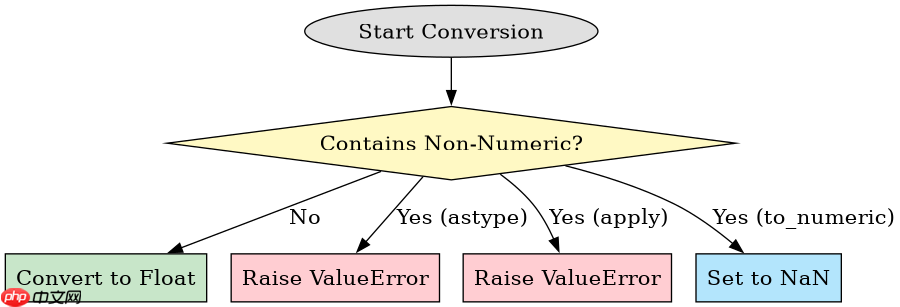
将 pandas 中字符串列批量转为浮点数,最直接且稳健的方法是使用 pandas.to_numeric() 函数。该函数能自动处理包含非数字字符(如货币符号、千分位逗号)的异常值,并通过 errors='coerce' 参数将这些无法转换的值设为 nan,从而避免程序崩溃。调用时只需传入目标 series 或 dataframe 列,即可得到转换后的结果。

对比 .astype(float) 与 .apply() 的差异
除了 to_numeric,开发者常误用 .astype(float) 或 .apply(float) 进行转换,但它们在遇到脏数据时会直接抛出异常。 .astype(float) 要求输入严格符合浮点格式,任何额外字符都会导致失败;而 .apply() 虽然灵活但性能较差。通过实际代码对比可见,当数据包含空格或特殊符号时,只有 to_numeric 能优雅降级为 NaN,而其他方法会中断执行。

Nodriver 异步无检测 Chrome 浏览器自动化 Python
下载
Nodriver是Undetected-Chromedriver的官方继承者,提供异步浏览器自动化功能,可直接与Chrome DevTools Protocol通信,无需Selenium或WebDriver依赖。专为规避反机器人系统(包括Cloudflare和Imperva)的隐蔽网络自动化而构建。
import pandas as pd

# 示例数据:包含空格和无效字符的字符串列
data = {'col': ['1.5', '2.0 ', 'abc', '3.14']}
df = pd.DataFrame(data)

# 方法1: to_numeric (推荐)
try:
    df['numeric'] = pd.to_numeric(df['col'], errors='coerce')
    print("to_numeric 成功:", df['numeric'].tolist())
except Exception as e:
    print("to_numeric 失败:", e)

# 方法2: astype (可能失败)
try:
    df['astype'] = df['col'].astype(float)
    print("astype 成功:", df['astype'].tolist())
except Exception as e:
    print("astype 失败:", type(e).__name__)

# 方法3: apply (可能失败)
try:
    df['apply'] = df['col'].apply(float)
    print("apply 成功:", df['apply'].tolist())
except Exception as e:
    print("apply 失败:", type(e).__name__)
基于 errors='coerce' 产生的 NaN 值处理
在使用 errors='coerce' 后,无法转换的字符串会变成 NaN。此时若直接对列进行数学运算(如求和),NaN 会导致结果为 NaN。因此,必须根据业务需求选择填充策略:使用 .fillna(0) 将缺失值视为零,或使用 .dropna() 剔除这些行。这一行为是批量转换中最常见的后续问题,需显式处理以保证计算正确。
立即学习“Python免费学习笔记(深入)”;
# 继续上述 df 数据
print("原始转换结果:", df['numeric'].tolist())
print("填充0后:", df['numeric'].fillna(0).tolist())
print("求和结果:", df['numeric'].sum())