如何配置Celery确保任务持久化
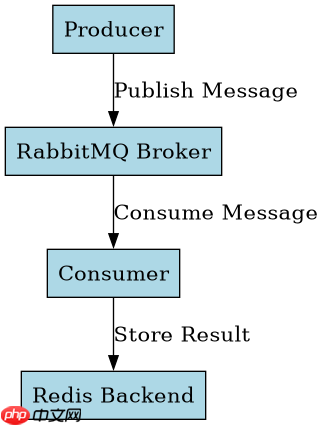
通过设置 task_store_result_to_celery_backend 为 true 并配置可靠的 broker(如 rabbitmq)和 result backend(如 redis),可以确保任务不丢失。在 celery 5.x 中,推荐使用 broker_transport_options 中的 confirm_publish 参数来保证消息发送确认,同时启用 result_persistent 以持久化结果。
from celery import Celery

app = Celery('tasks', broker='amqp://guest@localhost//')
app.conf.update(
    task_store_result_to_celery_backend=True,
    result_persistent=True,
    broker_transport_options={
        'confirm_publish': True,
    },
)
上述代码展示了基本的配置方式,其中 confirm_publish 确保了消息到达 Broker 后才返回确认,而 result_persistent 则保证了结果存储的可靠性。
如何处理任务重试与异常捕获
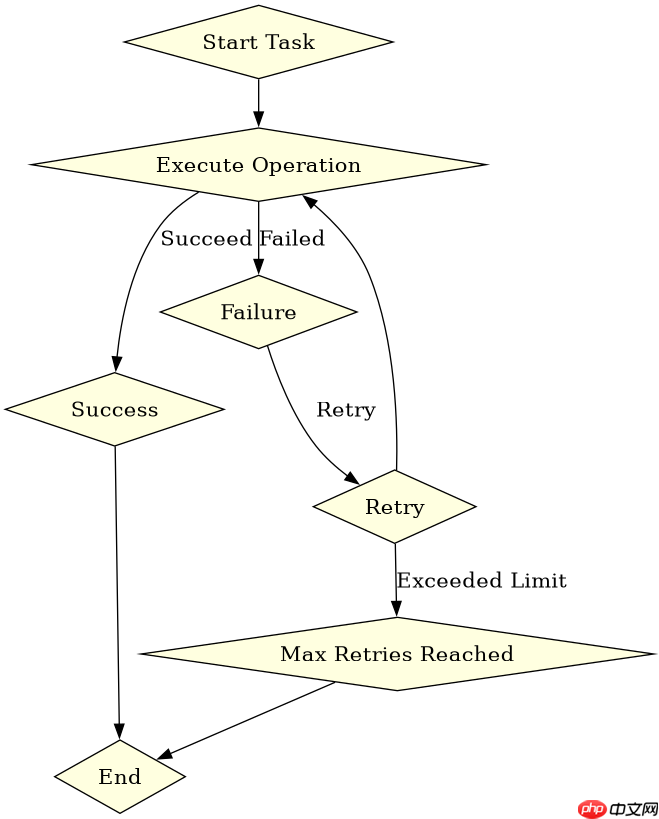
通过定义任务的 retry 属性和自定义异常处理逻辑,可以有效防止因临时故障导致的任务丢失。使用 @app.task(bind=True, max_retries=3) 装饰器可以限制重试次数,避免无限重试。

Nodriver是Undetected-Chromedriver的官方继承者,提供异步浏览器自动化功能,可直接与Chrome DevTools Protocol通信,无需Selenium或WebDriver依赖。专为规避反机器人系统(包括Cloudflare和Imperva)的隐蔽网络自动化而构建。
立即学习“Python免费学习笔记(深入)”;
from celery.exceptions import Retry

@app.task(bind=True, max_retries=3)
def process_data(self, data):
    try:
        # 模拟可能失败的操作
        result = perform_operation(data)
        return result
    except Exception as exc:
        raise self.retry(exc=exc, countdown=60)
该示例展示了如何在任务执行失败时进行重试,并通过 countdown 参数控制重试间隔,从而减少系统压力并提高成功率。
如何监控任务状态以确保完整性
利用 Celery 提供的 AsyncResult 对象和监控工具(如 Flower),可以实时跟踪任务状态,及时发现并解决潜在问题。通过定期检查任务状态,可以确保所有任务都已完成或处于预期状态。
from celery.result import AsyncResult

result = AsyncResult(task_id)
if result.ready():
    print(f"Task completed with status: {result.status}")
else:
    print("Task is still pending or retrying...")
此段代码演示了如何通过 AsyncResult 查询任务状态,并根据状态采取相应措施,从而保障任务的完整性和可靠性。