在python 3.10中处理网络io密集型业务,应使用asyncio库结合异步http客户端(如aiohttp)或原生asyncio.open_connection来实现高并发。核心做法是定义异步函数并使用async/await语法,通过事件循环并发执行多个网络请求,从而避免阻塞主线程。具体实现时,需确保所有io操作均为非阻塞的异步调用,并利用asyncio.gather()或asyncio.taskgroup(3.11+,但在3.10中可用gather替代)来管理并发任务。

如何构建基础的异步HTTP请求流程
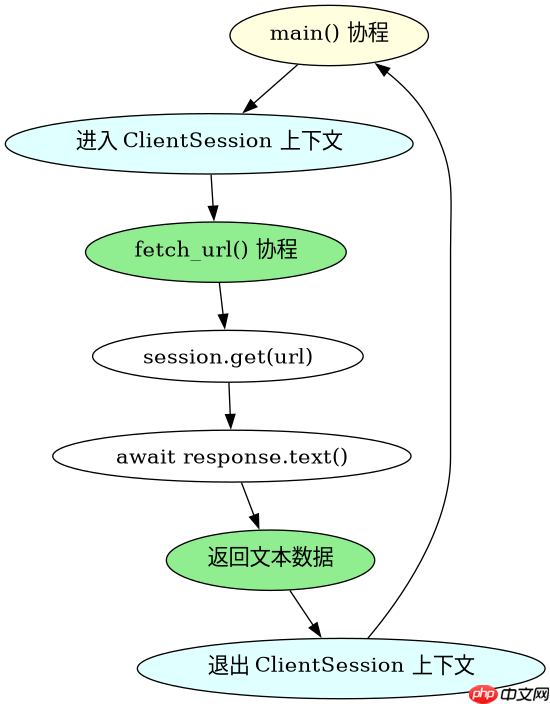
构建基础异步HTTP请求流程需要引入aiohttp库,创建ClientSession实例以复用连接,并在异步上下文中发起GET或POST请求。该流程的关键在于使用await等待响应完成,并正确处理异步上下文管理器以确保资源释放。通过这种方式,单个协程可以高效地处理一个网络请求,而不会阻塞其他正在运行的协程。
import asyncio
import aiohttp

async def fetch_url(session, url):
    async with session.get(url) as response:
        return await response.text()

async def main():
    urls = ["https://example.com", "https://python.org"]
    async with aiohttp.ClientSession() as session:
        tasks = [fetch_url(session, url) for url in urls]
        results = await asyncio.gather(*tasks)
        for res in results:
            print(res[:50])

asyncio.run(main())
如何处理并发请求中的错误与超时
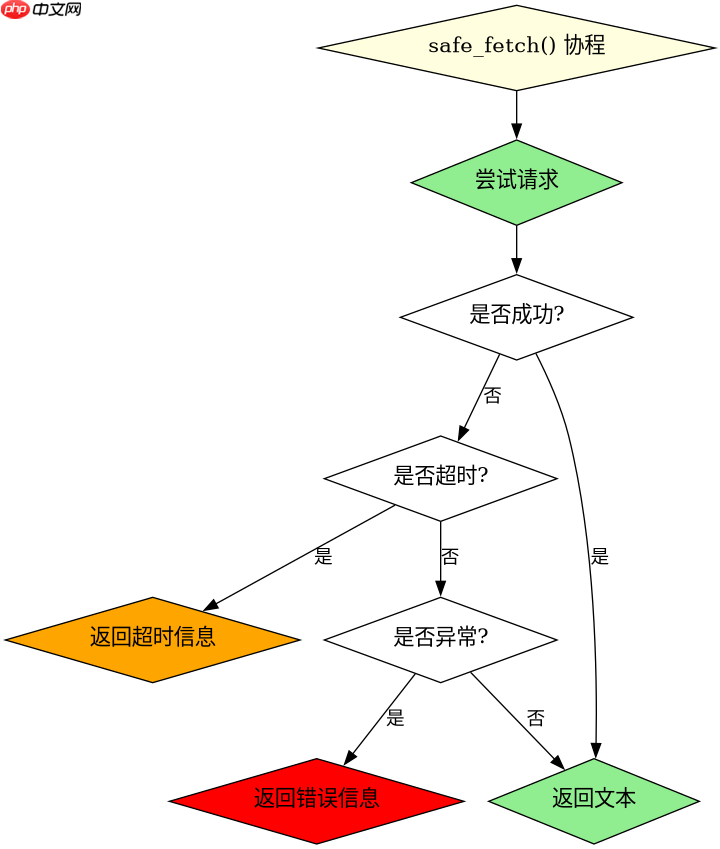
处理并发请求中的错误与超时需要在每个异步请求内部使用try...except块捕获异常,并在ClientSession或请求参数中设置超时时间。推荐使用asyncio.TimeoutError来处理超时情况,并结合aiohttp.ClientTimeout配置全局或局部超时策略。这样可以在部分请求失败时不影响整体任务的执行,并通过asyncio.gather(..., return_exceptions=True)收集所有结果包括异常对象。

Nodriver是Undetected-Chromedriver的官方继承者,提供异步浏览器自动化功能,可直接与Chrome DevTools Protocol通信,无需Selenium或WebDriver依赖。专为规避反机器人系统(包括Cloudflare和Imperva)的隐蔽网络自动化而构建。
立即学习“Python免费学习笔记(深入)”;
import asyncio
import aiohttp

async def safe_fetch(session, url, timeout=5.0):
    try:
        async with session.get(url, timeout=timeout) as response:
            return await response.text()
    except asyncio.TimeoutError:
        return f"Timeout for {url}"
    except Exception as e:
        return f"Error for {url}: {e}"

async def main():
    urls = ["https://slow.example.com", "https://error.example.com"]
    async with aiohttp.ClientSession() as session:
        tasks = [safe_fetch(session, url) for url in urls]
        results = await asyncio.gather(*tasks, return_exceptions=True)
        for res in results:
            print(res)

asyncio.run(main())
当网络请求返回空响应体时程序行为如何
当网络请求返回空响应体时,aiohttp的response.text()方法将返回空字符串'',而不会抛出异常。程序会继续正常执行后续逻辑,开发者需在代码中显式检查响应内容是否为空,以避免因空值导致的后续处理错误。这种行为符合HTTP协议规范,即200 OK状态码下允许存在空主体。