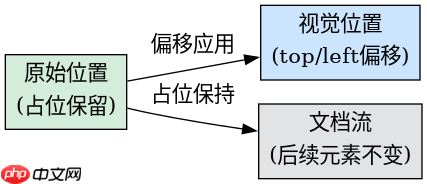
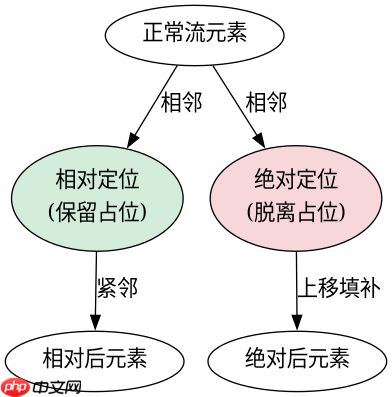
因为css相对定位(position: relative)的设计机制是相对于元素在文档流中的原始位置进行偏移,而不会改变其在布局树中的占位空间。浏览器在计算页面布局时,会先为元素分配固定的物理空间,随后应用top、left等属性仅改变视觉渲染坐标,原位置依然被保留以维持后续元素的排列顺序。
相对定位与绝对定位在占位行为上的区别是什么
相对定位保留原占位,而绝对定位(position: absolute)则完全脱离文档流,不再占据任何物理空间。当使用绝对定位时,元素相对于最近的非静态定位祖先元素进行定位,其原本的位置会被其他正常流元素填补,导致布局塌陷或重叠。
<!DOCTYPE html>
<html lang="zh">
<head>
    <meta charset="UTF-8">
    <title>Positioning Demo</title>
    <style>
        .container {
            width: 300px;
            border: 1px solid #ccc;
            padding: 10px;
        }
        .box {
            width: 100px;
            height: 50px;
            background-color: lightblue;
            margin-bottom: 10px;
        }
        /* 相对定位:保留占位 */
        .relative {
            position: relative;
            top: 20px;
            left: 20px;
            background-color: lightgreen;
        }
        /* 绝对定位:不保留占位 */
        .absolute {
            position: absolute;
            top: 20px;
            left: 20px;
            background-color: lightcoral;
        }
    </style>
</head>
<body>
    <div class="container">
        <div class="box">Normal</div>
        <div class="box relative">Relative</div>
        <div class="box">After Relative</div>
    </div>
    <div class="container" style="margin-top: 20px;">
        <div class="box">Normal</div>
        <div class="box absolute">Absolute</div>
        <div class="box">After Absolute</div>
    </div>
</body>
</html>
运行上述代码后,第一个容器中“Relative”元素向下向右偏移,但“After Relative”元素仍紧随其后,未发生位移;第二个容器中“Absolute”元素脱离文档流,“After Absolute”元素上移填补了空缺,视觉上可能与“Absolute”元素重叠。
立即学习“前端免费学习笔记(深入)”;
为什么相对定位常用于微调UI而不破坏布局
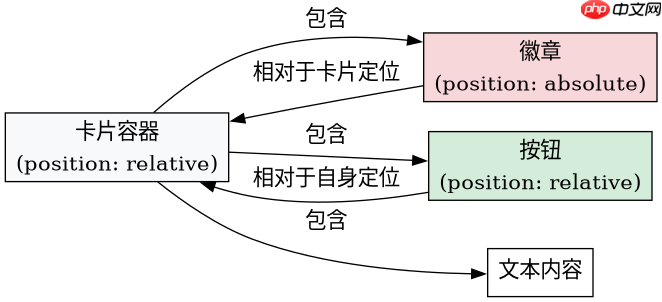
相对定位常用于微调UI组件的视觉位置,例如调整图标间距、实现悬停效果或对齐文本,因为它不会干扰周围元素的布局结构。开发者可以通过top、right、bottom、left属性精确控制偏移量,同时确保文档流的完整性,避免子元素错位或父容器高度异常。

htmlq 是一个命令行工具,使用 CSS 选择器从 HTML 中提取内容,相当于 jq 的 HTML 版本。该工具使用 Rust 编写,允许你通过 CSS 选择器将 HTML 管道化,直接从终端提取文本、属性和结构化内容。
<!DOCTYPE html>
<html lang="zh">
<head>
    <meta charset="UTF-8">
    <title>UI Adjustment Demo</title>
    <style>
        .card {
            width: 200px;
            padding: 15px;
            border: 1px solid #ddd;
            background-color: #fff;
            position: relative;
        }
        .badge {
            position: absolute;
            top: -10px;
            right: -10px;
            width: 20px;
            height: 20px;
            background-color: red;
            color: white;
            text-align: center;
            line-height: 20px;
            font-size: 12px;
            border-radius: 50%;
        }
        .adjustment {
            position: relative;
            top: 5px;
            left: 5px;
            background-color: #f0f0f0;
        }
    </style>
</head>
<body>
    <div class="card">
        <span class="badge">1</span>
        <p>Card Content</p>
        <button class="adjustment">Button</button>
    </div>
</body>
</html>运行该示例后,徽章(.badge)通过绝对定位悬浮于卡片右上角,不影响卡片内部文本和按钮的布局;按钮(.adjustment)通过相对定位微调位置,周围元素不受影响,整体结构保持稳定。
相对定位中z-index属性如何影响层叠上下文
相对定位元素若设置了z-index值(非auto),则会创建一个新的层叠上下文,影响其自身及子元素的堆叠顺序。默认情况下,相对定位元素的z-index为auto,不参与层叠排序,仅按文档流顺序显示;当显式设置z-index时,可控制元素与其他层叠上下文的层级关系,实现遮挡或前置效果。
<!DOCTYPE html>
<html lang="zh">
<head>
    <meta charset="UTF-8">
    <title>z-index Demo</title>
    <style>
        .parent {
            position: relative;
            width: 200px;
            height: 200px;
            background-color: #eee;
        }
        .child1 {
            position: relative;
            width: 100px;
            height: 100px;
            background-color: blue;
            z-index: 1;
        }
        .child2 {
            position: relative;
            width: 100px;
            height: 100px;
            background-color: green;
            z-index: 2;
        }
    </style>
</head>
<body>
    <div class="parent">
        <div class="child1">Child 1</div>
        <div class="child2">Child 2</div>
    </div>
</body>
</html>运行此代码后,.child2因z-index: 2高于.child1的z-index: 1,将覆盖在.child1之上,尽管它们在HTML中顺序相反。这验证了相对定位元素通过z-index创建层叠上下文并控制堆叠顺序的行为。