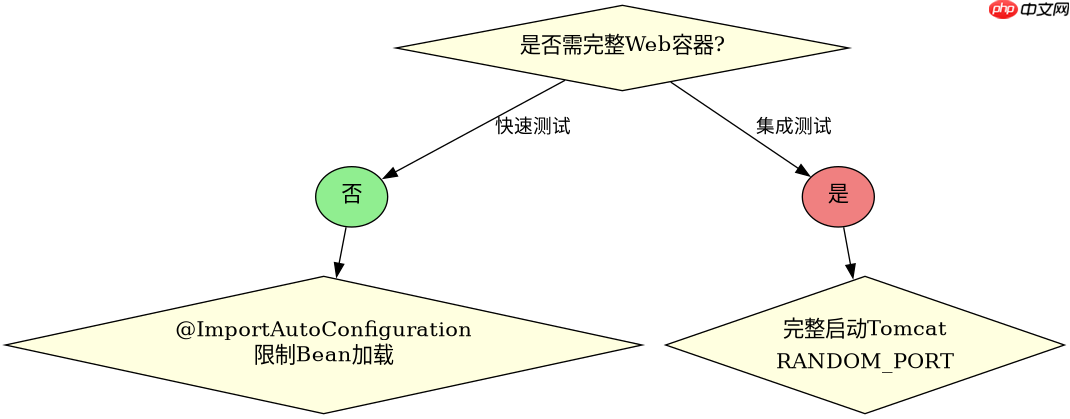
使用 @springboottest 启动容器时,默认会加载整个 spring 应用上下文。若需控制启动范围或配置,可通过 webenvironment 属性指定模式,例如 spring_web 启动 mock mvc 环境,random_port 随机端口启动真实服务器,或 definded_ports 固定端口启动。结合 @autoconfiguremockmvc 可注入 mockmvc 进行请求测试,无需实际网络调用。

如何仅加载部分 Bean 以加快测试速度?
通过 @ImportAutoConfiguration 或 @ComponentScan 限制扫描包路径,或使用 @TestPropertySource 排除非必要配置类。例如,将 spring.main.web-application-type=none 设为非 Web 类型,可跳过 Tomcat 启动,显著缩短初始化时间。

OpenAI Agents SDK JavaScript 工作流工具包
下载
一个基于源码的 OpenAI Agents SDK JavaScript 和 TypeScript 技术文档。涵盖了代理编排、工具、转接、追踪以及实际安装路径。
如何在测试中验证特定 Controller 的响应状态码?
在已启动的 Mock MVC 环境中,调用 perform(get("/api/test")) 后链式调用 andExpect(status().isOk()) 即可断言 HTTP 状态码为 200。若需检查返回 JSON 内容,可进一步使用 jsonPath() 匹配字段值。
立即学习“Java免费学习笔记(深入)”;
import org.junit.jupiter.api.Test;
import org.springframework.beans.factory.annotation.Autowired;
import org.springframework.boot.test.autoconfigure.web.servlet.AutoConfigureMockMvc;
import org.springframework.boot.test.context.SpringBootTest;
import org.springframework.test.web.servlet.MockMvc;

import static org.springframework.test.web.servlet.request.MockMvcRequestBuilders.get;
import static org.springframework.test.web.servlet.result.MockMvcResultMatchers.status;

@SpringBootTest(webEnvironment = SpringBootTest.WebEnvironment.MOCK)
@AutoConfigureMockMvc
class MyControllerTest {

    @Autowired
    private MockMvc mockMvc;

    @Test
    void testGetEndpoint() throws Exception {
        mockMvc.perform(get("/api/data"))
               .andExpect(status().isOk());
    }
}