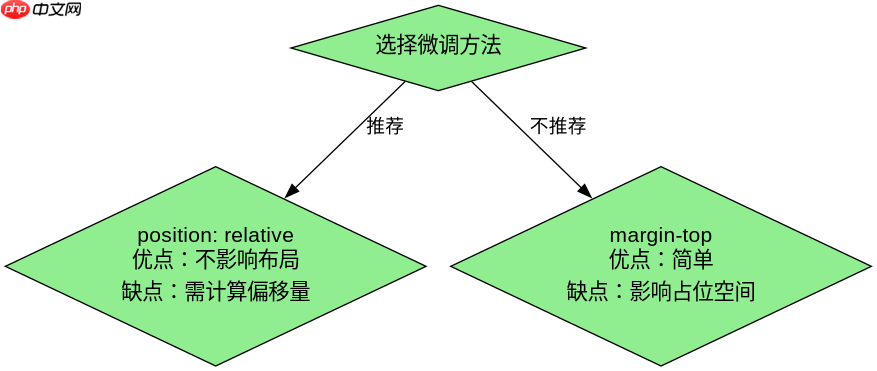
使用 position: relative 配合 top 或 bottom 属性可以微调单选框与相邻文本文字的垂直对齐。通过给单选框设置相对定位,并调整偏移量,可以使其在视觉上向上或向下移动,从而与文本基线完美对齐。
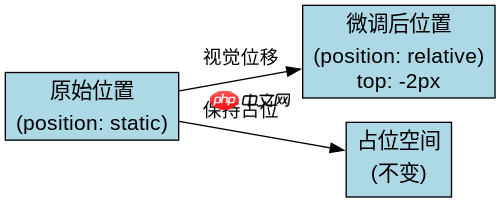
position: relative 如何影响布局流?
使用 position: relative 时,元素仍然占据原来的空间,不会脱离文档流。这意味着周围的元素不会因为单选框的移动而重新排列,只有单选框本身相对于其原始位置发生视觉位移。
<style>
  .radio-wrapper {
    display: flex;
    align-items: center;
  }

  .custom-radio {
    position: relative;
    top: -2px; /* 向上微调 */
    margin-right: 8px;
  }
</style>

<div class="radio-wrapper">
  <input type="radio" id="option1" class="custom-radio" name="group1">
  <label for="option1">选项一</label>
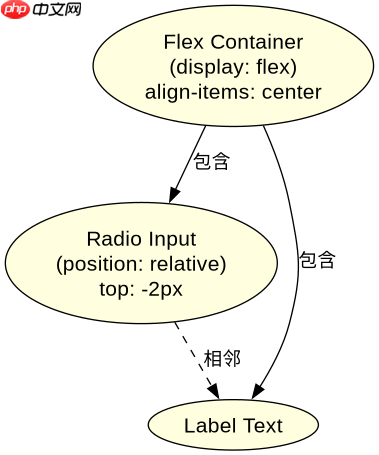
</div>上述代码中,.custom-radio 类应用了 position: relative 和 top: -2px。这会使单选框在视觉上向上移动 2 像素,而不会改变其在文档流中的占位空间。display: flex 用于确保容器内的元素水平排列,align-items: center 提供初始的垂直居中,但微调仍需依赖 top 属性。
立即学习“前端免费学习笔记(深入)”;

htmlq 是一个命令行工具,使用 CSS 选择器从 HTML 中提取内容,相当于 jq 的 HTML 版本。该工具使用 Rust 编写,允许你通过 CSS 选择器将 HTML 管道化,直接从终端提取文本、属性和结构化内容。
为什么不用 margin-top 直接调整?
虽然 margin-top 也可以调整位置,但它会影响元素的占位空间,可能导致布局抖动或与相邻元素重叠。相比之下,position: relative 的偏移是纯粹的视觉位移,不影响周围元素的布局。
<style>
  .radio-wrapper {
    display: flex;
    align-items: center;
  }

  .margin-adjusted-radio {
    margin-top: -2px; /* 不推荐,可能影响布局 */
    margin-right: 8px;
  }
</style>

<div class="radio-wrapper">
  <input type="radio" id="option2" class="margin-adjusted-radio" name="group1">
  <label for="option2">选项二</label>
</div>在上述代码中,.margin-adjusted-radio 使用了 margin-top: -2px。这会导致单选框向上移动,但同时会减少其下方的空间,可能影响后续内容的布局。因此,position: relative 是更安全和可控的选择。
不同浏览器下的渲染差异如何处理?
不同浏览器对单选框的默认样式和尺寸处理存在差异,导致微调值可能需要根据目标浏览器进行调整。建议在开发时使用 Chrome DevTools 等工具实时预览和调整 top 值,以确保在所有目标浏览器中达到一致的视觉效果。