为什么input和button高度不一致
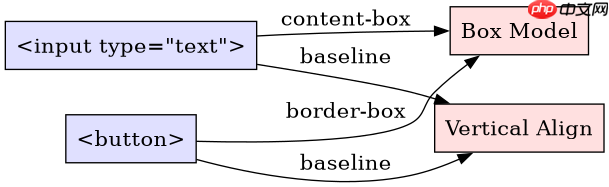
在css中,<input>和<button></button>默认高度不一致是因为浏览器对它们的盒模型处理不同。<input type="text">通常使用box-sizing: content-box,而<button></button>可能受padding、border或用户代理样式影响。此外,vertical-align的默认值baseline会导致基线对齐偏差。
/* 重置所有元素的盒模型 */
*, *::before, *::after {
  box-sizing: border-box;
}

/* 统一输入框和按钮的样式 */
.input-button-group input[type="text"],
.input-button-group button {
  height: 40px;
  padding: 0 10px;
  border: 1px solid #ccc;
  font-size: 16px;
  vertical-align: middle;
}上述代码通过设置box-sizing: border-box确保height包含padding和border,并通过vertical-align: middle实现垂直居中对齐。
如何验证对齐效果
可以通过创建一个简单的HTML结构来验证对齐效果。以下是一个完整的示例:

htmlq 是一个命令行工具,使用 CSS 选择器从 HTML 中提取内容,相当于 jq 的 HTML 版本。该工具使用 Rust 编写,允许你通过 CSS 选择器将 HTML 管道化,直接从终端提取文本、属性和结构化内容。
立即学习“前端免费学习笔记(深入)”;
<!DOCTYPE html>
<html lang="en">
<head>
  <meta charset="UTF-8">
  <title>Input and Button Alignment</title>
  <style>
    *, *::before, *::after {
      box-sizing: border-box;
    }
    .input-button-group input[type="text"],
    .input-button-group button {
      height: 40px;
      padding: 0 10px;
      border: 1px solid #ccc;
      font-size: 16px;
      vertical-align: middle;
    }
  </style>
</head>
<body>
  <div class="input-button-group">
    <input type="text" placeholder="Enter text">
    <button>Submit</button>
  </div>
</body>
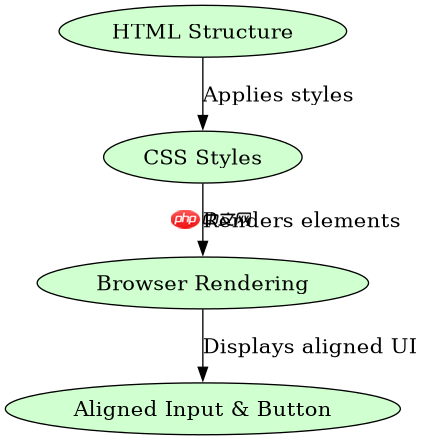
</html>打开此HTML文件后,可以看到<input>和<button></button>在同一行内垂直居中对齐,且高度一致。
基于具体输入条件的对齐问题
当<input>和<button></button>位于不同的父容器中时,对齐问题可能会更加复杂。例如,如果它们分别位于两个相邻的<div>中,需要确保父容器也应用相同的盒模型和对齐方式。<pre class="brush:php;toolbar:false;"><div class="parent-container">
<div class="input-container">
<input type="text" placeholder="Enter text">
</div>
<div class="button-container">
<button>Submit</button>
</div>
</div></pre><p>在这种情况下,可以通过为<code>.parent-container设置display: flex并调整子元素的align-items属性来实现对齐:
.parent-container {
  display: flex;
  align-items: center;
}
.parent-container .input-container,
.parent-container .button-container {
  margin: 0;
  padding: 0;
}这种布局方式确保了<input>和<button></button>在父容器内垂直居中对齐,同时保持了各自的高度一致性。