在 nginx 中解决单页应用(spa)刷新 404 的核心做法是配置 try_files 指令,将请求优先匹配到实际存在的静态文件,若未找到则 fallback 到 /index.html。具体操作是在 location / 块中添加 try_files $uri $uri/ /index.html;,这样浏览器刷新时,nginx 会尝试寻找对应的资源,找不到则返回入口 html,由前端路由接管处理。

Nginx try_files 遇到空输入或路径不存在时会返回什么
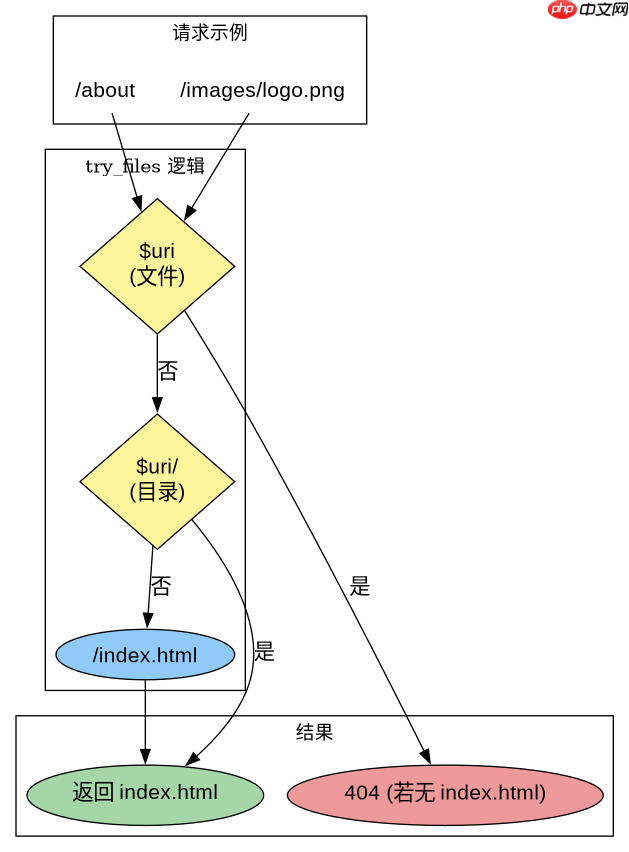
当请求的路径既不是文件也不是目录时,try_files 会执行最后指定的 fallback 参数,即返回 /index.html 的内容,而不是直接报错。
server {
    listen 80;
    server_name example.com;

    location / {
        root /usr/share/nginx/html;
        index index.html;
        # 核心配置:先找文件,再找目录,最后都回退到 index.html
        try_files $uri $uri/ /index.html;
    }
}
上述配置中,$uri 代表请求的 URI。如果请求 /about,Nginx 先在 root 目录下找 /usr/share/nginx/html/about 文件,找不到则找目录,还找不到则内部重定向到 /index.html。前端框架(如 React Router 或 Vue Router)读取 URL 后渲染对应组件。
try_files 与 rewrite 相比有什么差异
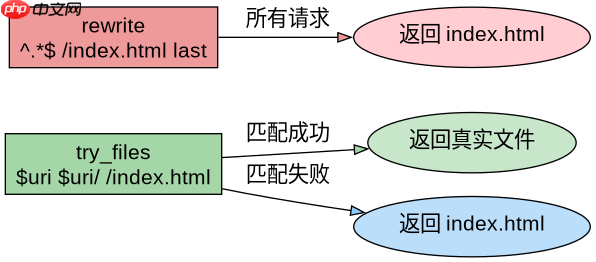
try_files 是内部重定向且性能更高,因为它直接在文件系统层面检查文件存在性,而 rewrite 是正则表达式匹配并修改 URI,开销更大且逻辑更复杂。

# 错误写法:使用 rewrite 可能导致循环或性能问题
location / {
    root /usr/share/nginx/html;
    index index.html;
    rewrite ^.*$ /index.html last;
}

# 正确写法:使用 try_files
location / {
    root /usr/share/nginx/html;
    index index.html;
    try_files $uri $uri/ /index.html;
}
在使用 rewrite 时,所有请求都会被强制重写为 /index.html,这会导致 Nginx 无法区分静态资源(如图片、CSS)和页面路由,除非配合复杂的条件判断。而 try_files 天然支持“有则返回,无则 fallback”的逻辑,更适合 SPA 场景。
基于程序中某个输入、条件或结果的具体问题
当请求包含查询参数(Query String)时,try_files 的行为取决于是否显式包含 $is_args$args,否则可能因参数导致文件匹配失败。
例如,请求 /login?redirect=/home,如果配置仅为 try_files $uri $uri/ /index.html;,Nginx 会尝试查找名为 /login?redirect=/home 的文件,这显然不存在,因此 fallback 到 /index.html。这是正确的行为。但如果请求的是 /api/data?id=1,且后端 API 需要保留参数,这种配置会将 API 请求也重定向到 /index.html,导致 API 调用失败。此时应排除 API 路径:
location / {
    root /usr/share/nginx/html;
    try_files $uri $uri/ /index.html;
}

location /api/ {
    proxy_pass http://backend_server;
}
通过分离 /api/ 路径,确保只有前端路由相关的请求才进行 fallback,API 请求正常代理到后端服务。