在 nginx 中,`root` 和 `alias` 的核心区别在于路径拼接方式:`root` 将 location 前缀作为目录根,追加请求 uri;`alias` 则用指定路径完全替换 location 前缀。要实现精确匹配别名,推荐使用 `location = /exact-path` 配合 `alias`,确保请求 `/exact-path` 时直接映射到目标文件,不产生歧义。

root 与 alias 的路径解析差异是什么
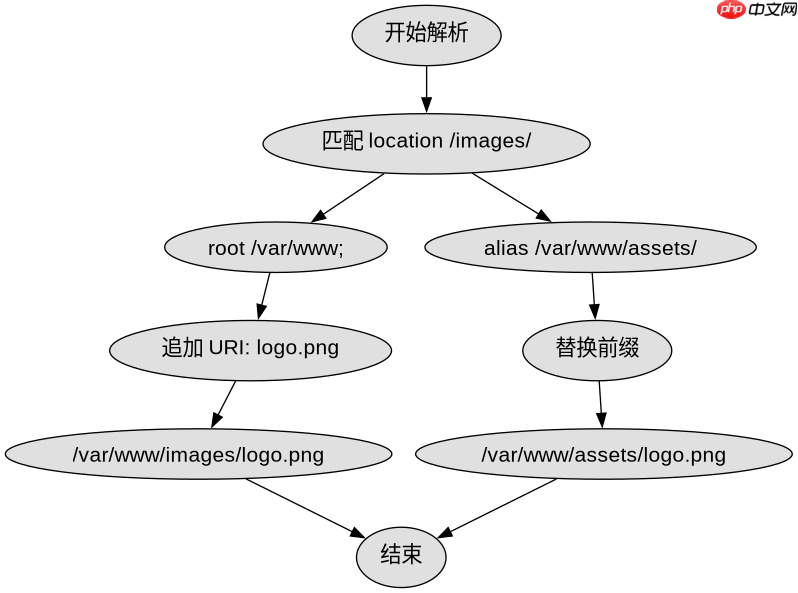
`root` 指令会将 location 块中的路径作为基础目录,后续拼接请求的 URI;而 `alias` 会完全替换 location 匹配的部分。例如,若 location 为 `/images/`,请求 `/images/logo.png`,`root /var/www;` 会查找 `/var/www/images/logo.png`,而 `alias /var/www/assets/;` 会查找 `/var/www/assets/logo.png`。这种差异决定了别名配置的准确性。
server {
    listen 80;
    server_name example.com;

    # 使用 root 配置
    location /old-path/ {
        root /var/www/html;
    }

    # 使用 alias 配置
    location /new-path/ {
        alias /var/www/html/old-path/;
    }
}
上述配置中,访问 `/old-path/test.html` 时,Nginx 会尝试读取 `/var/www/html/old-path/test.html`;访问 `/new-path/test.html` 时,会读取 `/var/www/html/old-path/test.html`。两者最终指向同一文件,但路径处理逻辑不同。

如何避免 alias 配置中的尾部斜杠问题
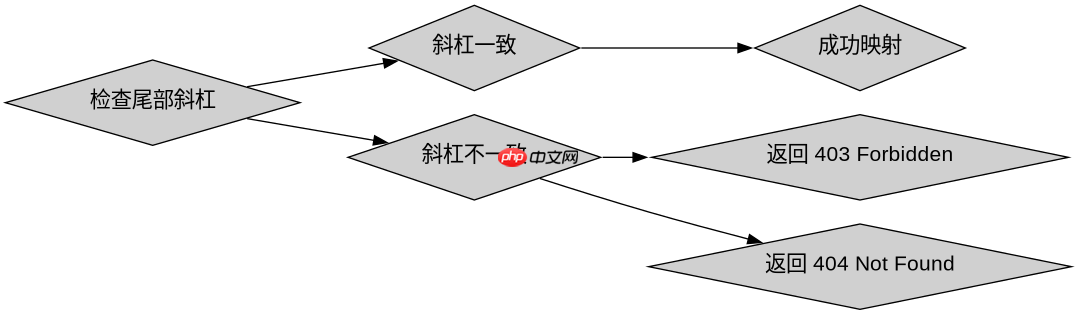
`alias` 指令在 location 路径包含尾部斜杠时容易引发 403 或 404 错误,因为 Nginx 可能错误地拼接路径。解决方法是确保 location 路径与 alias 路径的斜杠一致性,或使用正则表达式精确匹配。例如,`location ~ ^/alias/(.*)$ { alias /path/to/files/$1; }` 可避免斜杠歧义。
server {
    listen 80;
    server_name example.com;

    # 推荐的正则 alias 配置
    location ~ ^/static/(.*)$ {
        alias /var/www/static/$1;
    }
}
此配置中,请求 `/static/image.png` 会被映射到 `/var/www/static/image.png`。正则表达式捕获组 `$1` 确保路径部分被正确传递,避免斜杠导致的解析错误。测试时需验证文件是否存在及权限设置。
当请求路径不存在时,Nginx 返回什么状态码
如果请求的文件在 `root` 或 `alias` 指定的路径中不存在,Nginx 默认返回 404 Not Found 状态码。这是标准行为,无需额外配置。可通过 `error_page` 指令自定义错误页面,但底层逻辑不变。例如,添加 `error_page 404 /custom-404.html;` 可重定向到自定义页面,但文件缺失仍触发 404。
,