bootstrap 5的css类名无法作用于vue动态渲染组件,通常是因为在模板中使用了错误的指令语法导致类名未被正确绑定。在vue 3中,必须使用`:class`或`v-bind:class`来绑定动态样式,而直接使用`class="..."`仅支持静态字符串。此外,如果使用的是单文件组件(sfc),还需要确保全局样式已正确引入或在组件内通过`scoped`处理冲突。

如何正确使用:class指令绑定Bootstrap类
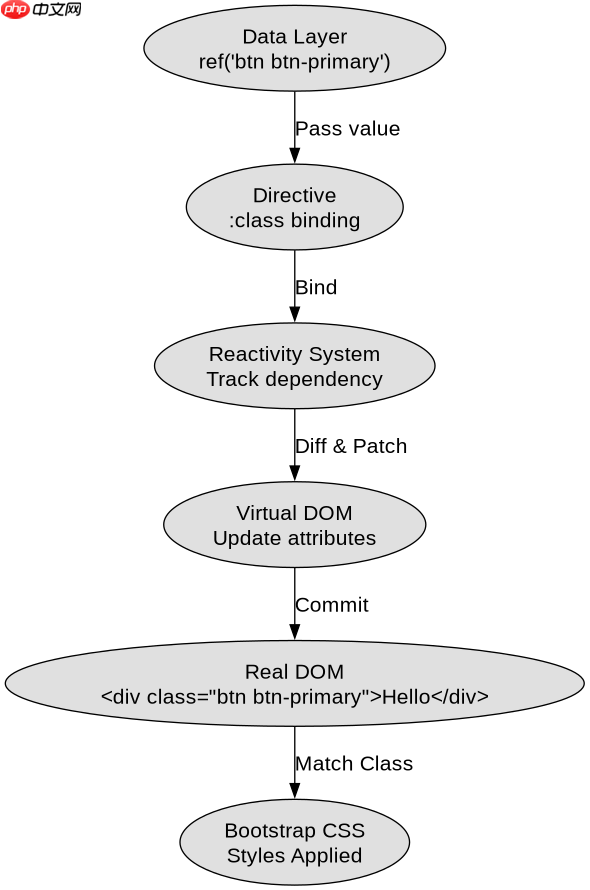
要解决类名不生效的问题,最直接的方法是将HTML属性中的`class`替换为Vue的`:class`指令。这样Vue会将字符串解析为实际的DOM属性并应用到元素上。例如,将`class="btn btn-primary"`改为`:class="'btn btn-primary'"`。这种方式确保了类名作为数据流的一部分被Vue响应式系统管理,从而能正确渲染到最终的DOM节点中。
<template>
  <div :class="dynamicClass">Hello</div>
</template>

<script setup>
import { ref } from 'vue';
const dynamicClass = ref('btn btn-primary');
</script>上述代码展示了在`<script setup></script>`中使用`ref`定义类名的方式。运行后,浏览器开发者工具中可以看到`<div class="btn btn-primary">`,此时Bootstrap的样式即可正常应用。若需根据条件切换类名,可使用对象语法或数组语法,如`:class="{ active: isActive }"`。<p><span>立即学习</span>“<a href="https://pan.quark.cn/s/cb6835dc7db1" style="text-decoration: underline !important; color: blue; font-weight: bolder;" rel="nofollow" target="_blank">前端免费学习笔记(深入)</a>”;</p><div class="aritcle_card flexRow">
<div class="artcardd flexRow">
<a class="aritcle_card_img" href="/xiazai/skill13700" title="Presale Service Bootstrap"><img
src="https://img.php.cn/upload/skill/001/246/273/6adaf20cf0281539.jpg" alt="Presale Service Bootstrap" ></a>
<div class="aritcle_card_info flexColumn">
<a href="/xiazai/skill13700" title="Presale Service Bootstrap">Presale Service Bootstrap</a>
<p>在编码前搭建新的预售服务基础架构(文档/配置/方案/就绪状态)。适用于启动新预售自动化服务或重建项目时。</p>
</div>
<a href="/xiazai/skill13700" title="Presale Service Bootstrap" class="aritcle_card_btn flexRow flexcenter"><b></b><span>下载</span> </a>
</div>
</div>
<h2>为什么直接写class属性会失效</h2>
<p>当在模板中直接书写`class="btn"`时,Vue将其视为静态文本处理。虽然这在某些简单场景下看似有效,但在涉及动态组件或复杂状态管理时,这种写法缺乏灵活性且容易引发类型检查错误。更重要的是,如果类名存储在变量中,直接写死会导致无法响应数据变化。因此,始终推荐使用`:class`进行绑定,以保证样式的动态性和可维护性。</p>
<p><img src="https://img.php.cn/upload/article/000/969/633/179531806890235.png" alt="为什么Bootstrap 5的CSS类名无法作用于Vue动态渲染组件"></p><pre class="brush:php;toolbar:false;"><template>
<!-- 错误写法 -->
<div class="static-class">Static</div>
<!-- 正确写法 -->
<div :class="computedClass">Dynamic</div>
</template>
<script setup>
import { computed } from 'vue';
const props = defineProps({
status: String
});
const computedClass = computed(() => {
return props.status === 'active' ? 'btn-success' : 'btn-secondary';
});
</script></pre><p>这段代码对比了静态与动态绑定的区别。通过`<code>computed`属性,可以根据`props`的变化自动更新类名。这种模式在处理表单验证、加载状态等场景时非常实用,确保UI反馈与数据状态严格同步。
如何处理scoped样式与Bootstrap的全局冲突
在Vue单文件组件中,如果使用`<style scoped></style>`,可能会导致部分Bootstrap类名无法穿透作用域限制。虽然Bootstrap主要依赖标签选择器和通用类,但某些高级组件可能受此影响。解决方法是在需要应用Bootstrap样式的元素上使用`:deep()`伪类,或者在全局样式表中单独引入Bootstrap CSS文件,避免在组件内部重复定义。