








javascript 时间格式化工具通过 date 对象获取原始数据,利用 string.prototype.padstart() 进行数字补零,并使用模板字符串拼接最终结果。核心做法是提取年月日等数值字段,将其转换为两位数字符串后组合。若输入为无效日期,工具应返回空值或特定错误提示以避免运行时异常。

如何从 Date 对象中提取并格式化年月日
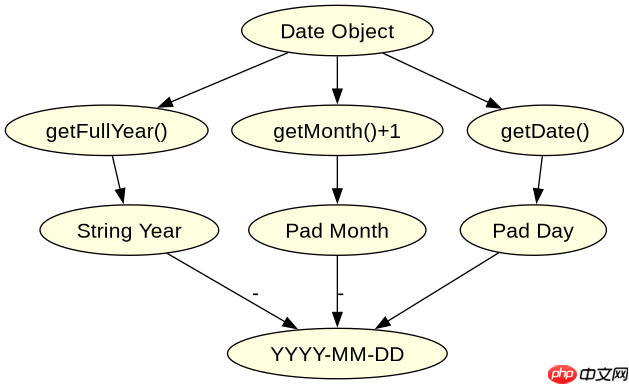
直接调用 getFullYear()、getMonth() 和 getDate() 方法获取数值,并将月份加一后使用 padStart(2, '0') 补齐两位数。这样得到的字符串可以直接拼接成 YYYY-MM-DD 格式。该方法适用于所有标准浏览器环境,无需引入第三方库。
function formatDate(date) {
  const year = date.getFullYear();
  const month = String(date.getMonth() + 1).padStart(2, '0');
  const day = String(date.getDate()).padStart(2, '0');
  return `${year}-${month}-${day}`;
}

const d = new Date(2023, 0, 5);
console.log(formatDate(d)); // 输出: "2023-01-05"
对于输入 new Date(2023, 0, 5),预期结果为 "2023-01-05"。类型转换主要发生在 String() 调用和模板字符串插值阶段,确保数值型数据正确转为字符型以便连接。
立即学习“Java免费学习笔记(深入)”;

如何处理毫秒级时间戳的格式化
将毫秒时间戳除以 1000 并取整得到秒数,再传入 new Date(timestamp) 构造日期对象,随后复用上述提取逻辑。这种方式统一了输入源,使工具能同时支持 Date 实例和数字时间戳。需注意时区问题,默认使用本地时区。

function formatTimestamp(ts) {
  const date = new Date(ts);
  if (isNaN(date.getTime())) return '';
  const year = date.getFullYear();
  const month = String(date.getMonth() + 1).padStart(2, '0');
  const day = String(date.getDate()).padStart(2, '0');
  return `${year}-${month}-${day}`;
}

console.log(formatTimestamp(1672876800000)); // 输出: "2023-01-04"
对于输入 1672876800000,预期结果为 "2023-01-04"。类型转换体现在算术运算和构造函数参数接收上,确保数字被正确解析为时间点。
当输入为无效日期字符串时会发生什么
如果传入非标准格式的字符串给 new Date(),如 'invalid',生成的对象 getTime() 会返回 NaN。此时需显式检查 isNaN(date.getTime()) 并返回空字符串或默认值,防止后续 getFullYear() 调用抛出 TypeError。这是处理用户输入时的关键防御步骤。


















