








使用 fetch() 发起请求后,调用响应对象的 .json() 方法即可将 xboxone 接口返回的 json 数据解析为 javascript 对象。该方法会自动处理 http 状态码并返回一个 promise,解析成功后直接获得包含游戏列表、用户信息或成就数据的结构化对象,便于后续在页面中渲染或进行逻辑处理。

如何获取 Xbox Live API 的用户 Gamertag 和头像
通过向 https://user.xboxlive.com/user/gamertag/{gamertag} 发送 GET 请求,可以获取指定玩家的详细信息。需要确保请求头中包含正确的 OAuth 令牌以通过身份验证,解析后的 JSON 数据中将包含用户的显示名称、在线状态以及高清头像的 URL 地址。
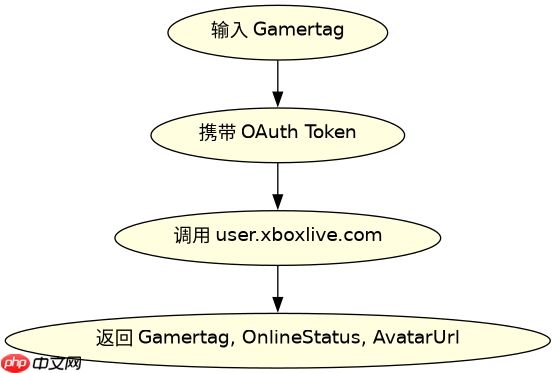
const gamertag = 'ShayIsBack';
const token = 'your_xbox_live_token';

fetch(`https://user.xboxlive.com/user/gamertag/${gamertag}`, {
  headers: {
    'Authorization': `Bearer ${token}`,
    'x-xbl-contractversion': '1'
  }
})
.then(response => response.json())
.then(data => {
  console.log('Gamertag:', data.Gamertag);
  console.log('Online Status:', data.OnlineStatus);
  console.log('Avatar URL:', data.AvatarUrl);
})
.catch(error => console.error('Fetch error:', error));
运行上述代码后,控制台将输出类似如下的结果:Gamertag: ShayIsBack, Online Status: Offline, Avatar URL: https://avatar.xboxlive.com/avatar/...。这证实了 API 成功返回了用户的基本资料。
立即学习“Java免费学习笔记(深入)”;

如何拉取玩家最近游玩的游戏列表
调用 https://profile.xboxlive.com/users/guid(profile_id)/devices/current/games/recentlyPlayed 接口可以获取玩家最近玩过的游戏记录。该接口返回的数据结构较为复杂,包含游戏 ID、标题、最后游玩时间戳以及所属平台类型。开发者需从嵌套的 JSON 结构中定位到 recentlyPlayedGames 数组,提取其中的关键字段用于展示。
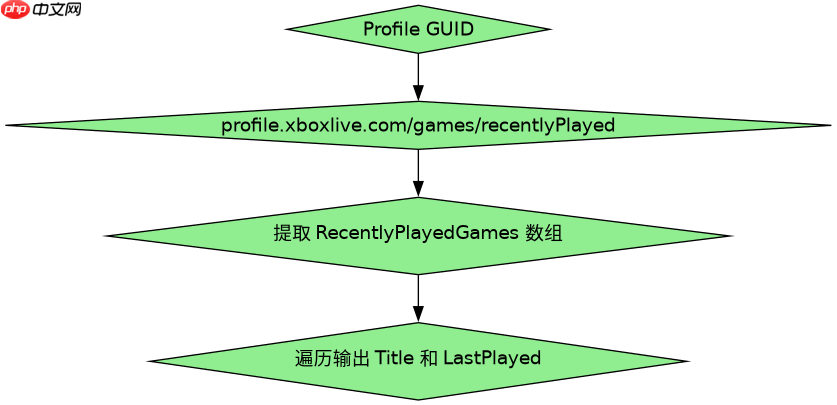
const profileId = 'guid_from_previous_step';
const token = 'your_xbox_live_token';

fetch(`https://profile.xboxlive.com/users/${profileId}/devices/current/games/recentlyPlayed`, {
  headers: {
    'Authorization': `Bearer ${token}`,
    'x-xbl-contractversion': '1'
  }
})
.then(res => res.json())
.then(data => {
  const games = data.RecentlyPlayedGames;
  games.forEach(game => {
    console.log(`Game: ${game.Title}, Last Played: ${game.LastPlayed}`);
  });
});
执行此代码片段后,控制台会打印出最近游玩的游戏标题和时间。例如:Game: Halo Infinite, Last Played: 2023-10-05T14:30:00Z。这表明程序正确解析了时间轴和游戏元数据。
当 XboxOne 接口返回空值或错误时如何处理
如果请求失败或用户不存在,fetch 的 Promise 可能会进入 reject 状态,或者返回的 JSON 中包含错误代码。此时应检查 response.ok 属性,若为 false 则抛出异常或在 catch 块中处理。对于 Xbox 服务特有的错误,如 ServiceUnavailable 或 InvalidToken,需在解析 JSON 后读取 ErrorMessage 字段进行针对性提示,避免程序崩溃。


















