








在表单提交前检查字段字幕操作状态,核心做法是监听 submit 事件并调用 event.preventdefault() 来拦截默认提交行为。通过遍历表单中的 input 元素,读取其 value 属性并与预期字幕或状态进行比对,若发现不匹配则抛出错误或提示用户。这样做可以确保在数据离开客户端之前完成校验,避免无效请求发送到服务器。

如何获取当前输入的字幕值
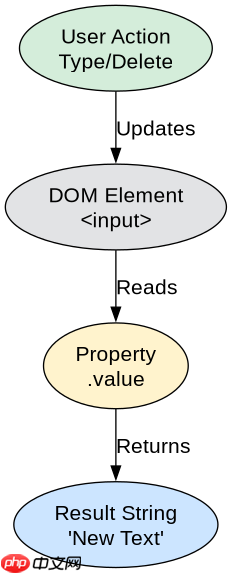
要获取当前输入的字幕值,直接访问 DOM 元素的 value 属性即可。对于标准的 <input> 标签,value 始终反映用户当前的输入内容。如果涉及动态生成的字幕(如从 API 加载的选项),则需要额外检查关联的数据结构或自定义属性。以下代码展示了如何在一个简单的表单中获取所有字段的当前值。
<!DOCTYPE html>
<html lang="en">
<head>
    <meta charset="UTF-8">
    <title>Subtitle Check</title>
</head>
<body>
    <form id="myForm">
        <label for="subtitleInput">Enter Subtitle:</label>
        <input type="text" id="subtitleInput" name="subtitle" value="Default Text">
        <button type="submit">Submit</button>
    </form>

    <script>
        const form = document.getElementById('myForm');
        const input = document.getElementById('subtitleInput');

        form.addEventListener('submit', function(event) {
            event.preventDefault(); // 阻止默认提交
            const currentValue = input.value;
            console.log('Current Subtitle Value:', currentValue);
            // 在这里添加具体的检查逻辑
        });
    </script>
</body>
</html>
运行上述代码后,在控制台将打印出输入框当前的文本内容。例如,如果用户修改了输入框内容为 "New Subtitle",控制台输出即为 "New Subtitle"。这验证了 value 属性能实时捕获用户的输入操作。
立即学习“Java免费学习笔记(深入)”;

如何对比字幕与预期状态
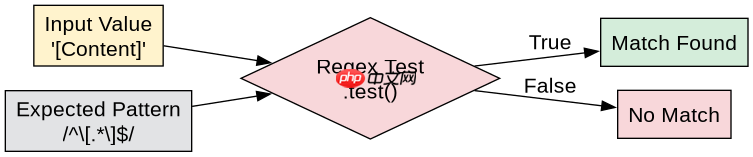
对比字幕与预期状态通常涉及字符串比较或正则表达式匹配。如果预期状态是固定的字符串,直接使用 === 运算符;如果是模式匹配,则使用 test() 方法。此外,还需考虑大小写敏感性和空白字符的处理。以下代码演示了如何检查输入的字幕是否包含特定的关键词,或者是否符合预定义的格式。
<!DOCTYPE html>
<html lang="en">
<head>
    <meta charset="UTF-8">
    <title>Subtitle Validation</title>
</head>
<body>
    <form id="validationForm">
        <label for="validatedInput">Validate Subtitle:</label>
        <input type="text" id="validatedInput" name="validated">
        <button type="submit">Check</button>
    </form>

    <script>
        const vForm = document.getElementById('validationForm');
        const vInput = document.getElementById('validatedInput');
        const expectedPattern = /^\[.*\]$/; // 预期格式为 [content]

        vForm.addEventListener('submit', function(event) {
            event.preventDefault();
            const val = vInput.value.trim();

            if (expectedPattern.test(val)) {
                alert('Subtitle matches expected format.');
            } else {
                alert('Subtitle does not match. Expected format: [content]');
            }
        });
    </script>
</body>
</html>
当用户输入 "[Valid Subtitle]" 时,警报框显示 "Subtitle matches expected format.";若输入 "Invalid Subtitle",则显示错误提示。这表明通过正则表达式可以有效验证字幕的结构是否符合预设的状态要求。
基于空值输入时的具体处理结果
当输入字段为空时,value 属性返回空字符串 ""。此时,任何非空的预期状态对比都会失败。在实际应用中,通常需要区分“未输入”和“输入了空格”。通过 trim() 方法去除首尾空白后,若结果为空,可视为无效输入。以下代码展示了针对空值输入的具体处理逻辑,包括如何检测空值并给出相应反馈。
<!DOCTYPE html>
<html lang="en">
<head>
    <meta charset="UTF-8">
    <title>Empty Input Handling</title>
</head>
<body>
    <form id="emptyForm">
        <label for="emptyInput">Test Empty Input:</label>
        <input type="text" id="emptyInput" name="empty">
        <button type="submit">Submit</button>
    </form>

    <script>
        const eForm = document.getElementById('emptyForm');
        const eInput = document.getElementById('emptyInput');

        eForm.addEventListener('submit', function(event) {
            event.preventDefault();
            const rawValue = eInput.value;
            const trimmedValue = rawValue.trim();

            if (trimmedValue === '') {
                console.log('Input is empty or contains only whitespace.');
                alert('Please enter a subtitle.');
            } else {
                console.log('Input has content:', trimmedValue);
            }
        });
    </script>
</body>
</html>
若用户未输入任何内容直接提交,控制台输出 "Input is empty or contains only whitespace.",并弹出提示框要求输入。这证明了在处理字幕状态时,对空值的显式检查是必要的,以防止后续逻辑因空字符串而产生意外行为。


















