在tailwind css中,利用css控制svg图标颜色变化的核心方法是使用 currentcolor 属性配合 fill 或 stroke。具体做法是将svg标签中的 fill 和 stroke 值设置为 currentcolor,然后通过tailwind的文本颜色工具类(如 text-red-500)直接改变父元素或svg自身的文字颜色,从而驱动svg颜色的变化。

如何确保SVG正确响应文本颜色类?
要确保SVG正确响应文本颜色类,必须在SVG代码中将 fill 和 stroke 显式设置为 currentColor。如果未设置,SVG将保持默认黑色或继承其他样式。通过给包含SVG的容器添加 text-{color} 类,即可实现颜色切换。
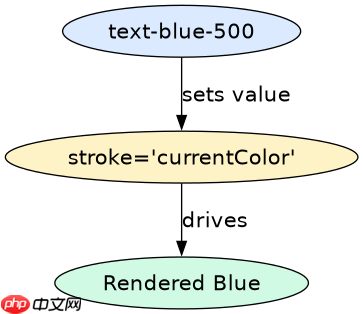
<svg xmlns="http://www.w3.org/2000/svg" class="w-6 h-6 text-blue-500" fill="none" viewBox="0 0 24 24" stroke="currentColor">
  <path stroke-linecap="round" stroke-linejoin="round" stroke-width="2" d="M13 10V3L4 14h7v7l9-11h-7z" />
</svg>
预期结果:上述代码渲染出的闪电图标将呈现蓝色(#3B82F6),因为 stroke 使用了 currentColor,而父级 div 或 span 的 text-blue-500 类定义了该颜色。
立即学习“前端免费学习笔记(深入)”;
如何在悬停状态下动态改变SVG颜色?
在悬停状态下动态改变SVG颜色,只需在父元素上应用Tailwind的 hover:text-{color} 类。由于SVG的 fill 或 stroke 绑定到 currentColor,当鼠标悬停时,父元素的文本颜色变化会自动传递给SVG。

<button class="group p-2 hover:text-green-500 transition-colors duration-200">
  <svg xmlns="http://www.w3.org/2000/svg" class="w-5 h-5" fill="none" viewBox="0 0 24 24" stroke="currentColor">
    <path stroke-linecap="round" stroke-linejoin="round" stroke-width="2" d="M5 13l4 4L19 7" />
  </svg>
  <span>确认</span>
</button>
预期结果:初始状态下,对勾图标为默认黑色(或继承的颜色)。当鼠标悬停在按钮上时,图标变为绿色(#22C55E),同时文字“确认”也变为绿色,实现了同步的颜色变化。
当SVG同时使用fill和stroke时,颜色如何分别控制?
当SVG同时使用 fill 和 stroke 时,两者都可以独立设置为 currentColor,从而实现统一的颜色控制。如果需要分别控制填充色和描边色,可以使用内联样式或自定义CSS变量,但在纯Tailwind场景下,通常建议统一使用 currentColor 以保持简洁。若需不同颜色,可嵌套两个SVG或使用伪元素,但标准做法是统一颜色。