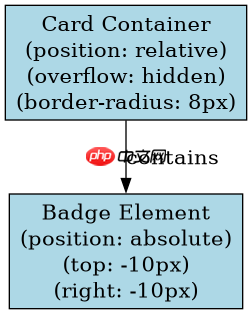
使用 position: absolute 将 badge 定位在卡片容器内,并配合 overflow: hidden 确保其超出部分被裁剪。具体做法是:父元素设置 position: relative 作为定位基准,子元素 badge 设置 position: absolute 并通过 top/right/bottom/left 调整位置,同时父元素必须设置 overflow: hidden 且自身具有圆角(border-radius)。
如何构建支持绝对定位的卡片结构?
首先创建一个父容器,设置相对定位和圆角,内部包含内容区域和 Badge 元素。父容器需明确高度或宽度以形成布局边界,Badge 则通过绝对定位脱离文档流,相对于父容器进行偏移。

<div class="card">
  <div class="content">
    Card Content
  </div>
  <span class="badge">New</span>
</div>

<style>
.card {
  position: relative;
  width: 200px;
  height: 100px;
  background: #fff;
  border-radius: 8px;
  overflow: hidden; /* 关键:裁剪溢出 */
  box-shadow: 0 2px 4px rgba(0,0,0,0.1);
}

.badge {
  position: absolute;
  top: -10px;
  right: -10px;
  background: red;
  color: white;
  padding: 4px 8px;
  border-radius: 4px;
  font-size: 12px;
}
</style>上述代码中,.card 设置了 overflow: hidden 和 border-radius: 8px,这使得任何超出 .card 边界的子元素都会被裁剪,并且裁剪形状遵循圆角。Badge 位于右上角外部,但被父容器隐藏了超出部分,从而保持视觉整洁。
立即学习“前端免费学习笔记(深入)”;
如何处理 Badge 与卡片边缘的对齐问题?
当 Badge 需要紧贴卡片边缘时,可通过负值偏移实现“半露”效果。例如,将 top 设为 -50% 或固定像素值,使 Badge 中心对齐卡片上边缘。若需完全嵌入角落,可调整 right 和 bottom 为负值,使其部分隐藏在卡片外。
<div class="card-rounded">
  <div class="inner">
    Rounded Card
  </div>
  <span class="corner-badge">★</span>
</div>

<style>
.card-rounded {
  position: relative;
  width: 150px;
  height: 80px;
  background: #f0f0f0;
  border-radius: 12px;
  overflow: hidden;
}

.corner-badge {
  position: absolute;
  bottom: -15px;
  left: -15px;
  background: gold;
  width: 30px;
  height: 30px;
  line-height: 30px;
  text-align: center;
  border-radius: 50%;
  font-size: 16px;
}
</style>此示例中,.corner-badge 位于左下角外部,但被 .card-rounded 的 overflow: hidden 裁剪,仅显示圆形的一半,形成装饰性角标。注意:border-radius 必须在父元素上生效,否则裁剪不会按圆角进行。
如果 Badge 内容过长导致布局错乱怎么办?
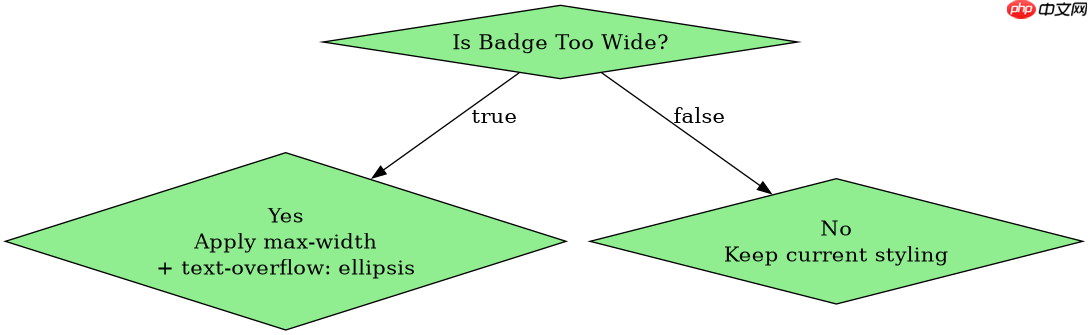
当 Badge 文本过长时,可能因宽度不足而换行或挤压其他元素。解决方案是限制 max-width 并使用 white-space: nowrap 防止换行,同时添加 text-overflow: ellipsis 显示省略号。此外,可动态计算 Badge 宽度或使用 flex 布局辅助对齐。
<div class="card-flex">
  <div class="content">
    Long Content Here
  </div>
  <span class="long-badge">Very Long Badge Text</span>
</div>

<style>
.card-flex {
  position: relative;
  display: flex;
  flex-direction: column;
  width: 200px;
  min-height: 100px;
  background: #fff;
  border-radius: 8px;
  overflow: hidden;
}

.long-badge {
  position: absolute;
  top: 10px;
  right: 10px;
  background: blue;
  color: white;
  padding: 4px 8px;
  border-radius: 4px;
  max-width: 100px;
  white-space: nowrap;
  overflow: hidden;
  text-overflow: ellipsis;
  font-size: 12px;
}
</style>该方案中,.long-badge 设置了 max-width: 100px 和 text-overflow: ellipsis,确保长文本不会破坏布局。即使文本很长,也会截断并显示省略号,保持界面美观。同时,position: absolute 仍使 Badge 脱离文档流,不影响内容区域的高度计算。