在react中使用styled components实现css动态属性,核心方法是利用组件的props向styled模板字符串传递数据。通过定义接受props的样式组件,并在渲染时传入具体的值,即可根据状态或交互实时改变样式。例如,将颜色、尺寸等变量绑定到props上,当父组件更新这些prop时,对应的dom元素会自动应用新的样式规则。

如何根据组件状态动态改变背景色
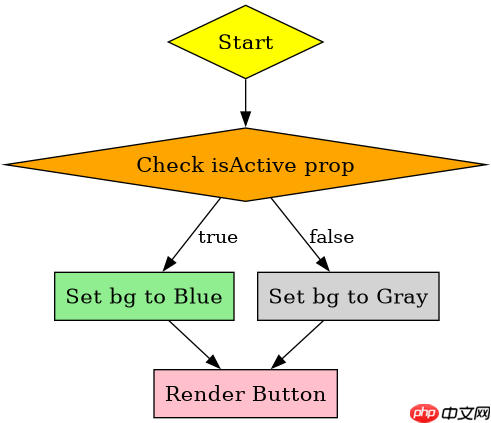
要实现根据状态动态改变背景色,只需在styled组件的定义中引用props对象中的特定属性。假设有一个按钮组件,其激活状态由`isActive` prop控制,我们可以在样式模板中使用`${props => props.isActive ? 'blue' : 'gray'}`这样的表达式来切换颜色。当父组件将`isActive`从false变为true时,按钮的背景色会立即从灰色变为蓝色,无需手动操作DOM或类名。
import React, { useState } from 'react';
import styled from 'styled-components';

const Button = styled.button`
  background-color: ${props => props.isActive ? '#007bff' : '#6c757d'};
  color: white;
  padding: 10px 20px;
  border: none;
  border-radius: 4px;
  cursor: pointer;
`;

export default function App() {
  const [active, setActive] = useState(false);

  return (
    <div>
      <Button isActive={active} onClick={() => setActive(!active)}>
        Toggle Color
      </Button>
      <p>Current State: {active ? 'Active' : 'Inactive'}</p><p><span>立即学习</span>“<a href="https://pan.quark.cn/s/cb6835dc7db1" style="text-decoration: underline !important; color: blue; font-weight: bolder;" rel="nofollow" target="_blank">前端免费学习笔记(深入)</a>”;</p><div class="aritcle_card flexRow">
                                                        <div class="artcardd flexRow">
                                                                <a class="aritcle_card_img" href="/xiazai/skill13256" title="Build React agent chat interfaces with assistant-ui"><img
                                                                                src="https://img.php.cn/upload/skill/001/246/273/6adaf20cf0281539.jpg" alt="Build React agent chat interfaces with assistant-ui" ></a>
                                                                <div class="aritcle_card_info flexColumn">
                                                                        <a href="/xiazai/skill13256" title="Build React agent chat interfaces with assistant-ui">Build React agent chat interfaces with assistant-ui</a>
                                                                        <p>使用 assistant-ui 构建具有可重用线程、运行时、消息组件和模型/提供者适配器的生产级 React 聊天界面。</p>
                                                                </div>
                                                                <a href="/xiazai/skill13256" title="Build React agent chat interfaces with assistant-ui" class="aritcle_card_btn flexRow flexcenter"><b></b><span>下载</span> </a>
                                                        </div>
                                                </div>
    </div>
  );
}
如何基于外部数据动态调整字体大小
若需根据外部数据(如用户输入或API返回的值)调整字体大小,同样可以通过props传递数值。在styled组件中,可以直接使用算术运算或条件判断来处理这些数值。例如,定义一个文本组件,其字体大小由`fontSize` prop决定,可以使用`font-size: ${props => props.fontSize}px;`。这种方式允许样式完全响应数据的变化,适用于需要灵活排版或响应式设计的场景。

import React, { useState } from 'react';
import styled from 'styled-components';

const DynamicText = styled.p`
  font-size: ${props => props.size}px;
  color: #333;
  margin: 10px 0;
`;

export default function TextControl() {
  const [size, setSize] = useState(16);

  return (
    <div>
      <DynamicText size={size}>Hello World</DynamicText>
      <input
        type="range"
        min="12"
        max="32"
        value={size}
        onChange={(e) => setSize(Number(e.target.value))}
      />
      <p>Size: {size}px</p>
    </div>
  );
}
当props为undefined时样式如何处理
当传递给styled组件的props为undefined或未提供时,样式引擎会尝试解析模板字符串中的表达式。如果表达式直接访问undefined的属性(如`props.color`),可能会返回undefined,导致CSS属性无效或被忽略。为了避免这种情况,应在样式逻辑中提供默认值或使用可选链操作符。例如,使用`${props => props.color || 'black'}`可以确保即使color未定义,也会回退到默认颜色黑色,从而保持样式的稳定性。