








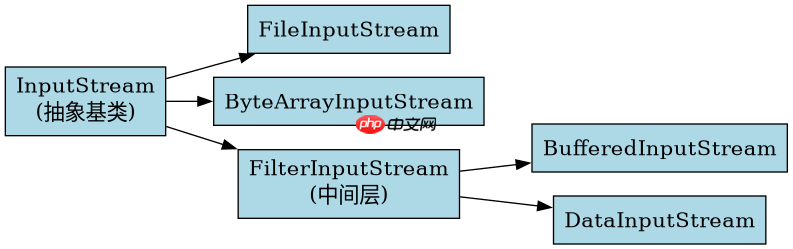
inputstream 是 java io 包中所有字节输入流的抽象基类,位于 java.io 包下。它定义了读取字节数据的通用方法,如 read()、read(byte[]) 和 close(),并提供了 skip() 等辅助功能。具体的实现类包括 fileinputstream、bufferedinputstream 以及 bytearrayinputstream 等,它们分别用于从文件、缓冲区和内存数组中读取数据。
InputStream 与 Reader 的核心区别是什么
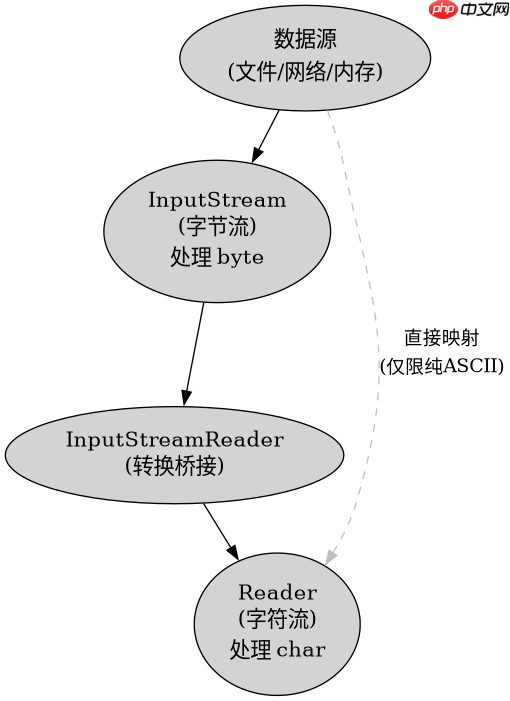
InputStream 处理的是原始字节(byte),而 Reader 处理的是字符(char)。这意味着 InputStream 不关心数据的编码格式,适合处理图片、音频或二进制文件;Reader 则基于字符集进行解码,适合处理文本内容。在实际开发中,如果操作对象是纯文本且需要处理中文等多字节字符,应优先使用 InputStreamReader 将 InputStream 转换为 Reader,以避免乱码问题。
import java.io.*;

public class StreamDemo {
    public static void main(String[] args) throws IOException {
        // 模拟一个包含中文的字节流
        byte[] data = "测试".getBytes("UTF-8");
        InputStream is = new ByteArrayInputStream(data);

        // 直接读取字节
        int b;
        System.out.print("字节流读取: ");
        while ((b = is.read()) != -1) {
            System.out.print(b + " ");
        }

        // 通过 InputStreamReader 读取字符
        is.reset();
        Reader r = new InputStreamReader(new ByteArrayInputStream(data), "UTF-8");
        System.out.print("\n字符流读取: ");
        int c;
        while ((c = r.read()) != -1) {
            System.out.print((char)c + " ");
        }
    }
}
如何正确使用 InputStream 进行资源管理
在使用 InputStream 时,必须确保在操作完成后关闭流以释放系统资源。推荐使用 try-with-resources 语句来自动管理资源的关闭,这样可以避免在发生异常时资源泄露。此外,对于大文件的读取,建议结合 BufferedInputStream 进行缓冲,以减少 I/O 操作的次数,提高读取效率。

立即学习“Java免费学习笔记(深入)”;
import java.io.*;

public class ResourceManagement {
    public static void main(String[] args) {
        // 使用 try-with-resources 自动关闭流
        try (InputStream is = new FileInputStream("test.txt");
             BufferedInputStream bis = new BufferedInputStream(is)) {

            byte[] buffer = new byte[1024];
            int bytesRead;
            while ((bytesRead = bis.read(buffer)) != -1) {
                // 处理读取到的数据
            }
        } catch (IOException e) {
            e.printStackTrace();
        }
    }
}
InputStream 的 read 方法在不同条件下的行为表现
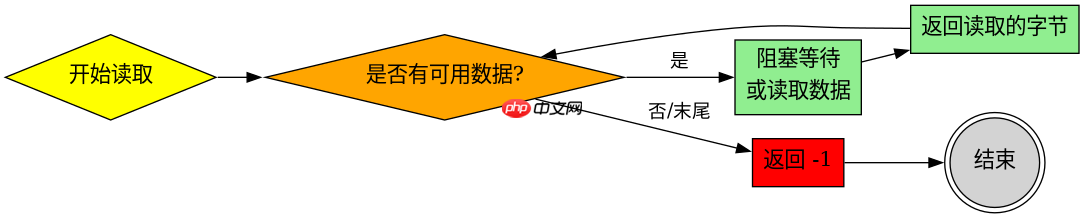
当调用 InputStream 的 read() 方法时,如果输入流中没有可用数据但尚未到达末尾,该方法会阻塞直到有数据可读或抛出 IOException。如果到达流的末尾,则返回 -1。对于 read(byte[] b) 方法,它会尝试读取指定长度的字节数,但实际读取的数量可能少于请求的长度,这取决于可用的数据量。开发者在处理返回值时必须检查实际读取的字节数,而不是假设每次都能读满缓冲区。


















