








java nio 中读写大文件的核心做法是使用 filechannel 配合 bytebuffer,通过循环读取和写入避免一次性将大文件加载到内存导致 outofmemoryerror。具体实现时,需创建固定大小的缓冲区(如 4mb),在 while ((read = channel.read(buffer)) != -1) 循环中处理数据,并在每次写操作前调用 buffer.flip() 切换模式。若涉及跨平台或特殊编码,需注意字符集转换开销;对于纯二进制流,直接字节拷贝效率最高。

如何高效实现大文件的断点续传下载
实现断点续传的关键在于利用 FileChannel 的 position() 和 size() 方法定位文件指针,并结合 HTTP 请求头 Range 指定起始字节。服务端通过 transferTo() 或手动循环读取跳过已下载部分,客户端则追加写入本地文件。此方法避免了重新下载已获取的数据块,显著节省带宽和时间。
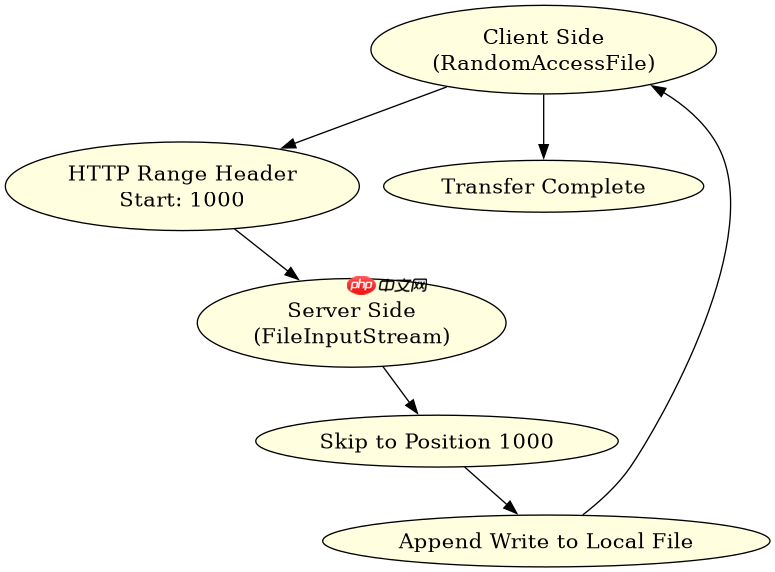
import java.io.*;
import java.nio.channels.*;

public class ResumeDownload {
    public static void main(String[] args) throws Exception {
        // 模拟服务端:从第 1000 字节开始传输
        FileChannel serverChannel = new FileInputStream("large_file.dat").getChannel();
        long startPos = 1000;
        serverChannel.position(startPos);

        // 模拟客户端:追加写入
        RandomAccessFile raf = new RandomAccessFile("local_copy.dat", "rw");
        FileChannel clientChannel = raf.getChannel();
        clientChannel.position(raf.length()); // 确保追加位置正确

        ByteBuffer buffer = ByteBuffer.allocate(4 * 1024 * 1024); // 4MB buffer
        while (serverChannel.read(buffer) > 0) {
            buffer.flip();
            clientChannel.write(buffer);
            buffer.clear();
        }
        serverChannel.close();
        clientChannel.close();
    }
}
如何利用零拷贝技术加速大文件传输
Java NIO 提供了 FileChannel.transferTo() 和 transferFrom() 方法,底层通常映射到操作系统的 sendfile 系统调用,实现内核态与用户态之间的零拷贝(Zero-Copy)。相比传统的 read/write 循环,这种方式减少了上下文切换和数据复制次数,极大提升了网络传输或磁盘间拷贝的效率。使用时只需传入源通道、起始偏移量和传输字节数即可。

立即学习“Java免费学习笔记(深入)”;

import java.io.*;
import java.nio.channels.*;

public class ZeroCopyTransfer {
    public static void main(String[] args) throws Exception {
        FileChannel inChannel = new FileInputStream("source.dat").getChannel();
        FileChannel outChannel = new FileOutputStream("dest.dat").getChannel();

        // 零拷贝:直接从输入通道传输到输出通道
        inChannel.transferTo(0, inChannel.size(), outChannel);

        inChannel.close();
        outChannel.close();
    }
}
当使用 transferTo 遇到 BrokenPipe 异常时如何处理
在使用 transferTo() 进行大文件网络传输时,如果接收端提前关闭连接或网络中断,会抛出 java.net.BrokenPipeException 或 java.io.IOException: Connection reset。这是因为底层系统调用试图向已关闭的 socket 写入数据。处理方式是捕获该异常并记录日志,同时关闭相关通道以释放资源。建议在非阻塞模式下结合 Selector 监控通道状态,或在阻塞模式下设置合理的超时时间,以便及时响应连接异常。


















