








Java 怎么用流程控制实现简易登录验证
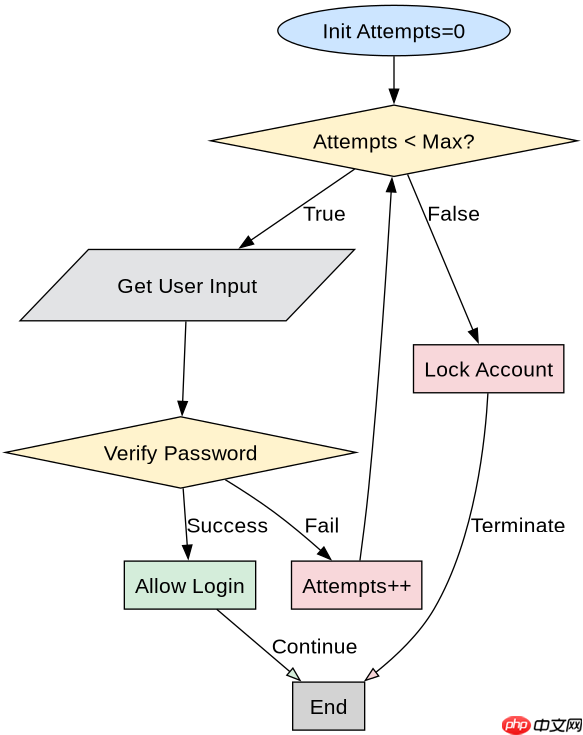
使用 scanner 读取用户输入,通过 if-else 结构判断用户名和密码是否匹配。如果匹配成功则输出欢迎信息并结束程序,否则提示错误并允许重试或终止。

如何防止暴力破解并增加安全性
在循环中限制尝试次数,超过阈值后强制退出。结合 break 和计数器变量来控制流程,避免无限循环。

Build Java agent transport gateways with Atmosphere
下载
使用Atmosphere构建通过WebSocket、SSE、gRPC、WebTransport、MCP、A2A和AG-UI流传输的JVM代理网关,并带有治理钩子。
如何处理空输入或异常字符
在获取输入前检查字符串是否为空或仅包含空白字符,使用 trim() 和 isEmpty() 进行预处理,确保逻辑健壮性。
立即学习“Java免费学习笔记(深入)”;

import java.util.Scanner;

public class SimpleLogin {
    public static void main(String[] args) {
        Scanner scanner = new Scanner(System.in);
        String correctUser = "admin";
        String correctPass = "123456";
        int maxAttempts = 3;
        int attempts = 0;
        boolean loggedIn = false;

        while (attempts < maxAttempts) {
            System.out.print("Enter username: ");
            String inputUser = scanner.nextLine();
            System.out.print("Enter password: ");
            String inputPass = scanner.nextLine();

            if (inputUser.equals(correctUser) && inputPass.equals(correctPass)) {
                loggedIn = true;
                break;
            } else {
                attempts++;
                System.out.println("Invalid credentials. Attempts left: " + (maxAttempts - attempts));
            }
        }

        if (loggedIn) {
            System.out.println("Login successful!");
        } else {
            System.out.println("Account locked due to too many failed attempts.");
        }
        scanner.close();
    }
} 


















