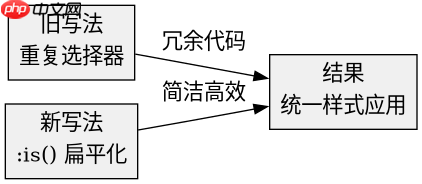
使用 :is() 伪类可以将深层嵌套且样式相同的元素选择器扁平化,从而消除重复代码并提升可维护性。具体做法是将所有需要应用相同样式的标签名或类名放入 :is() 的参数列表中,用逗号分隔,浏览器会将其解析为这些选择器的逻辑“或”组合。这样只需编写一条规则即可覆盖所有目标元素,无需为每个层级单独声明样式。
如何重构多层嵌套的标题与段落样式
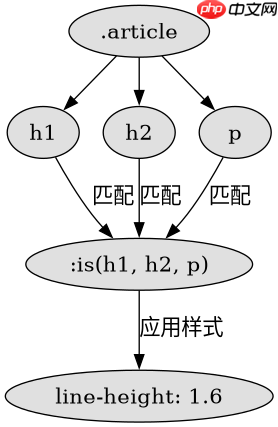
当文章结构中存在多级标题(如 h1、h2)和段落(p),且它们都需要设置相同的字体大小、行高和颜色时,传统写法需要为每个层级分别定义选择器。使用 :is() 可以一次性选中这些不同层级的元素,统一应用样式,避免冗余。
<style>
/* 旧写法:重复定义 */
.article h1 {
  font-size: 2rem;
  color: #333;
}
.article h2 {
  font-size: 1.5rem;
  color: #333;
}
.article p {
  font-size: 1rem;
  color: #666;
}

/* 新写法:使用 :is() 扁平化 */
:is(.article h1, .article h2, .article p) {
  line-height: 1.6;
}

:is(.article h1, .article h2) {
  font-size: 2rem;
  color: #333;
}

.article p {
  font-size: 1rem;
  color: #666;
}
</style>

<div class="article">
  <h1>主标题</h1>
  <p>第一段内容...</p><p><span>立即学习</span>“<a href="https://pan.quark.cn/s/cb6835dc7db1" style="text-decoration: underline !important; color: blue; font-weight: bolder;" rel="nofollow" target="_blank">前端免费学习笔记(深入)</a>”;</p>
  <h2>子标题</h2>
  <p>第二段内容...</p><div class="aritcle_card flexRow">
                                                        <div class="artcardd flexRow">
                                                                <a class="aritcle_card_img" href="/xiazai/gongju/2905" title="CSS"><img
                                                                                src="https://img.php.cn/upload/manual/000/969/633/6af2b1226ad9e733.png" alt="CSS" ></a>
                                                                <div class="aritcle_card_info flexColumn">
                                                                        <a href="/xiazai/gongju/2905" title="CSS">CSS</a>
                                                                        <p>CSS 官方网站入口。访问 W3C 的 CSS 页面,查看 CSS 标准、学习资料与工作组动态;CSS 是 Web 标准,无需下载安装。</p>
                                                                </div>
                                                                <a href="/xiazai/gongju/2905" title="CSS" class="aritcle_card_btn flexRow flexcenter"><b></b><span>下载</span> </a>
                                                        </div>
                                                </div>
</div>
运行上述代码后,h1、h2 和 p 都会继承 :is() 中定义的 line-height,而 h1 和 h2 会额外获得更大的字号和深色文字。这种写法显著减少了 CSS 规则的重复,同时保持了样式的特异性一致。
如何处理具有相同交互状态的表单元素
在表单设计中,多个不同类型的输入框(如 input、textarea、select)往往需要共享相同的焦点状态、悬停效果或禁用样式。通过 :is() 将这些元素分组,可以简化状态管理,确保用户体验的一致性。

<style>
/* 旧写法:逐个定义焦点样式 */
.input-group input:focus,
.input-group textarea:focus,
.input-group select:focus {
  border-color: #007bff;
  box-shadow: 0 0 0 0.2rem rgba(0, 123, 255, 0.25);
}

/* 新写法:使用 :is() 统一处理 */
:is(.input-group input, .input-group textarea, .input-group select):focus {
  border-color: #007bff;
  box-shadow: 0 0 0 0.2rem rgba(0, 123, 255, 0.25);
}

.input-group {
  display: flex;
  flex-direction: column;
  gap: 1rem;
}

.input-group label {
  font-weight: bold;
}

.input-group input,
.input-group textarea,
.input-group select {
  padding: 0.5rem;
  border: 1px solid #ccc;
  border-radius: 4px;
}
</style>

<form class="input-group">
  <label for="name">姓名</label>
  <input type="text" id="name" placeholder="请输入姓名">

  <label for="message">留言</label>
  <textarea id="message" rows="4" placeholder="请输入留言"></textarea>

  <label for="category">分类</label>
  <select id="category">
    <option value="tech">技术</option>
    <option value="design">设计</option>
  </select>
</form>
在此示例中,input、textarea 和 select 在获得焦点时都会显示蓝色边框和阴影效果。使用 :is() 后,只需一条规则即可实现这一行为,避免了为每种输入类型重复编写相同的焦点样式代码。
基于程序中某个输入、条件或结果的具体问题
在使用 :is() 时,如果选择器列表中包含无效的选择器或语法错误,整个规则可能会失效。例如,如果在 :is() 中误写了不支持的伪类或属性选择器,浏览器将无法解析该规则,导致样式不生效。因此,在重构时应仔细检查每个选择器的有效性,确保它们在当前浏览器环境中得到支持。