








AutoCloseable 实现类在 try-with-resources 中如何正确关闭
通过继承 autocloseable 接口并实现 close() 方法,即可让自定义资源支持 try-with-resources。单元测试时,使用 mockito 的 @mock 或 spy 模拟该资源,验证 close() 是否被调用以及调用顺序。若资源抛出异常,需确保 close() 仍被执行,且不影响主逻辑的异常传播。

多个资源时 close() 的执行顺序与异常处理
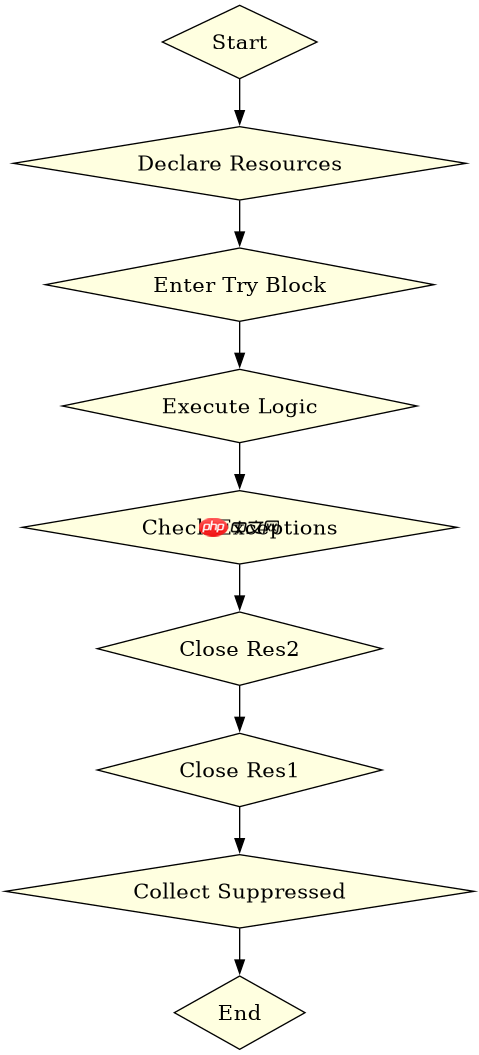
当 try-with-resources 包含多个资源时,close() 按声明的逆序执行。如果某个资源的 close() 抛出异常,它会作为 suppressed exception 附加到主异常上,不会掩盖主异常。测试时需验证 suppressed exceptions 列表中包含预期的关闭异常。

Build Java agent transport gateways with Atmosphere
下载
使用Atmosphere构建通过WebSocket、SSE、gRPC、WebTransport、MCP、A2A和AG-UI流传输的JVM代理网关,并带有治理钩子。
资源关闭失败时的异常抑制行为
当主操作和 close() 都抛出异常时,主异常会被保留,而 close() 抛出的异常会被添加到主异常的 suppressed 列表中。测试应检查 getSuppressed() 返回的数组长度和内容,确保关闭异常未被丢失。
立即学习“Java免费学习笔记(深入)”;
import org.junit.jupiter.api.Test;
import static org.mockito.Mockito.*;

public class TryWithResourcesTest {
    @Test
    public void testSingleResourceClose() {
        AutoCloseable resource = mock(AutoCloseable.class);
        try (resource) {
            // do something
        } catch (Exception e) {
            // handle
        }
        verify(resource).close();
    }

    @Test
    public void testMultipleResourcesCloseOrder() {
        AutoCloseable res1 = mock(AutoCloseable.class);
        AutoCloseable res2 = mock(AutoCloseable.class);
        try (res1; res2) {
            // do something
        }
        verify(res2, times(1)).close();
        verify(res1, times(1)).close();
    }

    @Test
    public void testSuppressedExceptions() throws Exception {
        AutoCloseable resource = mock(AutoCloseable.class);
        doThrow(new RuntimeException("close failed")).when(resource).close();
        try (resource) {
            throw new RuntimeException("main error");
        } catch (Exception e) {
            assert e.getSuppressed().length == 1;
            assert e.getSuppressed()[0].getMessage().equals("close failed");
        }
    }
}



















