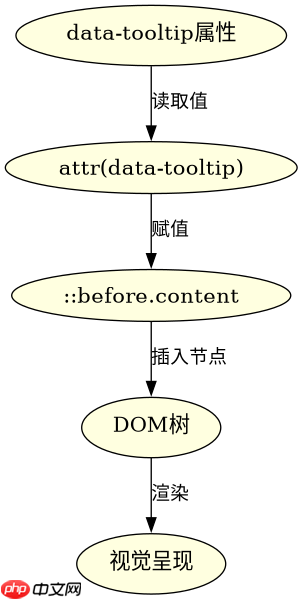
结合 ::before 伪元素和 attr() 函数,可以在 css 中动态读取 html 元素的属性值并插入到内容中。具体做法是在 content 属性中使用 attr(属性名),浏览器会自动获取该元素的指定属性值作为伪元素的显示内容。如果属性不存在,则返回空字符串;若属性值为 url 格式且用于非图像属性,需配合 url() 使用。

如何读取自定义 data 属性并显示文本?
通过 data-* 自定义属性可以存储任意数据,并在 CSS 中通过 attr(data-xxx) 读取。例如,给一个链接添加 data-tooltip 属性,即可在悬停时显示提示文字。这种方式常用于实现轻量级工具提示或动态标签,无需 JavaScript 介入。
<!DOCTYPE html>
<html lang="zh">
<head>
  <meta charset="UTF-8">
  <title>Attr Demo</title>
  <style>
    .tooltip {
      position: relative;
      cursor: help;
    }
    .tooltip::before {
      content: attr(data-tooltip);
      position: absolute;
      bottom: 100%;
      left: 50%;
      transform: translateX(-50%);
      background: #333;
      color: white;
      padding: 4px 8px;
      border-radius: 4px;
      font-size: 12px;
      white-space: nowrap;
      opacity: 0;
      pointer-events: none;
      transition: opacity 0.2s;
    }
    .tooltip:hover::before {
      opacity: 1;
    }
  </style>
</head>
<body>
  <a href="#" class="tooltip" data-tooltip="这是一个提示">悬停查看</a>
</body>
</html>
预期结果:鼠标悬停在“悬停查看”链接上时,上方会显示背景为深灰色、文字为白色的“这是一个提示”文本框,离开后消失。该效果完全由 CSS 控制,无 JS 参与。
立即学习“前端免费学习笔记(深入)”;
如何读取 title 属性并替换默认行为?
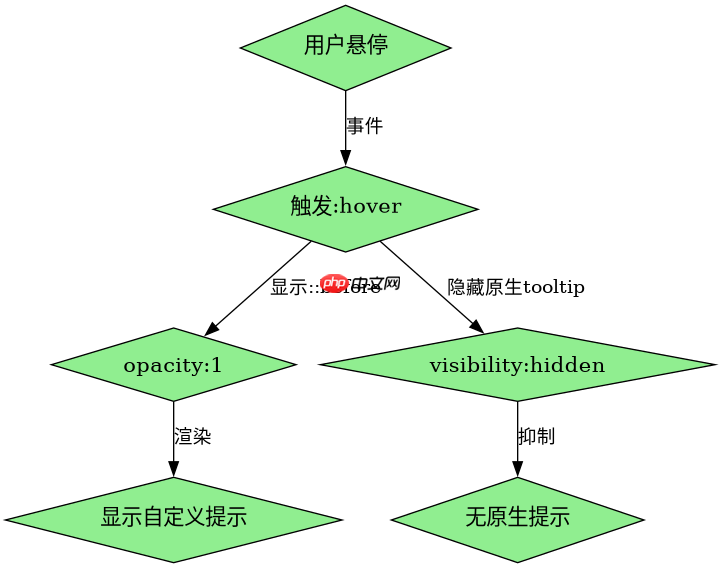
attr(title) 可直接读取元素的 title 属性值,但需注意:原生 title 有浏览器默认 tooltip 行为,而 ::before 插入的内容是独立渲染的。若希望完全自定义样式,可隐藏原生 tooltip(如通过 pointer-events: none 或覆盖样式),并用 ::before 重新呈现。此方法适用于需要统一 UI 风格的场景。
<!DOCTYPE html>
<html lang="zh">
<head>
  <meta charset="UTF-8">
  <title>Title Attr Demo</title>
  <style>
    .custom-title {
      position: relative;
      display: inline-block;
      color: blue;
      text-decoration: underline;
    }
    .custom-title::before {
      content: attr(title);
      position: absolute;
      top: -20px;
      left: 0;
      background: yellow;
      color: black;
      padding: 2px 6px;
      font-size: 11px;
      border: 1px solid gray;
      opacity: 0;
      transition: opacity 0.3s;
    }
    .custom-title:hover::before {
      opacity: 1;
    }
    /* 隐藏原生 title tooltip */
    .custom-title[title]:hover {
      visibility: hidden;
    }
  </style>
</head>
<body>
  <span class="custom-title" title="这是自定义标题">点击我</span>
</body>
</html>
预期结果:鼠标悬停在“点击我”文本上时,上方出现黄色背景、黑色文字的“这是自定义标题”提示框,同时浏览器原生 tooltip 被隐藏。注意:visibility: hidden 仅对当前元素生效,不影响子元素,此处用于抑制原生 tooltip 触发。
当属性值为空时,attr() 返回什么?
当指定的属性存在但值为空字符串(如 data-x="")或未定义时,attr() 返回空字符串,即 ::before 不生成任何可见内容。若属性根本不存在于元素上,同样返回空字符串。因此,在使用前应确保属性已正确设置,或通过 CSS 选择器限定范围以避免意外空白。