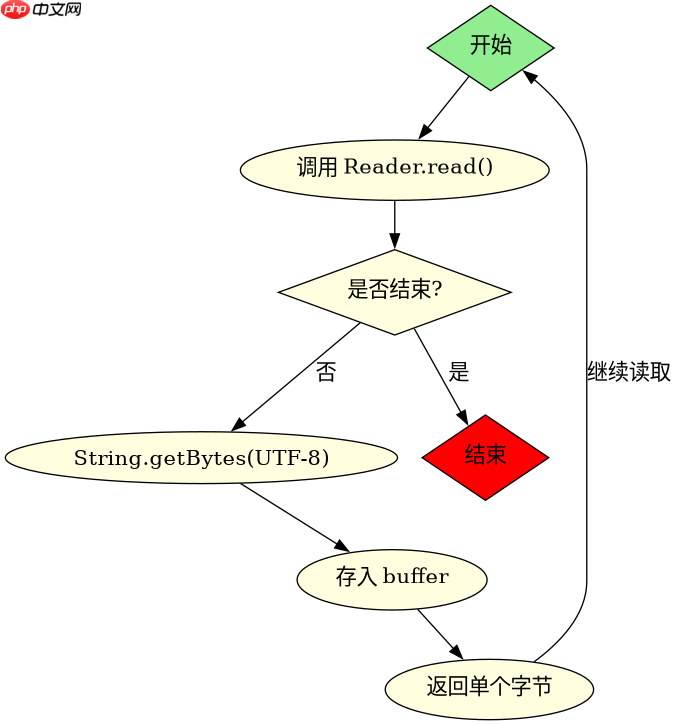
java 中 reader 无法直接转换为 inputstream,因为字符流处理的是 unicode 字符,而字节流处理的是原始字节。最稳妥的做法是创建一个自定义的 inputstream 子类,在 read() 方法中调用 reader.read() 读取字符,并将其转换为字节数组返回。

如何封装 Reader 为 InputStream
通过继承 java.io.InputStream 并重写核心读取方法,可以将任何 Reader 实例包装为字节流。实现的关键在于将字符编码为字节,通常使用 UTF-8 编码以确保兼容性。
import java.io.*;

public class ReaderToInputStream extends InputStream {
    private final Reader reader;
    private final byte[] buffer = new byte[1024];
    private int pos = 0;
    private int len = 0;

    public ReaderToInputStream(Reader reader) {
        this.reader = reader;
    }

    @Override
    public int read() throws IOException {
        if (pos >= len) {
            fillBuffer();
            if (len == -1) return -1;
        }
        return buffer[pos++] & 0xFF;
    }

    @Override
    public int read(byte[] b, int off, int len) throws IOException {
        if (pos >= len) {
            fillBuffer();
            if (len == -1) return -1;
        }
        int nRead = 0;
        while (nRead < len && pos < len) {
            b[off + nRead++] = buffer[pos++];
        }
        return nRead;
    }

    private void fillBuffer() throws IOException {
        char[] chars = new char[1024];
        int nChars = reader.read(chars);
        if (nChars == -1) {
            len = -1;
            return;
        }
        String s = new String(chars, 0, nChars);
        byte[] bytes = s.getBytes("UTF-8");
        System.arraycopy(bytes, 0, buffer, 0, bytes.length);
        len = bytes.length;
        pos = 0;
    }

    @Override
    public void close() throws IOException {
        reader.close();
    }
}

// 测试代码
public class Main {
    public static void main(String[] args) throws Exception {
        Reader reader = new StringReader("Hello World");
        InputStream is = new ReaderToInputStream(reader);
        int c;
        while ((c = is.read()) != -1) {
            System.out.print((char) c);
        }
    }
}
为什么不能直接转换
Reader 和 InputStream 的设计初衷不同。前者处理字符(char),后者处理字节(byte)。Java 中的字符是 16 位的 Unicode 编码,而字节是 8 位的数据。因此,转换过程必须涉及编码和解码,这会导致数据膨胀或丢失风险。

立即学习“Java免费学习笔记(深入)”;
处理中文乱码问题
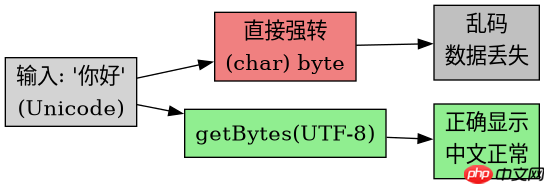
当 Reader 中包含非 ASCII 字符(如中文)时,直接使用 (byte) char 强制转换会导致乱码。上述实现中使用了 s.getBytes("UTF-8") 来确保正确的编码转换。如果 Reader 本身使用的是其他编码(如 GBK),则需要指定相应的编码格式。