








jQuery 中 this 的指向规则
在 jquery 中,this 的指向取决于代码执行的具体上下文。在普通的 dom 事件处理函数中,this 默认指向触发该事件的 dom 元素;而在 jquery 的链式方法(如 .each())或回调函数中,this 通常指向当前遍历到的 dom 对象。开发者可以通过 $(this) 将其转换为 jquery 对象以使用 jquery 方法。

事件处理中的 this 指向
当为 DOM 元素绑定事件时,this 指向触发事件的原始 DOM 节点。例如,点击一个按钮时,事件处理函数内部的 this 就是那个按钮元素本身,而不是 jQuery 包装器。这意味着可以直接访问 DOM 属性,但需要使用 $(this) 才能调用 jQuery 方法。
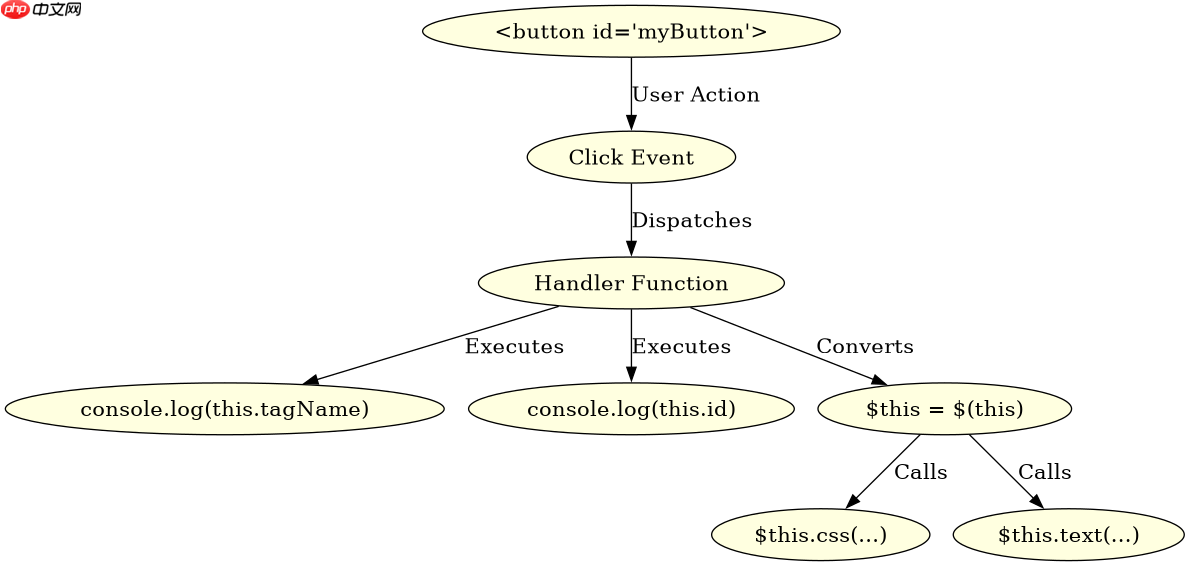
<!DOCTYPE html>
<html>
<head>
    <script src="https://code.jquery.com/jquery-3.6.0.min.js"></script>
    <script>
        $(document).ready(function() {
            // 绑定点击事件
            $('#myButton').on('click', function(event) {
                // this 指向触发事件的 DOM 元素
                console.log(this.tagName); // 输出: BUTTON
                console.log(this.id);      // 输出: myButton

                // 转换为 jQuery 对象以使用 jQuery 方法
                var $this = $(this);
                $this.css('color', 'red');
                $this.text('Clicked!');
            });
        });
    </script>
</head>
<body>
    <button id="myButton">Click me</button>
</body>
</html>
遍历与回调中的 this 指向
在使用 jQuery 的 .each() 方法遍历集合时,回调函数中的 this 指向当前遍历到的 DOM 元素。这与普通事件处理类似,this 是原生 DOM 对象。如果需要操作 jQuery 方法,同样需要包裹 $(this)。此外,在 AJAX 请求的 success 回调中,this 可能指向 XMLHttpRequest 对象或其他上下文,具体取决于配置,因此通常建议使用变量保存 $(this) 或在回调中使用箭头函数(如果环境支持)来保持上下文一致。

立即学习“Java免费学习笔记(深入)”;

<!DOCTYPE html>
<html>
<head>
    <script src="https://code.jquery.com/jquery-3.6.0.min.js"></script>
    <script>
        $(document).ready(function() {
            // 假设有一组列表项
            $('li.item').each(function(index, element) {
                // this 指向当前遍历到的 li 元素
                console.log(this.className); // 输出: item

                // 转换为 jQuery 对象
                var $item = $(this);
                $item.addClass('highlighted');
                $item.text('Item ' + index);
            });
        });
    </script>
</head>
<body>
    <ul>
        <li class="item">One</li>
        <li class="item">Two</li>
        <li class="item">Three</li>
    </ul>
</body>
</html>
基于特定输入条件的 this 指向问题
当在 jQuery 插件或复杂组件中使用时,this 的指向可能会因为内部方法的调用方式而改变。例如,如果在插件内部定义了一个辅助函数,并在其中调用另一个方法,this 可能不再指向预期的 DOM 元素。此时,可以使用 $.proxy() 或 bind() 方法来显式绑定 this 的指向,确保在回调或嵌套函数中 this 仍然指向正确的对象。这种场景下,明确管理 this 的指向对于避免错误至关重要。
,

















