java 中 switch 对 string 的匹配是区分大小写的。这意味着 "abc" 和 "abc" 会被视为不同的值,不会进入同一个 case 分支。如果需要进行不区分大小写的匹配,必须在进入 switch 之前将字符串统一转换为小写(或大写)。

switch 中 String 匹配的具体行为是什么
在 Java 7 引入的 switch 支持 String 类型后,编译器会将 switch 语句转换为基于 hashCode() 和 equals() 的查找逻辑。这个过程严格遵循 String.equals() 的定义,即逐字符比较 ASCII 值,因此大小写不同会导致匹配失败。
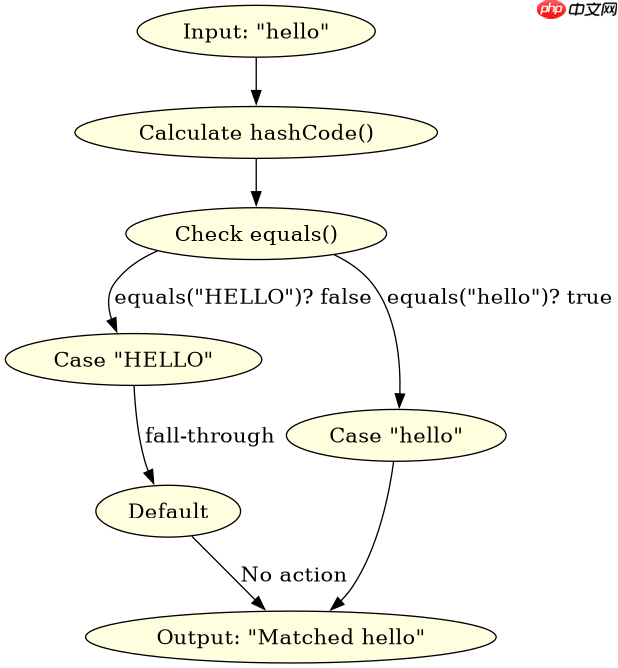
public class SwitchDemo {
    public static void main(String[] args) {
        String input = "hello";
        switch (input) {
            case "HELLO":
                System.out.println("Matched HELLO");
                break;
            case "hello":
                System.out.println("Matched hello");
                break;
            default:
                System.out.println("No match");
                break;
        }
    }
}
运行上述代码,输出结果为:
Matched hello
这证明了 "hello" 仅匹配 case "hello",而不会匹配 case "HELLO"。
立即学习“Java免费学习笔记(深入)”;

如何实现不区分大小写的 String 匹配
要实现不区分大小写的匹配,最标准的做法是在 switch 表达式中使用 toLowerCase() 或 toUpperCase() 方法预处理输入字符串。这样可以将所有可能的变体归一化为同一种形式,从而简化 case 标签的编写。

public class CaseInsensitiveSwitch {
    public static void main(String[] args) {
        String input = "Hello";
        // 统一转为小写
        String lowerInput = input.toLowerCase();

        switch (lowerInput) {
            case "hello":
                System.out.println("Matched Hello/HELLO/hello");
                break;
            case "world":
                System.out.println("Matched World/WORLD/world");
                break;
            default:
                System.out.println("No match");
                break;
        }
    }
}
运行上述代码,输出结果为:
Matched Hello/HELLO/hello
因为 "Hello".toLowerCase() 的结果是 "hello",所以它成功匹配了 case "hello"。
当输入为 null 时 switch 会抛出什么异常
如果在 switch 表达式中的字符串变量为 null,程序会直接抛出 java.lang.NullPointerException。这是因为 switch 内部需要调用 hashCode() 和 equals() 方法,而这些方法不能在 null 对象上调用。为了避免这个问题,可以在 switch 之前添加 null 检查,或者使用 Objects.hashCode() 等工具类进行安全处理,但最直接的方式是确保传入 switch 的字符串非空。