








使用 header() 函数设置响应头并配合 readfile() 输出文件流即可实现强制下载。核心做法是发送 content-type: application/octet-stream、content-disposition: attachment 以及 content-length,随后读取文件内容并终止脚本执行。

Content-Disposition 的格式要求是什么
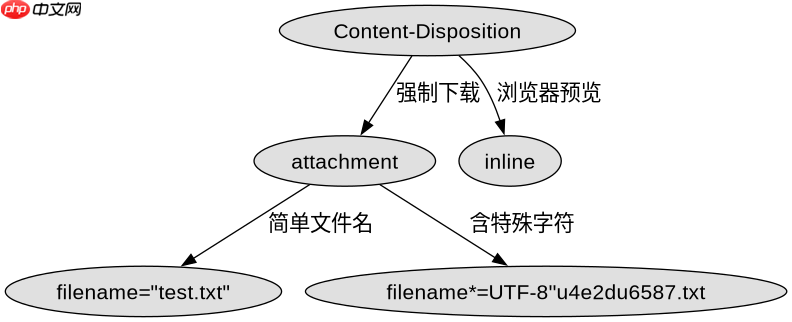
该头部决定了浏览器是否将内容视为附件下载。必须包含 attachment 关键字,并通过 filename 参数指定文件名。如果文件名包含中文或特殊字符,需要进行 URL 编码或使用 RFC 5987 标准格式,否则可能导致文件名乱码或下载失败。
<?php
$file = 'report.pdf';
if (file_exists($file)) {
    header('Content-Description: File Transfer');
    header('Content-Type: application/octet-stream');
    header('Content-Disposition: attachment; filename="' . basename($file) . '"');
    header('Expires: 0');
    header('Cache-Control: must-revalidate');
    header('Pragma: public');
    header('Content-Length: ' . filesize($file));
    readfile($file);
    exit;
}
如何确保大文件下载的稳定性
对于大文件,需要禁用输出缓冲并设置超时时间,防止因内存溢出或连接超时导致下载中断。同时应检查文件路径的可访问性,避免权限错误。

立即学习“PHP免费学习笔记(深入)”;

<?php
ini_set('max_execution_time', 300);
ob_clean();
flush();
$file = 'large_data.zip';
if (is_readable($file)) {
    header('Content-Type: application/zip');
    header('Content-Disposition: attachment; filename="' . basename($file) . '"');
    header('Content-Length: ' . filesize($file));
    readfile($file);
} else {
    http_response_code(404);
    echo 'File not found';
}
当文件不存在时程序会返回什么状态
如果指定的文件路径无效或不可读,程序不会触发下载流程,而是直接输出错误信息或返回 HTTP 404 状态码。这有助于前端正确识别错误并进行相应处理,而不是接收一个空的二进制流。



















