








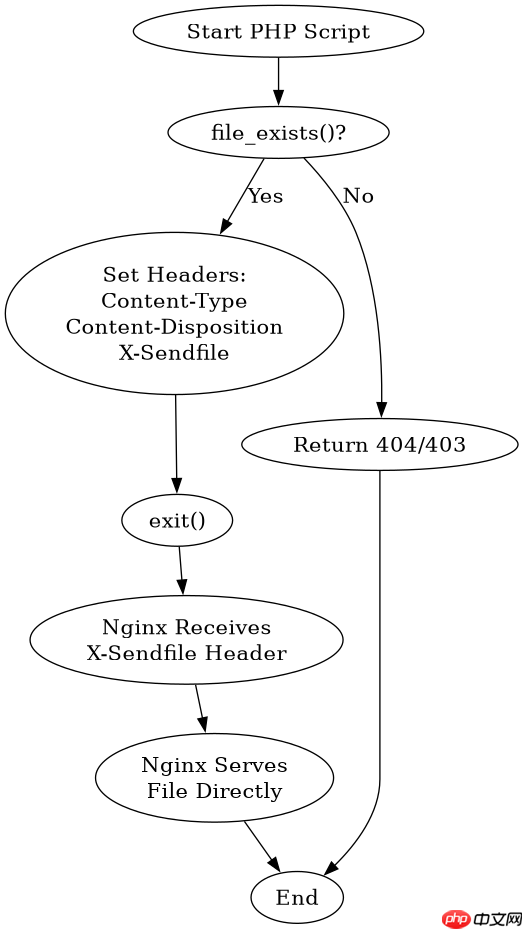
在nginx环境下通过php实现大文件强制下载,核心做法是关闭php直接输出缓冲,设置正确的http响应头(content-type、content-disposition),并将处理权交给nginx的x-sendfile模块。调用header()函数发送x-sendfile头并指定绝对路径,随后使用exit终止脚本执行,这样nginx会接管文件的读取与传输,避免php内存溢出和超时问题。

X-Sendfile头如何触发Nginx的文件传输
Nginx收到带有X-Sendfile头的请求后,会忽略PHP输出的任何内容,直接从磁盘读取指定路径的文件并发送给客户端。这要求Nginx配置中启用ngx_http_xsendfile_module模块,且PHP脚本必须明确告知Nginx文件的具体位置。开发者只需确保路径正确且文件存在,无需关心底层的I/O操作。
location /files/ {
    internal;
    alias /var/www/data/files/;
}

server {
    listen 80;
    server_name example.com;

    location /download {
        fastcgi_pass unix:/run/php-fpm.sock;
        include fastcgi_params;
        fastcgi_param SCRIPT_FILENAME $document_root$fastcgi_script_name;
    }
}上述Nginx配置片段展示了关键设置。internal指令限制/files/目录只能通过内部重定向或X-Sendfile访问,防止用户直接浏览文件列表。PHP端代码示例如下:
立即学习“PHP免费学习笔记(深入)”;
<?php
$file_path = '/var/www/data/files/large_video.mp4';
if (file_exists($file_path)) {
    header('Content-Type: application/octet-stream');
    header('Content-Disposition: attachment; filename="large_video.mp4"');
    header('X-Sendfile: ' . $file_path);
    header('X-Accel-Redirect: ' . $file_path); // Nginx专用替代方案
    exit;
} else {
    http_response_code(404);
    echo 'File not found';
}
?>运行该脚本时,浏览器会开始下载large_video.mp4。由于使用了X-Sendfile或X-Accel-Redirect,PHP进程在发送头部后立即退出,实际数据传输由Nginx完成,极大降低了服务器负载。

对比传统PHP直接输出下载的性能差异
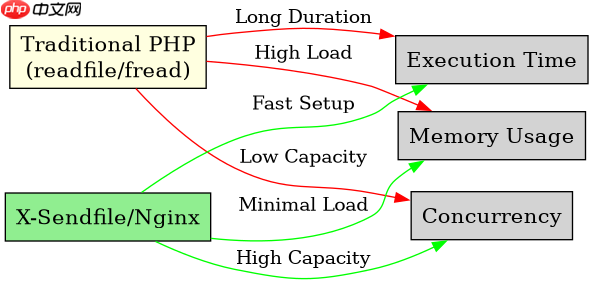
传统方式下,PHP通过readfile()或循环fread()将文件内容写入php://output。这种方式会将文件数据加载到PHP内存或依赖PHP的输出缓冲,对于GB级大文件,极易导致内存耗尽(OOM)或达到max_execution_time限制。而X-Sendfile机制下,PHP仅负责逻辑判断和头部设置,数据传输完全由Nginx的高效C代码处理,支持断点续传和零拷贝技术。
// 传统低效方式
function download_legacy($file) {
    if (file_exists($file)) {
        header('Content-Type: application/octet-stream');
        header('Content-Disposition: attachment; filename="' . basename($file) . '"');
        header('Content-Length: ' . filesize($file));
        readfile($file); // 阻塞式读取,占用大量内存
    }
}

// X-Sendfile高效方式
function download_accelerated($file) {
    if (file_exists($file)) {
        header('Content-Type: application/octet-stream');
        header('Content-Disposition: attachment; filename="' . basename($file) . '"');
        header('X-Sendfile: ' . realpath($file));
        exit; // 立即结束,不读取文件内容
    }
}对比两段代码,download_legacy在处理大文件时会持续占用PHP进程资源,直到传输结束。而download_accelerated在调用exit后,PHP进程即可释放并处理其他请求。这种差异使得在高并发场景下,X-Sendfile能显著提升服务器的吞吐量。注意,使用X-Sendfile时,必须确保Content-Length头可选,因为Nginx会自动计算并添加该头,手动设置可能导致冲突,但显式设置通常无害且有助于客户端显示进度。
当X-Sendfile路径不存在时的错误处理结果
如果PHP脚本中指定的X-Sendfile路径对应的文件在磁盘上不存在,或者Nginx无权访问该路径,Nginx不会尝试下载一个空文件,而是会根据其内部错误处理机制返回相应的HTTP状态码。通常情况下,Nginx会返回404 Not Found或403 Forbidden,具体取决于文件系统权限和Nginx配置。此时,PHP脚本中的exit已经执行,但Nginx在解析X-Sendfile头时发现目标无效,从而中断传输流程。
为了验证这一行为,可以修改之前的PHP代码,故意传入一个不存在的路径:
<?php
$non_existent_file = '/var/www/data/files/does_not_exist.txt';
header('Content-Type: application/octet-stream');
header('Content-Disposition: attachment; filename="test.txt"');
header('X-Sendfile: ' . $non_existent_file);
exit;
?>执行此代码后,浏览器接收到的将是Nginx生成的404错误页面,而不是空的下载文件。这表明X-Sendfile并非简单的重定向,而是Nginx内核级的文件服务指令,其有效性依赖于底层文件系统的真实状态。因此,在生产环境中,务必在设置X-Sendfile前使用file_exists()和is_readable()进行严格校验,以确保用户体验和系统稳定性。



















