在 java 中使用 try-with-resources 管理 scanner 时,只需将 new scanner(system.in) 放在括号内即可自动关闭。由于 system.in 是标准输入流,关闭它会导致底层流不可用,因此通常建议仅关闭包装了文件路径的 scanner,或者在不需要再读取控制台输入时谨慎使用。

如何正确关闭文件 Scanner 避免资源泄漏
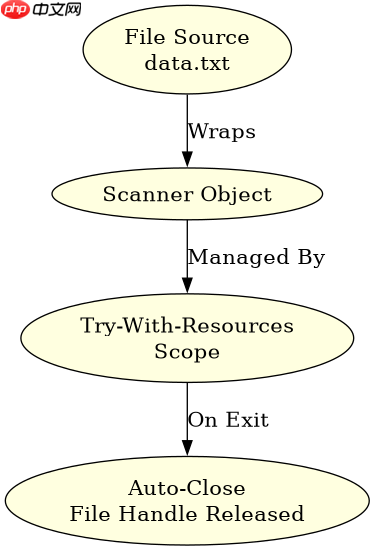
直接回答:对于文件输入,必须使用 try-with-resources 确保 close() 被调用。如果不手动关闭或不在 try-with-resources 中,文件句柄会一直占用直到垃圾回收,这在长时间运行的应用中会导致资源耗尽。
import java.io.File;
import java.io.FileNotFoundException;
import java.util.Scanner;

public class FileScannerExample {
    public static void main(String[] args) {
        // 假设有一个名为 data.txt 的文件
        String filePath = "data.txt";

        // 使用 try-with-resources 自动关闭 Scanner
        try (Scanner scanner = new Scanner(new File(filePath))) {
            while (scanner.hasNextLine()) {
                String line = scanner.nextLine();
                System.out.println("Read: " + line);
            }
        } catch (FileNotFoundException e) {
            System.err.println("File not found: " + e.getMessage());
        }
        // 离开 try 块后,scanner.close() 会自动执行
    }
}
预期结果:程序成功读取文件内容并打印每一行。如果文件不存在,捕获异常并打印错误信息。离开作用域后,文件句柄被释放。
立即学习“Java免费学习笔记(深入)”;

为什么不建议关闭 System.in 的 Scanner
直接回答:Scanner(System.in) 关闭时会关闭 System.in 本身。一旦 System.in 被关闭,后续任何尝试从标准输入读取的操作都会抛出 IllegalStateException 或返回空值,导致程序无法再从控制台获取用户输入。

import java.util.Scanner;

public class InappropriateCloseExample {
    public static void main(String[] args) {
        // 创建基于 System.in 的 Scanner
        try (Scanner scanner = new Scanner(System.in)) {
            System.out.println("Inside try block. Please enter text:");
            if (scanner.hasNextLine()) {
                String input = scanner.nextLine();
                System.out.println("You entered: " + input);
            }
        } catch (Exception e) {
            e.printStackTrace();
        }

        // 尝试再次读取
        System.out.println("Trying to read again after try-with-resources...");
        Scanner secondScanner = new Scanner(System.in);
        if (secondScanner.hasNextLine()) {
            String again = secondScanner.nextLine();
            System.out.println("Second read: " + again);
        } else {
            System.out.println("Failed to read: Stream closed or no input available.");
        }
        secondScanner.close();
    }
}
预期结果:第一次读取正常。第二次尝试读取时,由于 System.in 已被关闭,hasNextLine() 可能返回 false 或抛出异常(取决于具体实现和状态),通常表现为无法读取新输入。
Scanner 关闭时的内部行为与异常处理
直接回答:Scanner.close() 会关闭其关联的 Readable 源。如果源是 File,则关闭文件;如果是 System.in,则关闭标准输入。如果在关闭过程中发生 I/O 错误,close() 方法本身不会抛出受检异常,但可能会记录日志或忽略错误。然而,如果在 try-with-resources 的执行期间(即读取操作)抛出异常,该异常会优先于关闭异常传播。
import java.io.BufferedReader;
import java.io.IOException;
import java.nio.file.Files;
import java.nio.file.Paths;
import java.util.Scanner;

public class CloseBehaviorCheck {
    public static void main(String[] args) {
        String path = "test.txt";
        try {
            // 模拟一个可能抛出异常的读取过程
            try (Scanner scanner = new Scanner(Files.newBufferedReader(Paths.get(path)))) {
                while (scanner.hasNext()) {
                    String token = scanner.next();
                    // 假设这里有一些逻辑可能导致异常
                    if (token.equals("ERROR")) {
                        throw new RuntimeException("Found error token");
                    }
                }
            }
        } catch (IOException | RuntimeException e) {
            System.out.println("Caught exception: " + e.getClass().getSimpleName() + ": " + e.getMessage());
        }
    }
}
预期结果:如果文件中包含 "ERROR",程序会抛出 RuntimeException 并被外层 catch 捕获。此时 Scanner 仍会被正确关闭,即使读取操作失败。这验证了 try-with-resources 的可靠性。