








在 vite 项目中注入插件,核心做法是在 vite.config.js 的 plugins 数组中引入并导出插件实例。vite 基于 rollup,因此兼容绝大多数 rollup 风格的插件,只需确保插件暴露了标准的生命周期钩子(如 configresolved、transform)即可生效。

如何配置一个基础的转换插件
要使用一个能修改源码的插件,需要实现 transform 钩子。该钩子在模块加载前触发,允许你返回修改后的代码或 AST。例如,创建一个将文件中所有 console.log 替换为 debug.log 的简单插件,并将其加入配置数组,Vite 启动时就会自动应用此逻辑。
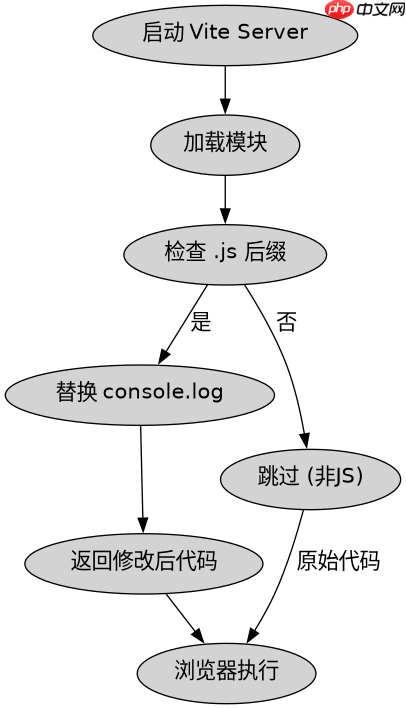
// vite.config.js
import { defineConfig } from 'vite';
import fs from 'fs';

function replaceConsole() {
  return {
    name: 'replace-console',
    transform(code, id) {
      if (!id.endsWith('.js')) return null;
      const replaced = code.replace(/console\.log/g, 'debug.log');
      return { code: replaced, map: null };
    }
  };
}

export default defineConfig({
  plugins: [replaceConsole()]
});
运行 npx vite 后,访问任何包含 console.log 的页面,浏览器控制台将显示 debug.log。这验证了插件在构建阶段成功拦截并修改了源代码。
立即学习“Java免费学习笔记(深入)”;

如何在插件中访问 Vite 内部配置
当插件需要根据 Vite 的环境模式(如 development 或 production)调整行为时,应使用 configResolved 钩子。这个钩子在配置合并完成后调用,提供了完整的最终配置对象。通过读取 config.mode,插件可以动态决定是启用调试日志还是压缩代码,从而适应不同的构建需求。

// vite.config.js
import { defineConfig } from 'vite';

function envAwarePlugin() {
  let isProd = false;
  return {
    name: 'env-aware',
    configResolved(config) {
      isProd = config.mode === 'production';
      console.log('Mode detected:', config.mode);
    },
    transform(code, id) {
      if (isProd && id.endsWith('.js')) {
        // 在生产模式下执行额外处理
        return { code: code.toUpperCase(), map: null };
      }
      return null;
    }
  };
}

export default defineConfig({
  plugins: [envAwarePlugin()]
});
分别运行 npx vite 和 npx vite build,观察控制台输出和最终产物。开发模式下代码保持原样,生产模式下代码被转换为大写,证明插件正确读取了环境状态并执行了差异化逻辑。
插件如何处理非 JS 文件类型
默认情况下,transform 钩子只针对 JavaScript 模块。若需处理 CSS 或其他静态资源,需在 transform 钩子中检查文件扩展名,或使用 load 钩子完全接管文件读取。例如,处理 .vue 或 .scss 文件时,必须明确判断 id 后缀,否则插件可能意外跳过或错误解析二进制数据。通过精确匹配路径正则,可确保插件仅作用于目标资源,避免干扰标准模块解析。


















