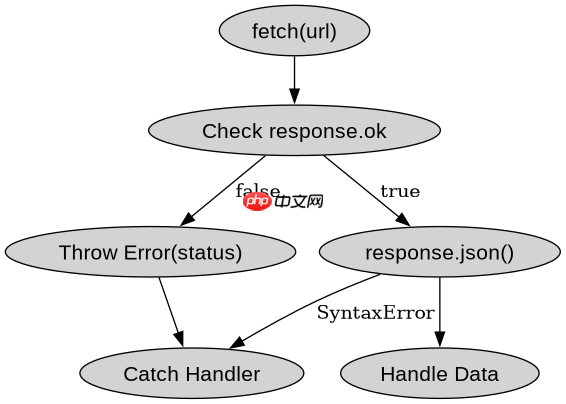
使用 fetch 发起请求时,必须通过链式调用 .catch() 来捕获网络错误,并在 .then() 中检查响应对象的 ok 属性以处理 http 状态码异常。如果 ok 为 false,应主动抛出错误对象以便进入 catch 分支统一处理。这样能确保无论是 dns 解析失败、服务器宕机还是返回 404/500 等状态码,都能被正确拦截并给出反馈。
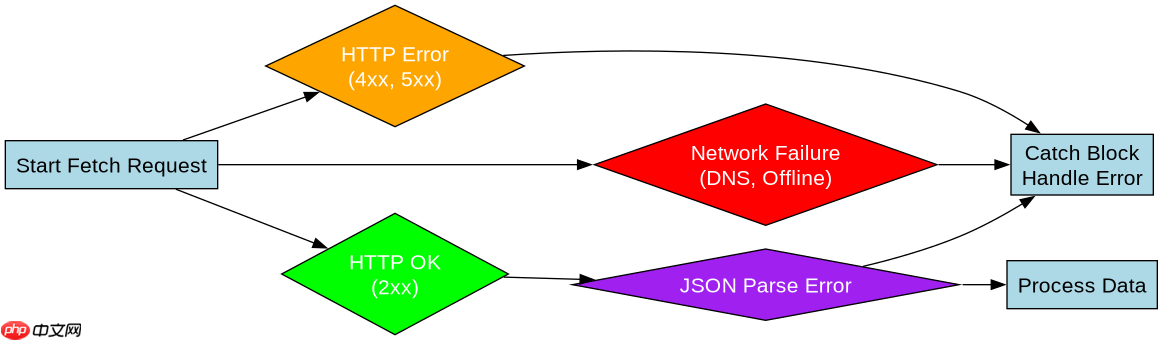
如何区分网络故障与 HTTP 错误状态
fetch 仅在发生网络级故障(如断网)时才会触发 reject,而服务器返回的 4xx 或 5xx 状态码会被视为成功响应进入 then 块。因此需要在 then 回调中判断 response.ok,若为假则抛出错误,从而将 HTTP 错误也引导至 catch 中进行统一处理。
const url = 'https://api.example.com/data';

fetch(url)
  .then(response => {
    if (!response.ok) {
      throw new Error(`HTTP error! status: ${response.status}`);
    }
    return response.json();
  })
  .then(data => console.log('Success:', data))
  .catch(error => console.error('Fetch failed:', error));
如何处理 JSON 解析失败的情况
当服务器返回了非 JSON 格式的内容(如 HTML 错误页)但状态码为 200 时,response.json() 会抛出语法错误。这种错误同样会被 catch 捕获,开发者可以在其中根据错误类型区分是数据格式问题还是其他网络问题,从而提供针对性的用户提示。

javascript-typescript-typescript-scaffold
下载
你是 TypeScript 项目架构专家,专注于脚手架搭建生产就绪的 Node.js 和前端应用。生成包含现代工具链(pnpm、Vite、Next.js)、类型
立即学习“Java免费学习笔记(深入)”;

const url = 'https://api.example.com/bad-json';

fetch(url)
  .then(response => {
    if (!response.ok) {
      throw new Error(`HTTP error! status: ${response.status}`);
    }
    return response.json();
  })
  .then(data => console.log('Success:', data))
  .catch(error => {
    if (error instanceof SyntaxError) {
      console.error('JSON parse error:', error.message);
    } else {
      console.error('Network or HTTP error:', error.message);
    }
  });
基于 response.ok 为 false 时的具体处理逻辑
当 response.ok 为 false 时,程序会执行 throw 语句,导致 Promise 链中断并跳转到 catch 块。此时 error 变量包含我们手动创建的 Error 实例,其消息中包含具体的 HTTP 状态码。开发者可以读取该状态码来决定是否重试、显示特定错误页面或记录日志。