








在alpine linux上安装manticore search,最直接的方法是使用官方提供的预编译二进制包。你需要先下载对应架构的压缩包,解压后通过命令行启动服务,或者将其配置为系统守护进程以便开机自启。

如何手动下载并启动Manticore服务
手动安装适合需要快速验证或临时使用的场景。你可以从GitHub Releases页面获取最新的静态编译版本,解压后即可直接运行可执行文件,无需依赖复杂的系统库。
#!/bin/bash
# 1. 创建目录并进入
mkdir -p /opt/manticore
cd /opt/manticore

# 2. 下载最新稳定版 (以x86_64为例)
# 请根据实际最新版本号替换 URL
wget https://github.com/manticoresoftware/manticore/releases/download/3.7.3/manticore-3.7.3-linux_x86_64.tar.gz

# 3. 解压
tar -xzf manticore-3.7.3-linux_x86_64.tar.gz

# 4. 初始化数据目录
./bin/indexer --all

# 5. 启动搜索守护进程
./bin/searchd
上述脚本执行后,`searchd` 将在后台运行,默认监听9306端口。你可以通过 `curl http://localhost:9306/status` 来检查服务状态。
如何将Manticore配置为Alpine系统服务
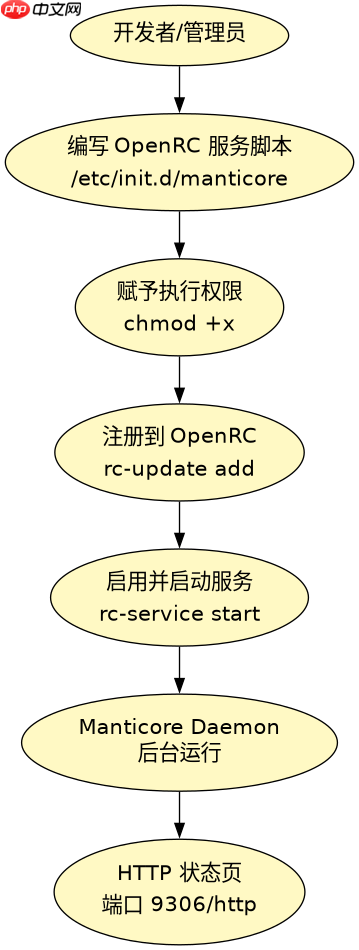
为了让Manticore在服务器重启后自动运行,建议将其配置为OpenRC服务。Alpine Linux使用OpenRC作为init系统,我们需要创建一个服务脚本来管理进程的启动和停止。

# 创建服务配置文件 /etc/init.d/manticore
cat > /etc/init.d/manticore << 'EOF'
#!/sbin/openrc-run

name="manticore"
description="Manticore Search Daemon"
command="/opt/manticore/bin/searchd"
command_args="-c /opt/manticore/etc/searchd.conf.xml"
pidfile="/run/${name}.pid"
extra_commands="reload"

depend() {
    need net
}

start_pre() {
    mkdir -p /run
    chown manticore:manticore /opt/manticore/data /opt/manticore/log 2>/dev/null || true
}

reload() {
    if [ -f $pidfile ]; then
        kill -HUP $(cat $pidfile)
    fi
}
EOF

# 赋予执行权限
chmod +x /etc/init.d/manticore

# 启用服务
rc-update add manticore default
rc-service manticore start
注意:在实际生产环境中,你需要先创建 `/opt/manticore/etc/searchd.conf.xml` 配置文件,并可能需要在Alpine中创建专用的 `manticore` 用户以确保安全。上述脚本假设你已经完成了基础的文件结构搭建。
Manticore默认配置文件searchd.conf.xml包含哪些核心参数
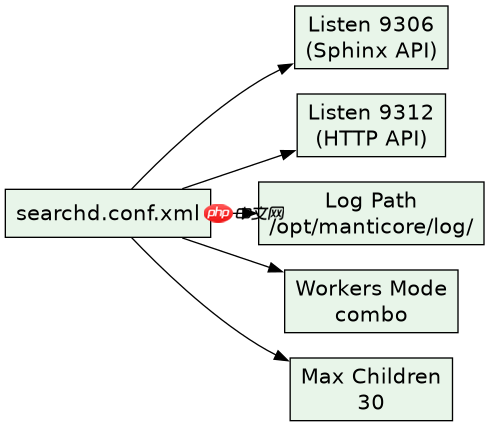
当你首次启动Manticore时,它需要一个配置文件来定义索引路径、监听端口和日志位置。默认的配置文件通常位于解压目录下的 `etc/searchd.conf.xml`。如果该文件不存在,Manticore会使用内置的默认值,但为了持久化和自定义,必须显式创建它。
<?xml version="1.0" ?>
<searchd>
    <listen>9306</listen>
    <listen>9312</listen>
    <listen>9306:http</listen>
    <log>/opt/manticore/log/searchd.log</log>
    <query_log>/opt/manticore/log/query.log</query_log>
    <pid_file>/run/searchd.pid</pid_file>
    <max_children>30</max_children>
    <workers>combo</workers>
    <status_http_enabled>1</status_http_enabled>
</searchd>
这个配置文件中,`listen` 标签定义了三个端口:9306用于Sphinx API(兼容旧客户端),9312用于新的HTTP API,9306:http允许通过浏览器访问状态页。`workers` 设置为 `combo` 表示使用混合工作模式,适合大多数通用场景。`max_children` 限制了同时处理查询的最大子进程数,防止资源耗尽。














