




本篇文章给大家分享的内容是关于面试:写一个vue的双向数据绑定 ,有着一定的参考价值,有需要的朋友可以参考一下
在目前的前端面试中,vue的双向数据绑定已经成为了一个非常容易考到的点,即时不能当场写出来,至少也要能说出原理。本篇文章中我将会仿照vue写一个双向数据绑定的实例,名字就叫myVue吧。结合注释,希望能让大家有所收获。(推荐:vue面试题2020)
1、原理
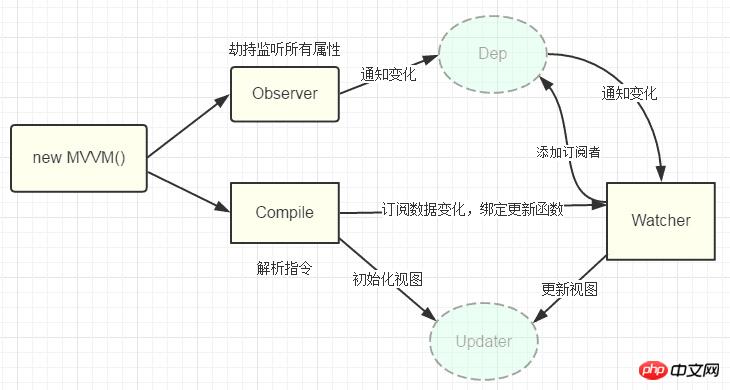
Vue的双向数据绑定的原理相信大家也都十分了解了,主要是通过 Object对象的defineProperty属性,重写data的set和get函数来实现的,这里对原理不做过多描述,只要还是来实现一个实例。为了使代码更加的清晰,这里只会实现最基本的内容,主要实现v-model,v-bind 和v-click三个命令,其他命令也可以自行补充。
添加网上的一张图
2、实现
页面结构很简单,如下
立即学习“前端免费学习笔记(深入)”;
<p id="app">
    <form>
      <input type="text"  v-model="number">
      <button type="button" v-click="increment">增加</button>
    </form>
    <h3 v-bind="number"></h3>
  </p>
包含:
 1. 一个input,使用v-model指令
 2. 一个button,使用v-click指令
 3. 一个h3,使用v-bind指令。
我们最后会通过类似于vue的方式来使用我们的双向数据绑定,结合我们的数据结构添加注释
var app = new myVue({
      el:'#app',
      data: {
        number: 0
      },
      methods: {
        increment: function() {
          this.number ++;
        },
      }
    })
首先我们需要定义一个myVue构造函数:
function myVue(options) {

}
为了初始化这个构造函数,给它添加一 个_init属性
function myVue(options) {
  this._init(options);
}
myVue.prototype._init = function (options) {
    this.$options = options;  // options 为上面使用时传入的结构体,包括el,data,methods
    this.$el = document.querySelector(options.el); // el是 #app, this.$el是id为app的Element元素
    this.$data = options.data; // this.$data = {number: 0}
    this.$methods = options.methods;  // this.$methods = {increment: function(){}}
  }
接下来实现_obverse函数,对data进行处理,重写data的set和get函数
并改造_init函数
 myVue.prototype._obverse = function (obj) { // obj = {number: 0}
    var value;
    for (key in obj) {  //遍历obj对象
      if (obj.hasOwnProperty(key)) {
        value = obj[key];
        if (typeof value === 'object') {  //如果值还是对象,则遍历处理
          this._obverse(value);
        }
        Object.defineProperty(this.$data, key, {  //关键
          enumerable: true,
          configurable: true,
          get: function () {
            console.log(`获取${value}`);
            return value;
          },
          set: function (newVal) {
            console.log(`更新${newVal}`);
            if (value !== newVal) {
              value = newVal;
            }
          }
        })
      }
    }
  }

 myVue.prototype._init = function (options) {
    this.$options = options;
    this.$el = document.querySelector(options.el);
    this.$data = options.data;
    this.$methods = options.methods;

    this._obverse(this.$data);
  }
接下来我们写一个指令类Watcher,用来绑定更新函数,实现对DOM元素的更新
function Watcher(name, el, vm, exp, attr) {
    this.name = name;         //指令名称,例如文本节点,该值设为"text"
    this.el = el;             //指令对应的DOM元素
    this.vm = vm;             //指令所属myVue实例
    this.exp = exp;           //指令对应的值,本例如"number"
    this.attr = attr;         //绑定的属性值,本例为"innerHTML"

    this.update();
  }

  Watcher.prototype.update = function () {
    this.el[this.attr] = this.vm.$data[this.exp]; //比如 H3.innerHTML = this.data.number; 当number改变时,
    会触发这个update函数,保证对应的DOM内容进行了更新。
  }
更新_init函数以及_obverse函数
myVue.prototype._init = function (options) {
    //...
    this._binding = {};   //_binding保存着model与view的映射关系,也就是我们前面定义的Watcher的实例。
    当model改变时,我们会触发其中的指令类更新,保证view也能实时更新
    //...
  }

  myVue.prototype._obverse = function (obj) {
    //...
      if (obj.hasOwnProperty(key)) {
        this._binding[key] = {    // 按照前面的数据,_binding = {number: _directives: []}
          _directives: []
        };
        //...
        var binding = this._binding[key];
        Object.defineProperty(this.$data, key, {
          //...
          set: function (newVal) {
            console.log(`更新${newVal}`);
            if (value !== newVal) {
              value = newVal;
              binding._directives.forEach(function (item) {  // 当number改变时,
              触发_binding[number]._directives 中的绑定的Watcher类的更新
                item.update();
              })
            }
          }
        })
      }
    }
  }
那么如何将view与model进行绑定呢?接下来我们定义一个_compile函数,用来解析我们的指令(v-bind,v-model,v-clickde)等,并在这个过程中对view与model进行绑定。
 myVue.prototype._init = function (options) {
   //...
    this._complie(this.$el);
  }

myVue.prototype._complie = function (root) { root 为 id为app的Element元素,也就是我们的根元素
    var _this = this;
    var nodes = root.children;
    for (var i = 0; i < nodes.length; i++) {
      var node = nodes[i];
      if (node.children.length) {  // 对所有元素进行遍历,并进行处理
        this._complie(node);
      }

      if (node.hasAttribute('v-click')) {  // 如果有v-click属性,我们监听它的onclick事件,触发increment事件,
      即number++
        node.onclick = (function () {
          var attrVal = nodes[i].getAttribute('v-click');
          return _this.$methods[attrVal].bind(_this.$data);
          //bind是使data的作用域与method函数的作用域保持一致
        })();
      }

      if (node.hasAttribute('v-model') && (node.tagName = 'INPUT' || node.tagName == 'TEXTAREA')) {
      // 如果有v-model属性,并且元素是INPUT或者TEXTAREA,我们监听它的input事件
        node.addEventListener('input', (function(key) {
          var attrVal = node.getAttribute('v-model');
           //_this._binding['number']._directives = [一个Watcher实例]
           // 其中Watcher.prototype.update = function () {
           //    node['vaule'] = _this.$data['number'];  这就将node的值保持与number一致
           // }
          _this._binding[attrVal]._directives.push(new Watcher(
            'input',
            node,
            _this,
            attrVal,
            'value'
          ))

          return function() {
            _this.$data[attrVal] =  nodes[key].value; // 使number 的值与 node的value保持一致,
            已经实现了双向绑定
          }
        })(i));
      }

      if (node.hasAttribute('v-bind')) { // 如果有v-bind属性,我们只要使node的值及时更新为data中number的值即可
        var attrVal = node.getAttribute('v-bind');
        _this._binding[attrVal]._directives.push(new Watcher(
          'text',
          node,
          _this,
          attrVal,
          'innerHTML'
        ))
      }
    }
  }
至此,我们已经实现了一个简单vue的双向绑定功能,包括v-bind, v-model, v-click三个指令。效果如下图

附上全部代码,不到150行
<!DOCTYPE html>
<head>
  <title>myVue</title>
</head>
<style>
  #app {
    text-align: center;
  }
</style>
<body>
  <p id="app">
    <form>
      <input type="text"  v-model="number">
      <button type="button" v-click="increment">增加</button>
    </form>
    <h3 v-bind="number"></h3>
  </p>
</body>

<script>
  function myVue(options) {
    this._init(options);
  }

  myVue.prototype._init = function (options) {
    this.$options = options;
    this.$el = document.querySelector(options.el);
    this.$data = options.data;
    this.$methods = options.methods;

    this._binding = {};
    this._obverse(this.$data);
    this._complie(this.$el);
  }

  myVue.prototype._obverse = function (obj) {
    var value;
    for (key in obj) {
      if (obj.hasOwnProperty(key)) {
        this._binding[key] = {
          _directives: []
        };
        value = obj[key];
        if (typeof value === 'object') {
          this._obverse(value);
        }
        var binding = this._binding[key];
        Object.defineProperty(this.$data, key, {
          enumerable: true,
          configurable: true,
          get: function () {
            console.log(`获取${value}`);
            return value;
          },
          set: function (newVal) {
            console.log(`更新${newVal}`);
            if (value !== newVal) {
              value = newVal;
              binding._directives.forEach(function (item) {
                item.update();
              })
            }
          }
        })
      }
    }
  }

  myVue.prototype._complie = function (root) {
    var _this = this;
    var nodes = root.children;
    for (var i = 0; i < nodes.length; i++) {
      var node = nodes[i];
      if (node.children.length) {
        this._complie(node);
      }

      if (node.hasAttribute('v-click')) {
        node.onclick = (function () {
          var attrVal = nodes[i].getAttribute('v-click');
          return _this.$methods[attrVal].bind(_this.$data);
        })();
      }

      if (node.hasAttribute('v-model') && (node.tagName =
      'INPUT' || node.tagName == 'TEXTAREA')) {
        node.addEventListener('input', (function(key) {
          var attrVal = node.getAttribute('v-model');
          _this._binding[attrVal]._directives.push(new Watcher(
            'input',
            node,
            _this,
            attrVal,
            'value'
          ))

          return function() {
            _this.$data[attrVal] =  nodes[key].value;
          }
        })(i));
      }

      if (node.hasAttribute('v-bind')) {
        var attrVal = node.getAttribute('v-bind');
        _this._binding[attrVal]._directives.push(new Watcher(
          'text',
          node,
          _this,
          attrVal,
          'innerHTML'
        ))
      }
    }
  }

  function Watcher(name, el, vm, exp, attr) {
    this.name = name;         //指令名称,例如文本节点,该值设为"text"
    this.el = el;             //指令对应的DOM元素
    this.vm = vm;             //指令所属myVue实例
    this.exp = exp;           //指令对应的值,本例如"number"
    this.attr = attr;         //绑定的属性值,本例为"innerHTML"

    this.update();
  }

  Watcher.prototype.update = function () {
    this.el[this.attr] = this.vm.$data[this.exp];
  }

  window.onload = function() {
    var app = new myVue({
      el:'#app',
      data: {
        number: 0
      },
      methods: {
        increment: function() {
          this.number ++;
        },
      }
    })
  }
</script>
相关推荐:













