


在这篇博文中,我们将指导您逐步将 faceio 的人脸身份验证合并到 next.js 应用程序中,从设置 faceio 帐户到在代码库中实现集成。
先决条件
在我们深入之前,请确保您已准备好以下内容:
node.js 和 npm:确保您的开发计算机上安装了 node.js 和 npm。您可以从 node.js 官方网站下载最新版本。
next.js:您需要设置一个 next.js 项目。如果没有,您可以创建一个新的:
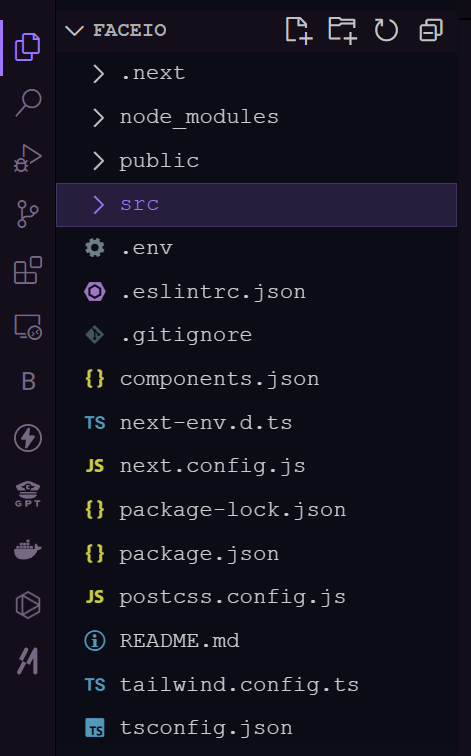
- faceio 帐户:在 faceio 控制台上注册 faceio 帐户。您将在此处创建 faceio 应用程序并获取必要的凭据。
设置 faceio 应用程序
1.创建新的 faceio 应用程序:登录到您的 faceio 控制台并单击“创建新应用程序”按钮。
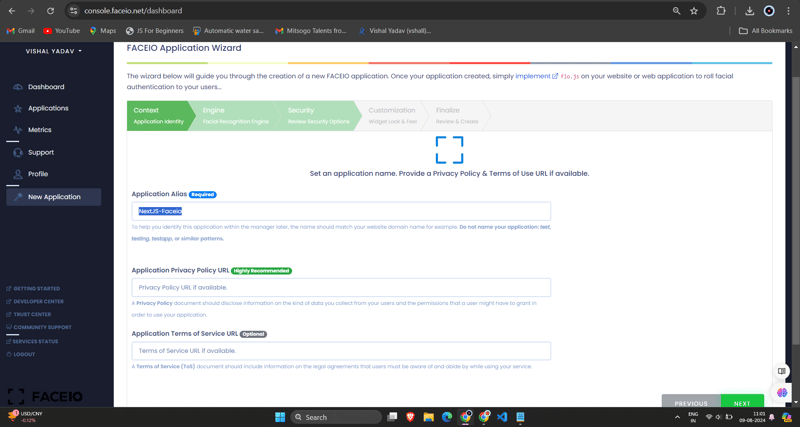
2.配置应用程序:填写所需信息,例如应用程序名称、描述和回调 url(这将是您的 next.js 应用程序的 url)。填写完表格后,点击“创建应用程序”。
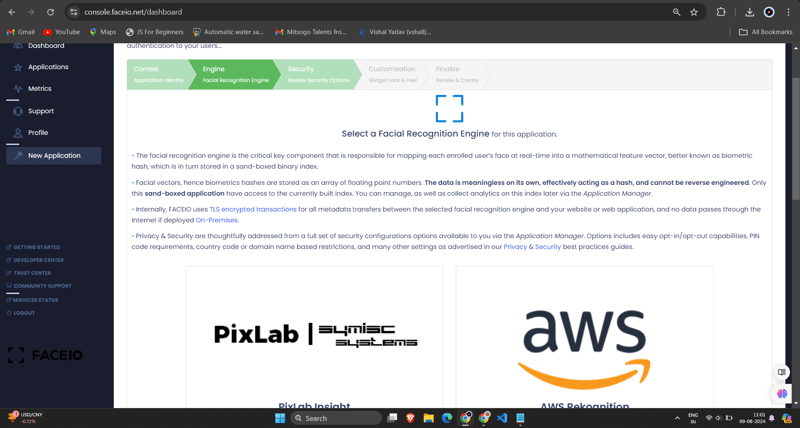
3.获取faceio_app_id:创建应用程序后,您将获得一个唯一的faceio_app_id。这是您将用于将 faceio 集成到 next.js 应用程序中的标识符。
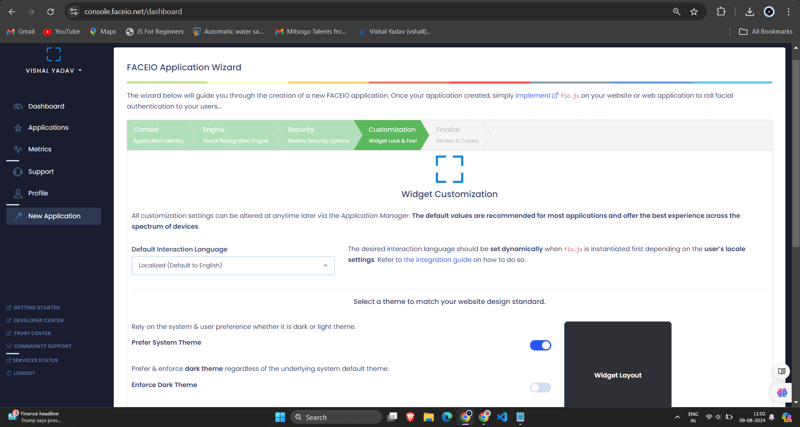
将 faceio 集成到您的 next.js 应用程序中
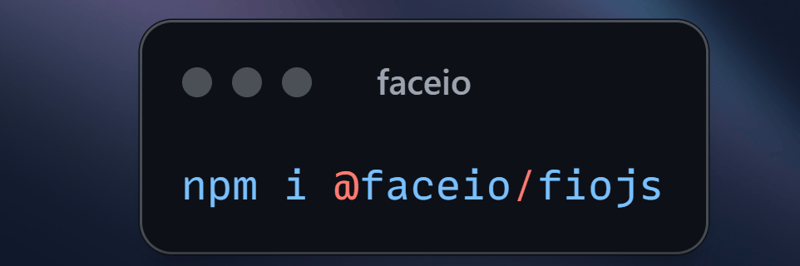
1.安装faceio npm包:在你的next.js项目中,使用npm或yarn安装faceio-npm包:
2.创建人脸验证组件:在您的 next.js 项目中,使用以下代码创建一个名为 components/dashboard.tsx (或您喜欢的任何其他名称)的新文件:
// dashboard.tsx
import react from "react";
import { card, cardheader, cardtitle, cardcontent } from "@/components/ui/card";
import { button } from "@/components/ui/button";
import { fausercircle, falock, facode, fachartbar, fasignoutalt } from 'react-icons/fa';

interface dashboardprops {
  useremail: string;
  onlogout: () => void;
}

const dashboard: react.fc<dashboardprops> = ({ useremail, onlogout }) => {
  return (
    <div classname="max-w-7xl mx-auto p-4 md:p-6 space-y-6">
      <card classname="w-full bg-black text-white">
        <cardheader classname="flex flex-col sm:flex-row items-start sm:items-center justify-between space-y-4 sm:space-y-0">
          <div>
            <cardtitle classname="text-2xl sm:text-3xl font-bold">welcome to faceio</cardtitle>
            <p classname="text-base sm:text-lg mt-2">email: {useremail}</p>
          </div>
          <button
            variant="secondary"
            size="sm"
            onclick={onlogout}
            classname="flex items-center w-full sm:w-auto justify-center mt-8"
          >
            <fasignoutalt classname="mr-2" /> logout
          </button>
        </cardheader>
        <cardcontent>
          <p classname="text-lg sm:text-xl mb-4">you have successfully logged in.</p>
        </cardcontent>
      </card>

      <h2 classname="text-xl sm:text-2xl font-bold text-center my-6">facial authentication for the web</h2>

      <div classname="grid grid-cols-1 sm:grid-cols-2 gap-4 sm:gap-6">
        <card>
          <cardheader>
            <cardtitle classname="flex items-center text-base sm:text-lg">
              <fausercircle classname="mr-2" /> secure & easy
            </cardtitle>
          </cardheader>
          <cardcontent>
            <p classname="text-sm sm:text-base">cross-browser, secure & easy to implement. passwordless authentication sdks powered by face recognition for web sites & apps.</p>
          </cardcontent>
        </card>

        <card>
          <cardheader>
            <cardtitle classname="flex items-center text-base sm:text-lg">
              <falock classname="mr-2" /> privacy-focused
            </cardtitle>
          </cardheader>
          <cardcontent>
            <p classname="text-sm sm:text-base">your facial data is encrypted and securely stored. we prioritize user privacy and data protection.</p>
          </cardcontent>
        </card>

        <card>
          <cardheader>
            <cardtitle classname="flex items-center text-base sm:text-lg">
              <facode classname="mr-2" /> developer-friendly
            </cardtitle>
          </cardheader>
          <cardcontent>
            <p classname="text-sm sm:text-base">easy integration with clear documentation. get started quickly and implement facial authentication in your projects.</p>
          </cardcontent>
        </card>

        <card>
          <cardheader>
            <cardtitle classname="flex items-center text-base sm:text-lg">
              <fachartbar classname="mr-2" /> analytics & insights
            </cardtitle>
          </cardheader>
          <cardcontent>
            <p classname="text-sm sm:text-base">gain valuable insights into user authentication patterns and improve your applications security.</p>
          </cardcontent>
        </card>
      </div>

      <div classname="flex flex-col sm:flex-row justify-center items-center space-y-4 sm:space-y-0 sm:space-x-4 mt-8">
        <button variant="default" size="lg" classname="w-full sm:w-auto">
          get started →
        </button>
        <button variant="outline" size="lg" classname="w-full sm:w-auto">
          integration guide →
        </button>
        <button variant="secondary" size="lg" classname="w-full sm:w-auto">
          faceio console →
        </button>
      </div>

      <card classname="mt-8 bg-gray-100">
        <cardcontent classname="text-center py-6">
          <p classname="text-base sm:text-lg font-semibold">ready to implement facial authentication in your project?</p>
          <p classname="mt-2 text-sm sm:text-base">check out our documentation and start securing your application today!</p>
        </cardcontent>
      </card>
    </div>
  );
};

export default dashboard;
3.将 dashboard.tsx 组件导入 login.tsx 组件:
/* eslint-disable react-hooks/exhaustive-deps */
"use client";
import {
  card,
  cardcontent,
  carddescription,
  cardfooter,
  cardheader,
  cardtitle,
} from "@/components/ui/card";
import { terminal } from "lucide-react";
import { mailicon, checkcircleicon } from "lucide-react";
import { alert, alertdescription, alerttitle } from "@/components/ui/alert";
import { input } from "@/components/ui/input";
import { label } from "@/components/ui/label";
import { button } from "./ui/button";
import faceio from "@faceio/fiojs";
import { useeffect, useref, usestate } from "react";
import link from "next/link";
import { toast } from "sonner";
import dashboard from "./dashboard";

type props = {};

const login: react.fc<props> = ({}) => {
  const faceioref = useref<faceio | null>(null);
  const [email, setemail] = usestate("");
  const [userlogin, setuserlogin] = usestate("");
  const [isloggedin, setisloggedin] = usestate(false);

  const publickey = process.env.next_public_faceio_public_id as string;

  const initialisefaceio = async () => {
    try {
      faceioref.current = new faceio(publickey);
      console.log("faceio initialized successfully");
    } catch (error) {
      console.log(error);
      handleerror(error);
    }
  };

  useeffect(() => {
    initialisefaceio();
  }, []);

  const handleregister = async () => {
    try {
      if (!faceioref.current) {
        console.error("faceio instance is not initialized");
        return;
      }

      await faceioref.current?.enroll({
        userconsent: false,
        locale: "auto",
        payload: { email: `${email}` },
      });
      toast.success("successfully registered user.");
    } catch (error) {
      handleerror(error);
      faceioref.current?.restartsession();
    }
  };

  const handlelogin = async () => {
    try {
      const authenticate = await faceioref.current?.authenticate();
      console.log("user authenticated successfully:", authenticate);
      setuserlogin(authenticate.payload.email);
      setisloggedin(true);
      toast.success("successfully logged in.");
    } catch (error) {
      console.log(error);
      handleerror(error);
    }
  };

  const handlelogout = () => {
    setisloggedin(false);
    setuserlogin("");
    toast.success("successfully logged out.");
  };

  function handleerror(errcode: any) {
    const fioerrs = faceioref.current?.fetchallerrorcodes()!;
    switch (errcode) {
      case fioerrs.permission_refused:
        toast.info("access to the camera stream was denied by the end user");
        break;
      case fioerrs.no_faces_detected:
        toast.info(
          "no faces were detected during the enroll or authentication process"
        );
        break;
      case fioerrs.unrecognized_face:
        toast.info("unrecognized face on this application's facial index");
        break;
      case fioerrs.many_faces:
        toast.info("two or more faces were detected during the scan process");
        break;
      case fioerrs.face_duplication:
        toast.info(
          "user enrolled previously (facial features already recorded). cannot enroll again!"
        );
        break;
      case fioerrs.minors_not_allowed:
        toast.info("minors are not allowed to enroll on this application!");
        break;
      case fioerrs.pad_attack:
        toast.info(
          "presentation (spoof) attack (pad) detected during the scan process"
        );
        break;
      case fioerrs.face_mismatch:
        toast.info(
          "calculated facial vectors of the user being enrolled do not matches"
        );
        break;
      case fioerrs.wrong_pin_code:
        toast.info("wrong pin code supplied by the user being authenticated");
        break;
      case fioerrs.processing_err:
        toast.info("server side error");
        break;
      case fioerrs.unauthorized:
        toast.info(
          "your application is not allowed to perform the requested operation (eg. invalid id, blocked, paused, etc.). refer to the faceio console for additional information"
        );
        break;
      case fioerrs.terms_not_accepted:
        toast.info(
          "terms & conditions set out by faceio/host application rejected by the end user"
        );
        break;
      case fioerrs.ui_not_ready:
        toast.info(
          "the faceio widget could not be (or is being) injected onto the client dom"
        );
        break;
      case fioerrs.session_expired:
        toast.info(
          "client session expired. the first promise was already fulfilled but the host application failed to act accordingly"
        );
        break;
      case fioerrs.timeout:
        toast.info(
          "ongoing operation timed out (eg, camera access permission, tos accept delay, face not yet detected, server reply, etc.)"
        );
        break;
      case fioerrs.too_many_requests:
        toast.info(
          "widget instantiation requests exceeded for freemium applications. does not apply for upgraded applications"
        );
        break;
      case fioerrs.empty_origin:
        toast.info("origin or referer http request header is empty or missing");
        break;
      case fioerrs.forbiddden_origin:
        toast.info("domain origin is forbidden from instantiating fio.js");
        break;
      case fioerrs.forbiddden_country:
        toast.info(
          "country iso-3166-1 code is forbidden from instantiating fio.js"
        );
        break;
      case fioerrs.session_in_progress:
        toast.info(
          "another authentication or enrollment session is in progress"
        );
        break;
      case fioerrs.network_io:
      default:
        toast.info(
          "error while establishing network connection with the target faceio processing node"
        );
        break;
    }
  }

  if (isloggedin) {
    return <dashboard useremail={userlogin} onlogout={handlelogout} />;
  }

  return (
    <div classname="min-h-screen bg-gradient-to-r from-cyan-500 to-blue-500 flex items-center justify-center p-4 w-full">
      <card classname="w-[400px] bg-white shadow-xl rounded-xl overflow-hidden">
        <cardheader classname="bg-gray-50 border-b p-6">
          <cardtitle classname="text-2xl font-bold text-gray-800">
            secure workspace
          </cardtitle>
          <carddescription classname="text-sm text-gray-600">
            authenticate to access your personalized work environment
          </carddescription>
        </cardheader>
        <cardcontent classname="p-6 space-y-4">
          <div classname="space-y-2">
            <label
              htmlfor="email"
              classname="text-sm font-medium text-gray-700"
            >
              work email
            </label>
            <input
              id="email"
              type="email"
              placeholder="you@company.com"
              classname="w-full px-3 py-2 border rounded-md"
              onchange={(e) => setemail(e.target.value)}
            />
          </div>
          <div classname="space-y-4">
            <button
              classname="w-full bg-blue-600 hover:bg-blue-700 text-white font-medium py-2 rounded-md transition duration-300 ease-in-out"
              onclick={handlelogin}
            >
              access workspace
            </button>
            <button
              classname="w-full bg-gray-100 hover:bg-gray-200 text-gray-800 font-medium py-2 rounded-md transition duration-300 ease-in-out"
              onclick={handleregister}
              disabled={!email.includes("@")}
            >
              register new account
            </button>
          </div>
        </cardcontent>
        <cardfooter classname="bg-gray-50 border-t p-4">
          <div classname="w-full text-center text-xs text-gray-500">
            protected by faceio™ technology.
            <link
              href="https://faceio.net/security-policy"
              classname="text-blue-600 hover:underline ml-1"
            >
              learn about our security measures
            </link>
          </div>
        </cardfooter>
      </card>

      {userlogin && !isloggedin && (
        <div classname="fixed bottom-4 right-4 bg-green-100 border-l-4 border-green-500 text-green-700 p-4 rounded-md shadow-lg">
          <div classname="flex">
            <div classname="flex-shrink-0">
              <checkcircleicon classname="h-5 w-5 text-green-500" />
            </div>
            <div classname="ml-3">
              <p classname="text-sm font-medium">workspace access granted</p>
              <p classname="text-xs mt-1">logged in as: {userlogin}</p>
            </div>
          </div>
        </div>
      )}
    </div>
  );
};

export default login;
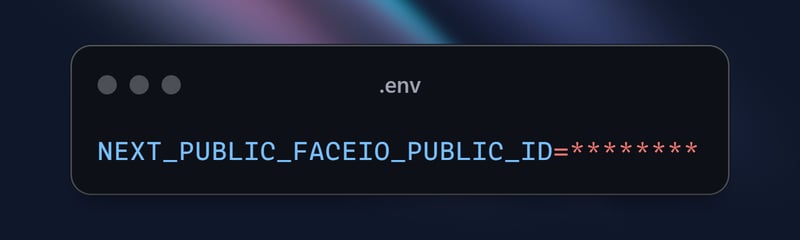
记得将 'next_public_faceio_public_id' 替换为您从 faceio 控制台获取的实际 faceio_app_id。
- 将人脸验证组件集成到您的 next.js 页面中:在 next.js 应用程序的主页(例如 app/page.tsx)中,导入 home 组件并渲染它:
import { buttonVariants } from "@/components/ui/button";
import { cn } from "@/lib/utils";
import Link from "next/link";
import { FaUserShield, FaImage, FaCode, FaRobot } from 'react-icons/fa';

export default function Home() {
  const demos = [
    { title: "FACIO Web Authentication", href: "/faceio", icon: FaUserShield },
    { title: "Image Processing", href: "/imageprocessing", icon: FaImage },
    { title: "Code Generation", href: "/codegeneration", icon: FaCode },
    { title: "AI Assistant", href: "/aiassistant", icon: FaRobot },
  ];

  return (
    <div className="max-h-screen  bg-gradient-to-br from-purple-700 via-blue-600 to-teal-500 text-white p-8 w-full">
      <div className="max-w-6xl mx-auto">
        <h1 className="text-5xl md:text-7xl font-bold text-center mb-8 animate-fade-in-down">
          PixLab Faceio
        </h1>
        <p className="text-xl text-center mb-12 animate-fade-in-up">
          Explore cutting-edge technologies and innovative solutions
        </p>

        <div className="grid grid-cols-1 md:grid-cols-2 gap-8">
          {demos.map((demo, index) => (
            <Link
              key={demo.href}
              href={demo.href}
              className={cn(
                buttonVariants({ variant: "outline" }),
                "h-40 text-lg font-semibold flex flex-col items-center justify-center space-y-4 bg-white bg-opacity-10 backdrop-filter backdrop-blur-lg rounded-xl hover:bg-opacity-20 transition-all duration-300 animate-fade-in",
                { 'animate-delay-100': index % 2 === 1 }
              )}
            >
              <demo.icon className="text-4xl" />
              {demo.title}
            </Link>
          ))}
        </div>

        <div className="mt-16 text-center animate-fade-in-up animate-delay-300">
          <h2 className="text-3xl font-bold mb-4">Why Choose PixLab?</h2>
          <ul className="text-lg space-y-2">
            <li>✨ Cutting-edge technologies</li>
            <li>? High-performance solutions</li>
            <li>? Advanced security features</li>
            <li>? Seamless integrations</li>
          </ul>
        </div>

        <footer className="mt-16 text-center text-sm opacity-75 animate-fade-in-up animate-delay-500">
          © 2024 PixLab. All rights reserved. Empowering innovation through technology.
        </footer>
      </div>
    </div>
  );
}
就是这样!您现在已将 faceio 的人脸身份验证集成到您的 next.js 应用程序中。当用户点击“面部验证”按钮时,faceio 小部件将会出现,指导他们完成身份验证过程。
捕获正在运行的 faceio 小部件 - 注册
为了演示 faceio 小部件的功能,让我们捕获注册过程的 gif:


此 gif 展示了 next.js 应用程序中 faceio 人脸注册过程的用户体验。用户可以轻松注册自己的脸部,用于以后登录时的无缝身份验证。
捕获正在运行的 faceio 小部件
为了演示 faceio 小部件的功能,让我们捕获身份验证过程的 gif:
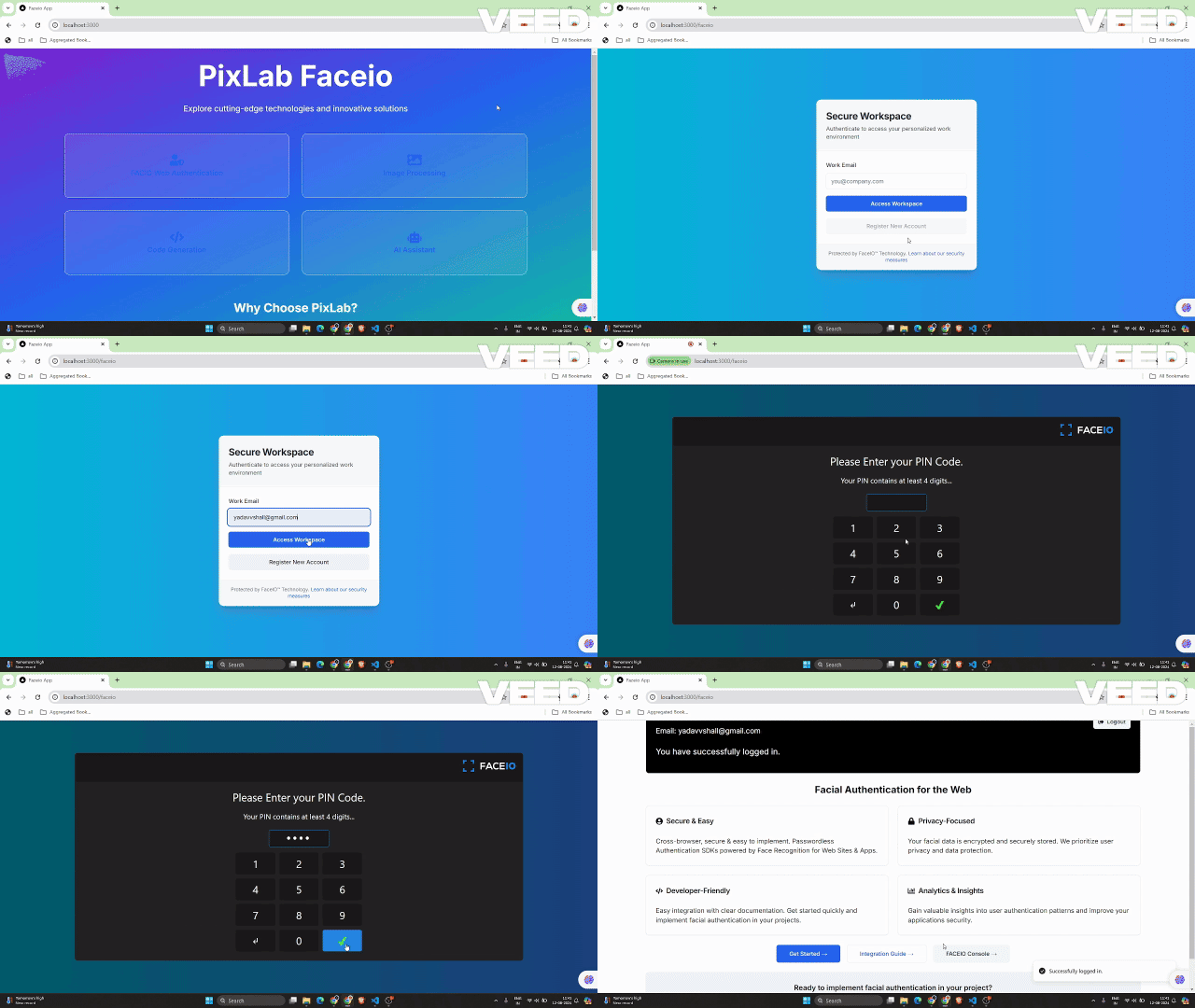
此 gif 展示了 next.js 应用程序中 faceio 人脸身份验证过程的用户体验。
faceio 应用程序的关键安全最佳实践
消除重复注册:启用设置以阻止同一用户多次注册,避免潜在的冲突或误用。
加强反欺骗措施:激活检测和阻止人脸欺骗尝试的功能,确保系统仅与真实的用户交互。
保证 pin 唯一性:确保每个用户的 pin 在应用程序内是唯一的,以防止未经授权的访问。
实施地理限制:将 faceio 小部件的实例化限制为授权域名和国家/地区,以增加安全控制。
在 next.js 应用程序中使用 faceio 的好处
将 faceio 集成到您的 next.js 应用程序中具有以下几个好处:
改进的用户体验:faceio 小部件提供无缝且直观的身份验证流程,使用户可以轻松登录您的应用程序。
跨平台兼容性:faceio 可跨各种设备和浏览器工作,确保一致的用户体验。
轻松集成:faceio-npm 包简化了集成过程,让您可以快速将人脸身份验证添加到 next.js 应用程序中。
faceio社区论坛:您可以从faceio社区获得问题帮助。
结论
在这篇博文中,您学习了如何将 faceio 的人脸身份验证服务集成到您的 next.js 应用程序中。通过执行此处概述的步骤,您现在可以为用户提供安全且用户友好的身份验证体验,从而提高 web 应用程序的整体质量。
如果您还有任何其他问题或需要其他帮助,请随时联系 faceio 支持团队或浏览全面的 faceio 文档。
快乐编码!
有关此实现的完整源代码,您可以访问 github 存储库并详细探索该项目。













