手写springboot
在日常开发中只需要引入下面的依赖就可以开发servlet进行访问了。
<dependency>
	<groupId>org.springframework.boot</groupId>
	<artifactId>spring-boot-starter-web</artifactId>
</dependency>
那这是怎么做到的呢?今天就来一探究竟
首先新建一个maven项目rick-spring-boot,并创建两个子项目分别是spring-boot和user,其中spring-boot项目就是模拟手写一个简单springboot,user就是用来测试手写的spring-boot的。
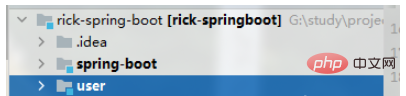
user项目-测试工程
user项目包含pom.xml、UserController和UserService
<dependencies>
    <dependency>
      <groupId>com.rick.spring.boot</groupId>
      <artifactId>spring-boot</artifactId>
      <version>1.0-SNAPSHOT</version>
    </dependency>
  </dependencies>
@RestController
public class UserController {
@Autowired
private UserService userService;
@GetMapping("/user")
public String getUser() {
return userService.getUser();
}
}
@Service
public class UserService {
public String getUser() {
return "rick";
}
}以及user项目的启动类RickApplication,而RickSpringApplication.run()是需要手写的启动类以及@RickSpringBootApplication注解,都是需要在spring-boot项目实现。
import com.rick.spring.boot.RickSpringApplication;
import com.rick.spring.boot.RickSpringBootApplication;
@RickSpringBootApplication
public class RickApplication {
    public static void main(String[] args) {
        RickSpringApplication.run(RickApplication.class);
    }
}
Springboot项目
首先来看RickSpringApplication.run(RickApplication.class)方法需要做的事情:
(1)创建spring容器,并将传入的class注册到spring容器中
(2)启动web服务,如tomcat,用来处理请求,并通过DispatchServlet将请求分发到Servlet进行处理。
public class RickSpringApplication {
    public static void run(Class clz) {
        AnnotationConfigWebApplicationContext context = new AnnotationConfigWebApplicationContext();
        context.register(clz);
        context.refresh();
        start(context);
    }
    public static void start(WebApplicationContext applicationContext) {
        System.out.println("start tomcat");
        Tomcat tomcat = new Tomcat();
        Server server = tomcat.getServer();
        Service service = server.findService("Tomcat");
        Connector connector = new Connector();
        connector.setPort(8081);
        Engine engine = new StandardEngine();
        engine.setDefaultHost("localhost");
        Host host = new StandardHost();
        host.setName("localhost");
        String contextPath = "";
        Context context = new StandardContext();
        context.setPath(contextPath);
        context.addLifecycleListener(new Tomcat.FixContextListener());
        host.addChild(context);
        engine.addChild(host);
        service.setContainer(engine);
        service.addConnector(connector);
        tomcat.addServlet(contextPath, "dispatcher", new DispatcherServlet(applicationContext));
        context.addServletMappingDecoded("/*", "dispatcher");
        try {
            tomcat.start();
        } catch (LifecycleException e) {
            e.printStackTrace();
        }
    }
}
RickApplication是被@RickSpringBootApplication注解修饰的,从如下代码可以看出RickApplication是配置类,在被注册到spring容器后,spring就会解析这个类。
@Retention(RetentionPolicy.RUNTIME)
@Target(ElementType.TYPE)
@Configuration
@ComponentScan
public @interface RickSpringBootApplication {
}
启动user项目RickApplication的main方法,

访问UserController

将 Spring Boot 2.7 项目升级到 Spring Boot 3.5 的实战流程,覆盖版本基线、依赖坐标替换、Jakarta 迁移、配置兼容、异步上下文传递改造与验证门禁。用于企业多模块 Maven 项目升级与排障。
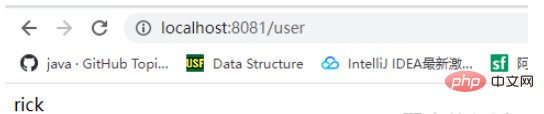
至此一个简单的spring-boot项目就整合完成了。
自动配置
实现tomcat和jetty的切换
在使用springboot时,如果我们不想使用tomcat作为请求处理服务,而是jetty或者其他的web服务,通常只需要将相关的tomcat依赖进行排除,然后引入jetty的依赖就可以了,这就是springboot的自动装配的机制。接下来看看是如何实现的
定义一个WebServer接口和两个实现类(tomcat和jetty),并写好启动tomcat和jetty服务的代码
public interface WebServer {
    void start();
}
public class JettyServer implements WebServer{
    @Override
    public void start() {
        System.out.println("start jetty");
    }
}
public class TomcatServer implements WebServer, ApplicationContextAware {
private WebApplicationContext applicationContext;
@Override
public void setApplicationContext(ApplicationContext applicationContext) throws BeansException {
this.applicationContext = (WebApplicationContext) applicationContext;
}
@Override
public void start() {
System.out.println("start tomcat");
...
tomcat.addServlet(contextPath, "dispatcher", new DispatcherServlet(applicationContext));
context.addServletMappingDecoded("/*", "dispatcher");
try {
tomcat.start();
} catch (LifecycleException e) {
e.printStackTrace();
}
}
}定义AutoConfiguration接口,用来标识需要自动装配的类。再定义一个WebServerAutoConfiguration类,它被表示为spring的一个配置类,最终我们需要导入这个类由spring来解析它,随后spring会解析@Bean注解的方法来加载Bean。注意这里下面两个方法还定义了@RickConditionalOnClass注解来决定是否需要解析这个bean,如果满足条件则进行解析,即应用内存在Tomcat或者Server的Class,会解析对应方法的Bean,
public interface AutoConfiguration {
}
@Configuration
public class WebServerAutoConfiguration implements AutoConfiguration {
    @Bean
    @RickConditionalOnClass("org.apache.catalina.startup.Tomcat")
    public TomcatServer tomcatServer() {
        return new TomcatServer();
    }
    @Bean
    @RickConditionalOnClass("org.eclipse.jetty.server.Server")
    public JettyServer jettyWebServer() {
        return new JettyServer();
    }
}
来看@RickConditionalOnClass注解:当spring解析被@RickConditionalOnClass注解的方法时,spring就知道它被@Conditional修饰,并会在解析时执行RickOnClassConditional的match()方法,来判断是否满足加载bean的条件。match()会尝试加载传入的类路径名,如果应用内引入相关的jar则会加载成功返回true,反之,返回false。
@Retention(RetentionPolicy.RUNTIME)
@Target(ElementType.METHOD)
@Conditional(RickOnClassConditional.class)
public @interface RickConditionalOnClass {
    String value();
}
public class RickOnClassConditional implements Condition {
    @Override
    public boolean matches(ConditionContext context, AnnotatedTypeMetadata metadata) {
        Map<String, Object> annotation = metadata.getAnnotationAttributes(RickConditionalOnClass.class.getName());
        try {
            context.getClassLoader().loadClass((String) annotation.get("value"));
        } catch (ClassNotFoundException e) {
            return false;
        }
        return true;
    }
}
引入WebServerAutoConfiguration,最简单粗暴的方式就是通过@Import(WebServerAutoConfiguration.class)导入该类。但是spring-boot不可能这么做,成千上百的自动配置写在代码里肯定不好。spring通过SPI机制,在resources目录下创建如下目录和文件

定义一个类实现DeferredImportSelector接口,并实现selectImports(),通过JDK的ServiceLoader加载以上文件中的类。通过@Import(WebServerImportSelector.class)注解导入该类spring在解析配置类的时候就会执行selectImports(),从而将WebServerAutoConfiguration导入到spring容器中,spring就会解析这个配置类。
public class WebServerImportSelector implements DeferredImportSelector {
    @Override
    public String[] selectImports(AnnotationMetadata metadata) {
        ServiceLoader<AutoConfiguration> load = ServiceLoader.load(AutoConfiguration.class);
        List<String> list = new ArrayList<>();
        for (AutoConfiguration loader : load) {
            list.add(loader.getClass().getName());
        }
        return list.toArray(new String[list.size()]);
    }
}
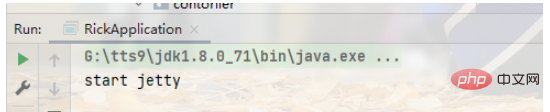
至此,springboot就做到了只需要修改user工程的maven依赖就能切换tomcat和jetty服务了
<dependency>
      <groupId>com.rick.spring.boot</groupId>
      <artifactId>spring-boot</artifactId>
      <version>1.0-SNAPSHOT</version>
      <exclusions>
        <exclusion>
          <groupId>org.apache.tomcat.embed</groupId>
          <artifactId>tomcat-embed-core</artifactId>
        </exclusion>
      </exclusions>
    </dependency>
    <dependency>
      <groupId>org.eclipse.jetty</groupId>
      <artifactId>jetty-server</artifactId>
      <version>9.4.43.v20210629</version>
    </dependency>
重启user项目