
centos 7 编译安装 php-7.2.11的步骤
在官网下载php-7.2.11的php压缩包,centos 7 安装 php-7.2.11的步骤,http://cn2.php.net/distributions/php-7.2.11.tar.gz
cd /usr/local/src
wget -c http://cn2.php.net/distributions/php-7.2.11.tar.gz
下载好后解压 php-7.2.11.tar.gz 压缩包,并进入解压后的目录
tar -xzvf php-7.2.11.tar.gz
cd php-7.2.11
安装php7需要的一些依赖库包 libxml2和一些其他依赖的扩展库
推荐(免费):PHP7
立即学习“PHP免费学习笔记(深入)”;
yum -y install libxml2
yum -y install libxml2-devel
yum -y install openssl
yum -y install openssl-devel
yum -y install curl-devel
yum -y install libjpeg-devel
yum -y install libpng-devel
yum -y install freetype-devel
yum -y install bzip2-devel
yum -y install libmcrypt libmcrypt-devel
yum -y install postgresql-devel
yum -y install aspell-devel
yum -y install readline-devel
yum -y install libxslt-devel
yum -y install net-snmp-devel
yum -y install unixODBC-devel
yum -y install libicu-devel
yum -y install libc-client-devel
yum -y install libXpm-devel
yum -y install libvpx-devel
yum -y install enchant-devel
yum -y install openldap
yum -y install openldap-devel
yum -y install db4-devel
yum -y install gmp-devel
yum -y install sqlite-devel
yum -y install mysql-devel
yum install oniguruma-devel -y
安装前的环境配置检查,php7的一些依赖包的检查和php扩展的启动,这个过程如果缺少php依赖的库包会有报错提示。
添加用户和组: (此处用户和组为 nginx, 我 nginx 用的用户名 ) groupadd -r nginx && useradd -r -g nginx -s /sbin/nologin
php 安装配置
请根据以下 A B C 选择合适的一项进行安装配置
A. PHP 7.2.10 单选模式
./configure --prefix=/usr/local/php --with-config-file-path=/usr/local/php/etc --enable-fpm --with-fpm-user=nginx --with-fpm-group=nginx --enable-inline-optimization --disable-debug --disable-rpath --enable-shared --enable-soap --with-xmlrpc --with-openssl --with-mcrypt --with-pcre-regex --with-sqlite3 --with-zlib --enable-bcmath --with-iconv --with-bz2 --enable-calendar --with-curl --with-cdb --enable-dom --enable-exif --enable-fileinfo --enable-filter --with-pcre-dir --enable-ftp --with-gd --with-openssl-dir --with-jpeg-dir --with-png-dir --with-freetype-dir --enable-gd-native-ttf --enable-gd-jis-conv --with-gettext --with-gmp --with-mhash --enable-json --enable-mbstring --enable-mbregex --enable-mbregex-backtrack --with-libmbfl --with-onig --enable-pdo --with-mysqli=mysqlnd --with-pdo-mysql=mysqlnd --with-zlib-dir --with-pdo-sqlite --with-readline --enable-session --enable-shmop --enable-simplexml --enable-sockets --enable-sysvmsg --enable-sysvsem --enable-sysvshm --enable-wddx --with-libxml-dir --with-xsl --enable-zip --enable-mysqlnd-compression-support --with-pear --enable-opcache
B. PHP 7.2.10 多行模式
./configure \
--prefix=/usr/local/php \
--with-config-file-path=/usr/local/php/etc \
--enable-fpm \
--with-fpm-user=nginx \
--with-fpm-group=nginx \
--enable-inline-optimization \
--disable-debug \
--disable-rpath \
--enable-shared \
--enable-soap \
--with-xmlrpc \
--with-openssl \
--with-mcrypt \
--with-pcre-regex \
--with-sqlite3 \
--with-zlib \
--enable-bcmath \
--with-iconv \
--with-bz2 \
--enable-calendar \
--with-curl \
--with-cdb \
--enable-dom \
--enable-exif \
--enable-fileinfo \
--enable-filter \
--with-pcre-dir \
--enable-ftp \
--with-gd \
--with-openssl-dir \
--with-jpeg-dir \
--with-png-dir \
--with-freetype-dir \
--enable-gd-native-ttf \
--enable-gd-jis-conv \
--with-gettext \
--with-gmp \
--with-mhash \
--enable-json \
--enable-mbstring \
--enable-mbregex \
--enable-mbregex-backtrack \
--with-libmbfl \
--with-onig \
--enable-pdo \
--with-mysqli=mysqlnd \
--with-pdo-mysql=mysqlnd \
--with-zlib-dir \
--with-pdo-sqlite \
--with-readline \
--enable-session \
--enable-shmop \
--enable-simplexml \
--enable-sockets \
--enable-sysvmsg \
--enable-sysvsem \
--enable-sysvshm \
--enable-wddx \
--with-libxml-dir \
--with-xsl \
--enable-zip \
--enable-mysqlnd-compression-support \
--with-pear \
--enable-opcache
C. PHP 7.4.10
./configure \
--prefix=/usr/local/php \
--with-config-file-path=/usr/local/php/etc \
--enable-fpm \
--with-fpm-user=nginx \
--with-fpm-group=nginx \
--enable-inline-optimization \
--disable-debug \
--disable-rpath \
--enable-shared \
--enable-soap \
--with-xmlrpc \
--with-openssl \
--with-mcrypt \
--with-pcre-regex \
--with-sqlite3 \
--with-zlib \
--enable-bcmath \
--with-iconv \
--with-kerberos \
--with-libdir=lib64 \
--with-bz2 \
--enable-calendar \
--with-curl \
--with-cdb \
--enable-dom \
--enable-exif \
--enable-fileinfo \
--enable-filter \
--with-pcre-dir \
--enable-ftp \
--enable-gd \
--with-openssl-dir \
--with-jpeg-dir \
--with-png-dir \
--with-freetype-dir \
--enable-gd-native-ttf \
--enable-gd-jis-conv \
--with-gettext \
--with-gmp \
--with-mhash \
--enable-json \
--enable-mbstring \
--enable-mbregex \
--enable-mbregex-backtrack \
--with-libmbfl \
--with-onig \
--enable-pdo \
--with-mysqli=mysqlnd \
--with-pdo-mysql=mysqlnd \
--with-zlib-dir \
--with-pdo-sqlite \
--with-readline \
--enable-session \
--enable-shmop \
--enable-simplexml \
--enable-sockets \
--enable-sysvmsg \
--enable-sysvsem \
--enable-sysvshm \
--enable-wddx \
--with-libxml-dir \
--with-xsl \
--with-zip \
--enable-xml \
--enable-mysqlnd-compression-support \
--with-pear \
--enable-opcache \
--enable-pcntl
从 PHP 7.4.0 开始,必须在编译 PHP 时用 --with-zip 配置选项来提供 zip 支持。之前的 PHP 版本,需要使用 --enable-zip 选项。
对php7进行编译和安装的操作
make && make install
( 如果出现 make: *** [sapi/cli/php] Error 1 的错误,通过继续执行 make ZEND_EXTRA_LIBS='-liconv' 命令解决
编译成功,查看php版本
/usr/local/php/bin/php -v
运行php-fpm
/usr/local/php/sbin/php-fpm
启动php-fpm可能会遇到的错误,基本都是配置文件配置和重命名的问题:
错误一:缺少www.conf配置文件(WARNING: Nothing matches the include pattern /usr/local/php/etc/php-fpm.d/*.conf),需要把/usr/local/php/etc/php-fpm.d/*.conf目录中的www.conf.default重命名为www.conf。
错误二:缺少php-fpm.conf配置文件 需要在/usr/local/php/etc/php-fpm.conf 把默认的配置文件php-fpm.conf.default改成php-fpm.conf
错误三:缺少php.ini配置文件 php7编译安装好后会发现没有php.ini配置文件,需要在解压包的根目录中复制php.ini-production或php.ini-development并重命名为php.ini到php编译好的安装目录中的/usr/local/php/etc文件夹即可。
其它错误的解决:
error: Package requirements (sqlite3 > 3.7.4) were not metyum install libsqlite3x-devel -yerror: Package requirements (oniguruma) were not met
yum install oniguruma-devel -y当yum install 提示 "没可用软件包"
yum install -y epel-releaseoff_t undefined 报错
configure: error: off_t undefined; check your library configuration
configure: WARNING: unrecognized options: --with-mcrypt, --enable-gd-native-ttf
php7.2以后不支持–with-mcrypt, --enable-gd-native-ttf 这两个参数,需要去掉
 CentOS Linux 7.9.2009下载
CentOS Linux 7.9.2009是传统CentOS Linux 7的最后主要版本,也是很多企业历史服务器中仍可能遇到的系统版本。它以稳定、兼容RHEL 7生态、文档丰富和软件支持广泛著称,曾长期用于Web服务、数据库、虚拟化节点和企业内部业务系统。不过CentOS Linux 7已于2024年6月30日停止维护,现在继续使用会面临安全补丁缺失风险。该版本更适合旧业务迁移、历史环境恢复或离
在centos7中编译安装好php后,系统重启后并不会对php进行开机启动,所以需要对centos7添加开机启动脚本对php进行开机启动服务。
php7编译安装方法:http://zixuephp.net/article-207.html
手动启动:
- /usr/local/php/sbin/php-fpm
开机自动启动:
开启配置php-fpm pid
- #找到php-fpm.conf配置文件
- /usr/local/php/etc/php-fpm.conf
- #开启pid ,去掉分号注释
- pid = run/php-fpm.pid
安装后要进行的操作:
1. 把安装目录下的 php.ini-development 复制到 /etc/ 目录下
2. 修改 /usr/local/php/etc/php-fpm.conf.default 名为 php-fpm.conf 并进入修改
3. 修改 /usr/local/php/etc/php-fpm.d/www.conf.default 为 www.conf 并进入修改
PHP 7.4.10 安装 ZIP
1 扩展包    wget https://pecl.php.net/get/zip-1.19.0.tgz
2 解压 并进入    tar -zxvf zip-1.19.0.tgz      2.2   cd  zip-1.19.0
3 /usr/local/php/bin/phpize
4 ./configure --with-php-config=/usr/local/php/bin/php-config   自己的php目录
5 make && make install

---------------------
然后下载最新的,解压

wget https://libzip.org/download/libzip-1.5.2.tar.gz
tar -zxvf libzip-1.5.2.tar.gz

这时发现还要安装cmake,再去下载cmake:
wget https://github.com/Kitware/CMake/releases/download/v3.15.4/cmake-3.15.4.tar.gz

解压:
tar -zxvf cmake-3.15.4.tar.gz

注意:cmake要按照文档安装
./bootstrap && make && sudo make install

漫长的等待,安装完成后,执行
cmake -version
出现版本号即表示cmake安装成功。

接下来, 再进入 cd libzip-1.5.2
mkdir build && cd build/
cmake -DCMAKE_INSTALL_PREFIX=/usr/local/libzip ..
make
make install

//检测libzip是否安装成功
whereis libzip
libzip: /usr/local/libzip
创建开机启动脚本
在Linux中将php-fpm配置成服务的方法
PHP 源文件路径: /usr/local/src/php-7.2.11/
PHP 安装后路径: /usr/local/php/
1、配置 php-fpm.conf
vim /usr/local/php/etc/php-fpm.conf
php-fpm.pid 目录必须指向:/usr/local/php/var/run/php-fpm.pid
2、拷贝php-fpm脚本至/etc/init.d目录
cp /usr/local/src/php-7.2.11/sapi/fpm/init.d.php-fpm /etc/init.d/php-fpm
#! /bin/sh

### BEGIN INIT INFO
# Provides:          php-fpm
# Required-Start:    $remote_fs $network
# Required-Stop:     $remote_fs $network
# Default-Start:     2 3 4 5
# Default-Stop:      0 1 6
# Short-Description: starts php-fpm
# Description:       starts the PHP FastCGI Process Manager daemon
### END INIT INFO

prefix=/usr/local/php
exec_prefix=${prefix}

php_fpm_BIN=${exec_prefix}/sbin/php-fpm
php_fpm_CONF=${prefix}/etc/php-fpm.conf
php_fpm_PID=${prefix}/var/run/php-fpm.pid


php_opts="--fpm-config $php_fpm_CONF --pid $php_fpm_PID"


wait_for_pid () {
	try=0

	while test $try -lt 35 ; do

		case "$1" in
			'created')
			if [ -f "$2" ] ; then
				try=''
				break
			fi
			;;

			'removed')
			if [ ! -f "$2" ] ; then
				try=''
				break
			fi
			;;
		esac

		echo -n .
		try=`expr $try + 1`
		sleep 1

	done

}

case "$1" in
	start)
		echo -n "Starting php-fpm "

		$php_fpm_BIN --daemonize $php_opts

		if [ "$?" != 0 ] ; then
			echo " failed"
			exit 1
		fi

		wait_for_pid created $php_fpm_PID

		if [ -n "$try" ] ; then
			echo " failed"
			exit 1
		else
			echo " done"
		fi
	;;

	stop)
		echo -n "Gracefully shutting down php-fpm "

		if [ ! -r $php_fpm_PID ] ; then
			echo "warning, no pid file found - php-fpm is not running ?"
			exit 1
		fi

		kill -QUIT `cat $php_fpm_PID`

		wait_for_pid removed $php_fpm_PID

		if [ -n "$try" ] ; then
			echo " failed. Use force-quit"
			exit 1
		else
			echo " done"
		fi
	;;

	status)
		if [ ! -r $php_fpm_PID ] ; then
			echo "php-fpm is stopped"
			exit 0
		fi

		PID=`cat $php_fpm_PID`
		if ps -p $PID | grep -q $PID; then
			echo "php-fpm (pid $PID) is running..."
		else
			echo "php-fpm dead but pid file exists"
		fi
	;;

	force-quit)
		echo -n "Terminating php-fpm "

		if [ ! -r $php_fpm_PID ] ; then
			echo "warning, no pid file found - php-fpm is not running ?"
			exit 1
		fi

		kill -TERM `cat $php_fpm_PID`

		wait_for_pid removed $php_fpm_PID

		if [ -n "$try" ] ; then
			echo " failed"
			exit 1
		else
			echo " done"
		fi
	;;

	restart)
		$0 stop
		$0 start
	;;

	reload)

		echo -n "Reload service php-fpm "

		if [ ! -r $php_fpm_PID ] ; then
			echo "warning, no pid file found - php-fpm is not running ?"
			exit 1
		fi

		kill -USR2 `cat $php_fpm_PID`

		echo " done"
	;;

	configtest)
		$php_fpm_BIN -t
	;;

	*)
		echo "Usage: $0 {start|stop|force-quit|restart|reload|status|configtest}"
		exit 1
	;;

esac
3、设置权限并启动php-fpm:
chmod 755 /etc/init.d/php-fpm
/etc/init.d/php-fpm start
chkconfig –add php-fpm
最后,给出php-fpm以服务的方式启动、停止和重启:
service php-fpm start
service php-fpm stop
service php-fpm reload
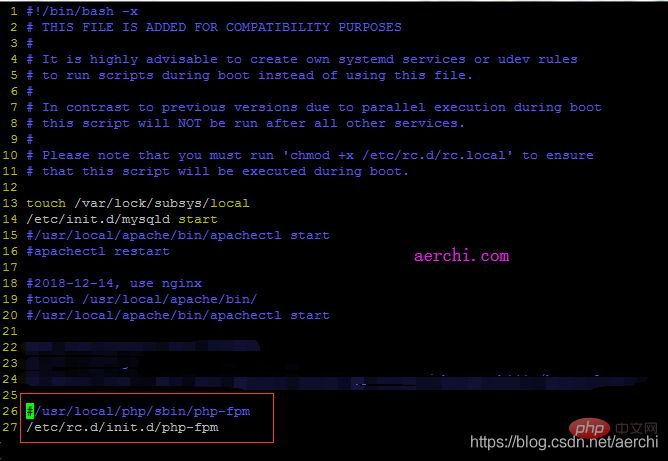
PHP-FPM 自启动配置服务:
vim /etc/rc.d/rc.local
查看开机启动的所有服务
chkconfig --list
nginx demo 配置:(不要忘记chown www-data:www-data 网站目录 不然没权限)
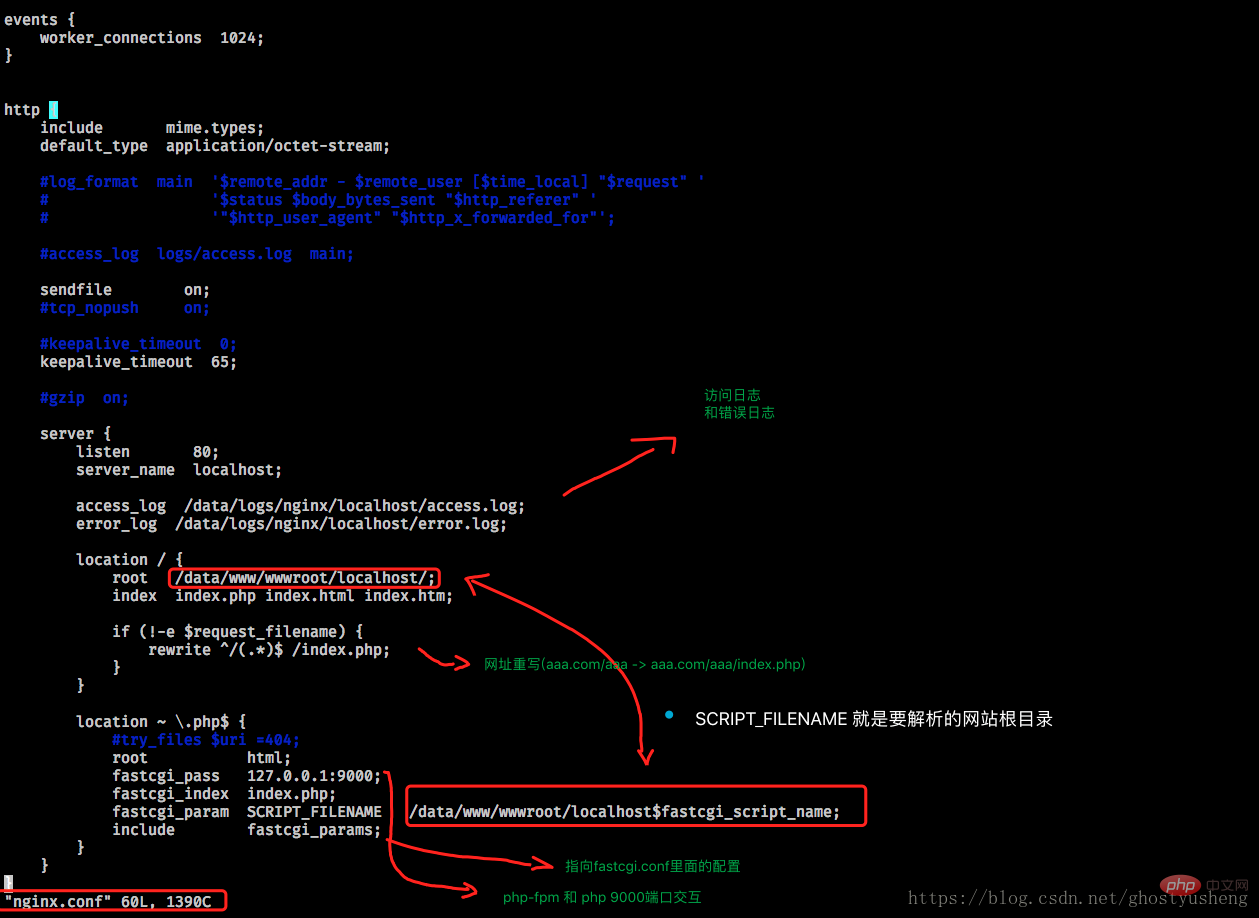
server {
	    listen      80;
	    server_name {{ server_name }};
	    access_log  /data/logs/nginx/{{ server_name }}/access.log;
	    error_log   /data/logs/nginx/{{ server_name }}/error.log;
    location / {
        index           index.php index.html index.htm;
        root            /data/www/wwwroot/{{ server_name }}/;

        if (!-e $request_filename) {
            rewrite ^/(.*)$ /index.php;
        }
    }

    location ~ \.php$ {
        include        fastcgi_params;
        fastcgi_pass   unix:/tmp/php-fcgi.sock;
        fastcgi_index  index.php;
    }
}
php-fpm配置 (重命名两个文件 其他看实际情况配置(略。。。))
www.conf.default -> www.conf
php-fpm.conf.default -> php-fpm.conf
启动: php-fpm -D
nginx -s reload