junit 本身不直接生成 html 报告,而是通过构建工具(如 maven 或 gradle)集成 junit platform 的扩展机制来实现。在 maven 项目中,配置 maven-surefire-plugin 并启用 <reportsdirectory></reportsdirectory> 和 <includes></includes> 即可自动生成包含详细测试结果的 html 文件;gradle 项目则需使用 test-results 目录并结合第三方插件或 ci 系统解析 xml 输出。

Maven Surefire 插件如何配置以生成 HTML 报告
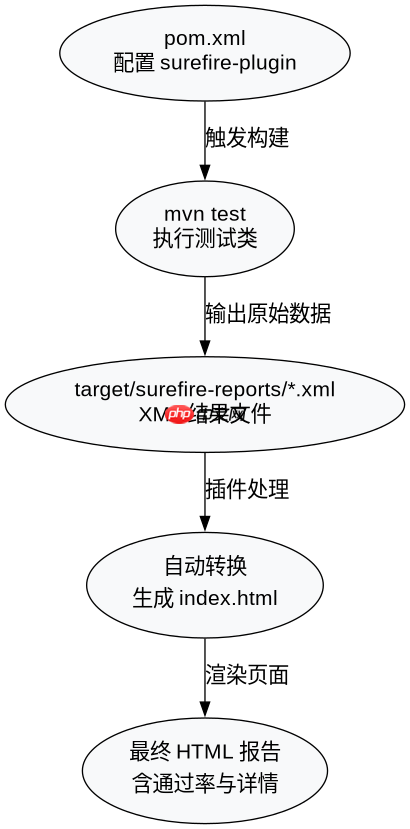
在 Maven 项目中,maven-surefire-plugin 默认会生成 XML 格式的报告,但可以通过配置将其转换为 HTML 或使用内置的 HTML 报告功能。从版本 2.19 开始,Surefire 插件支持生成基于 JUnit 5 的 HTML 报告,只需确保插件版本足够新,并在 pom.xml 中正确指定测试依赖。
<?xml version="1.0" encoding="UTF-8"?>
<project xmlns="http://maven.apache.org/POM/4.0.0"
         xmlns:xsi="http://www.w3.org/2001/XMLSchema-instance"
         xsi:schemaLocation="http://maven.apache.org/POM/4.0.0 http://maven.apache.org/xsd/maven-4.0.0.xsd">
    <modelVersion>4.0.0</modelVersion>

    <groupId>com.example</groupId>
    <artifactId>junit-html-report-demo</artifactId>
    <version>1.0-SNAPSHOT</version>

    <properties>
        <maven.compiler.source>17</maven.compiler.source>
        <maven.compiler.target>17</maven.compiler.target>
        <junit.version>5.10.0</junit.version>
    </properties>

    <dependencies>
        <dependency>
            <groupId>org.junit.jupiter</groupId>
            <artifactId>junit-jupiter-api</artifactId>
            <version>${junit.version}</version>
            <scope>test</scope>
        </dependency>
        <dependency>
            <groupId>org.junit.jupiter</groupId>
            <artifactId>junit-jupiter-engine</artifactId>
            <version>${junit.version}</version>
            <scope>test</scope>
        </dependency>
    </dependencies>

    <build>
        <plugins>
            <plugin>
                <groupId>org.apache.maven.plugins</groupId>
                <artifactId>maven-surefire-plugin</artifactId>
                <version>3.1.2</version>
                <configuration>
                    <includes>
                        <include>**/*Test.java</include>
                    </includes>
                    <reportsDirectory>target/surefire-reports</reportsDirectory>
                </configuration>
            </plugin>
        </plugins>
    </build>
</project>
运行 mvn test 后,HTML 报告将位于 target/surefire-reports/index.html。该报告包含所有测试类的汇总、通过率及失败详情。若需自定义报告样式,可结合 maven-site-plugin 生成更完整的站点文档。
立即学习“前端免费学习笔记(深入)”;

JUnit 5.13.4 可用于旧项目兼容性排查;5.13 系列引入参数化测试类并改进测试发现诊断。该分支已不受支持,不建议用于生产项目;对应的 Platform 独立运行包为 1.13.4。
Gradle 项目中如何配置 JUnit 测试报告
Gradle 默认不会直接生成 HTML 报告,但可通过 test-results 目录中的 XML 文件,配合第三方工具如 jacoco 或 allure-gradle 实现 HTML 可视化。推荐使用 allure-gradle 插件,它能将 JUnit 5 测试结果转换为美观的 HTML 报告。

// build.gradle.kts
plugins {
    java
    id("io.qameta.allure") version "2.11.2"
}

dependencies {
    testImplementation(platform("org.junit:junit-bom:5.10.0"))
    testImplementation("org.junit.jupiter:junit-jupiter")
}

tasks.test {
    useJUnitPlatform()
    reports {
        html.required.set(true)
        junitXml.required.set(true)
    }
}

allure {
    version.set("2.17.3")
    adapter {
        framework {
            junit5.enabled.set(true)
        }
    }
}
执行 ./gradlew test allureServe 后,Allure 报告会启动本地服务器,用户可在浏览器中查看交互式 HTML 报告。该报告包含测试步骤、截图、日志及性能指标,适合持续集成环境。
当测试用例抛出异常时,HTML 报告如何展示错误信息
当 JUnit 测试用例抛出未捕获异常时,HTML 报告会将异常堆栈跟踪完整记录在对应测试项的“Failure”标签页中。例如,若 MathService.calculate() 因除零异常失败,报告中会显示 java.lang.ArithmeticException: / by zero 及其调用链。开发者可直接点击展开查看详细行号与上下文,无需额外配置。