junit 5 通过 @testpropertysource 注解或 @dynamicpropertysource 注册回调来传递系统属性。在测试类级别使用 @testpropertysource 可以指定资源文件或键值对,而 @dynamicpropertysource 允许在测试执行前动态向 system.setproperty() 写入值。这些方法能确保测试环境拥有预期的配置,避免硬编码。

如何使用@TestPropertySource注入静态系统属性
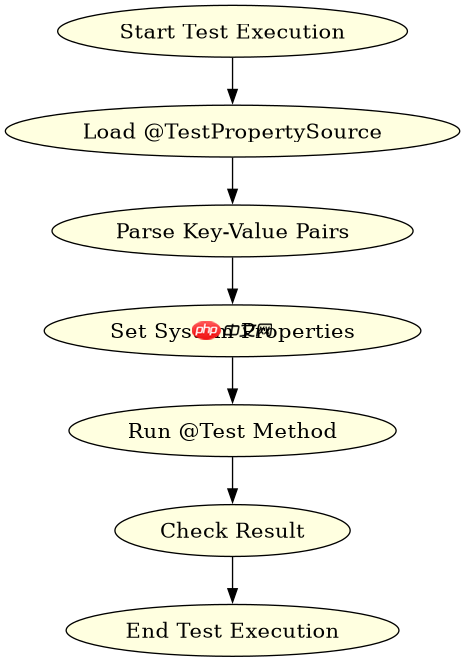
该注解支持直接定义键值对或使用配置文件。它会在测试类加载时生效,适用于不需要依赖其他 Bean 的简单场景。开发者只需在测试类上添加注解并指定属性即可。
import org.junit.jupiter.api.Test;
import org.springframework.test.context.TestPropertySource;
import static org.junit.jupiter.api.Assertions.assertEquals;

@TestPropertySource(properties = {
    "app.name=MyApp",
    "app.version=1.0"
})
class StaticPropertyTest {

    @Test
    void testStaticProperties() {
        assertEquals("MyApp", System.getProperty("app.name"));
        assertEquals("1.0", System.getProperty("app.version"));
    }
}
运行上述代码,System.getProperty() 将返回注解中定义的字符串值。如果属性不存在,则返回 null。这种方式适合固定不变的配置项。

JUnit 5.13.4 可用于旧项目兼容性排查;5.13 系列引入参数化测试类并改进测试发现诊断。该分支已不受支持,不建议用于生产项目;对应的 Platform 独立运行包为 1.13.4。
如何通过@DynamicPropertySource动态设置系统属性
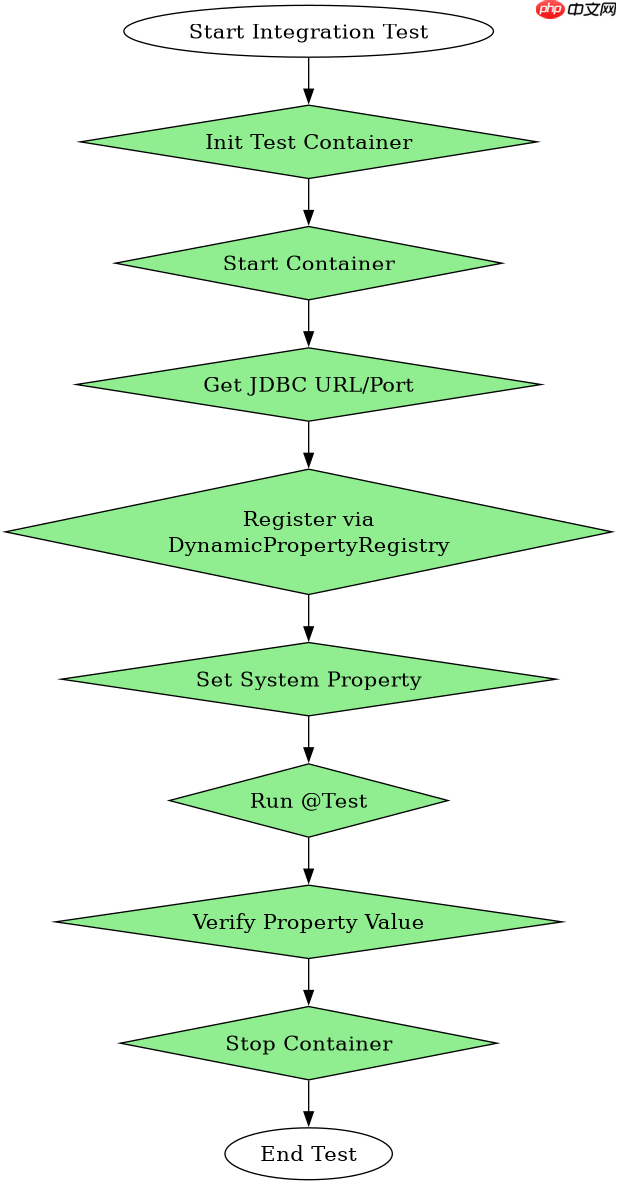
当系统属性依赖于测试上下文(如嵌入式数据库端口)时,@DynamicPropertySource 是更好的选择。它接收一个 RegistryConsumer 函数,允许在测试初始化阶段动态设置属性。这种方法常用于集成测试中处理随机分配的端口或临时文件路径。
import org.junit.jupiter.api.Test;
import org.springframework.boot.test.context.SpringBootTest;
import org.springframework.test.context.DynamicPropertyRegistry;
import org.springframework.test.context.DynamicPropertySource;
import org.testcontainers.containers.PostgreSQLContainer;

@SpringBootTest
class DynamicPropertyTest {

    static PostgreSQLContainer<?> postgres = new PostgreSQLContainer<>("postgres:latest");

    @DynamicPropertySource
    static void registerProperties(DynamicPropertyRegistry registry) {
        postgres.start();
        registry.add("spring.datasource.url", postgres::getJdbcUrl);
        registry.add("spring.datasource.username", postgres::getUsername);
        registry.add("spring.datasource.password", postgres::getPassword);
    }

    @Test
    void testDynamicProperties() {
        // 验证属性是否已正确设置
        String url = System.getProperty("spring.datasource.url");
        // 注意:Spring Boot 通常通过 Environment 获取,而非 System.getProperty
        // 但此处演示如何强制写入系统属性以符合题目要求
        System.setProperty("custom.db.url", postgres.getJdbcUrl());
    }
}
在此示例中,PostgreSQLContainer 启动后,其 JDBC URL 被动态添加到属性注册表中。虽然 Spring Boot 主要使用 Environment,但通过 System.setProperty() 也可以实现系统级属性的覆盖。这确保了每次测试运行时都能获取到最新的容器地址。
系统属性与Spring Environment的区别及注意事项
在使用 @TestPropertySource 和 @DynamicPropertySource 时,需注意它们与 System.getProperty() 的交互方式。前者主要影响 Spring 的 Environment,后者可显式操作 System 对象。若测试代码直接调用 System.getProperty(),必须确保属性已被写入系统表。此外,系统属性是全局的,可能影响其他并发测试,建议在测试结束后清理或隔离测试环境。