在css中,要精准获取包含外边距(margin)在内的盒子真实占位,最可靠的方法是使用javascript的 getboundingclientrect() 方法。该方法返回一个 domrect 对象,其 width 和 height 属性直接对应元素在视口中的实际渲染尺寸,即包含了边框、内边距以及外边距所占据的空间。对于需要精确到像素级的布局计算,这是目前浏览器兼容性最好且无需额外样式依赖的标准方案。

getBoundingClientRect() 与 offsetWidth/Height 的区别是什么
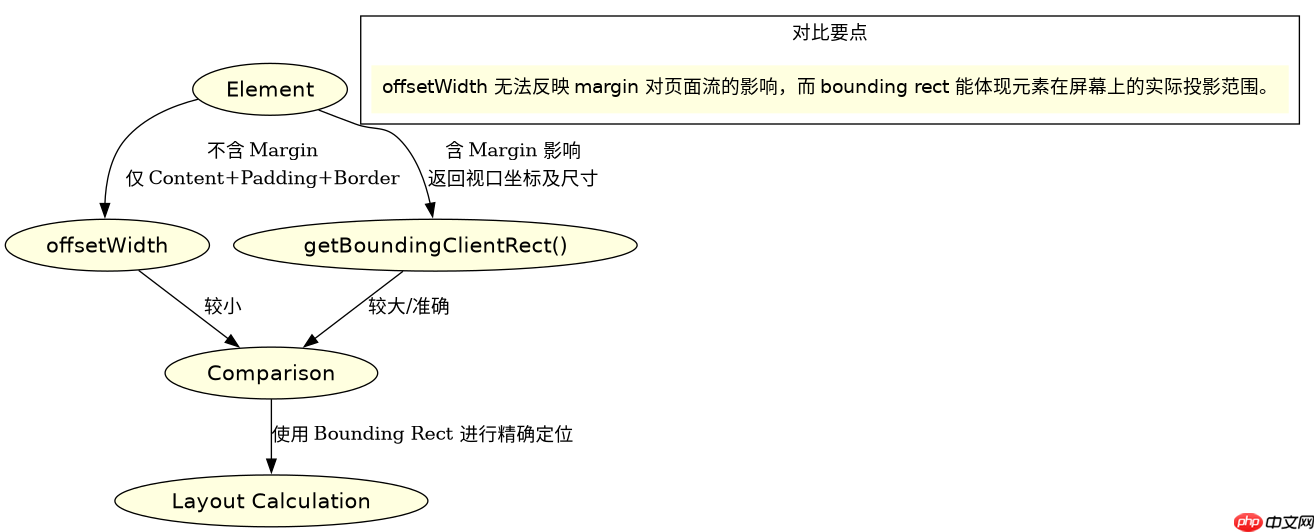
getBoundingClientRect() 返回的是相对于视口的坐标和尺寸,而 offsetWidth 和 offsetHeight 返回的是元素相对于父容器的偏移量及自身尺寸。关键区别在于:offsetWidth 不包含外边距,仅包含内容、内边距和边框;而 getBoundingClientRect() 的尺寸属性反映的是元素在屏幕上实际占据的视觉面积,若元素有外边距且未发生重叠,其可视宽度通常等于 offsetWidth 加上外边距的影响(但在计算绝对位置时,它更准确地反映了元素在页面流中的实际占用空间)。此外,getBoundingClientRect() 还返回 x, y, top, left, right, bottom 等坐标信息,便于进行复杂的定位判断。
const el = document.getElementById('box');
const rect = el.getBoundingClientRect();
console.log(rect.width);   // 包含 margin 影响的视觉宽度
console.log(rect.height);  // 包含 margin 影响的视觉高度
console.log(rect.left);    // 距离视口左边的距离
console.log(rect.top);     // 距离视口顶部的距离
运行上述代码,假设 #box 的 CSS 为 width: 100px; height: 50px; padding: 10px; border: 2px solid black; margin: 20px;,则 rect.width 将显示为 124(100+10*2+2*2),rect.height 为 74。注意,虽然 getBoundingClientRect 不直接提供 margin 值,但其返回的 left 和 right 差值即为元素在页面上占据的总水平空间,间接反映了 margin 的存在。

htmlq 是一个命令行工具,使用 CSS 选择器从 HTML 中提取内容,相当于 jq 的 HTML 版本。该工具使用 Rust 编写,允许你通过 CSS 选择器将 HTML 管道化,直接从终端提取文本、属性和结构化内容。
立即学习“前端免费学习笔记(深入)”;
如何通过纯 CSS 或 JS 组合获取外边距的具体数值
如果开发者不仅需要总占位,还需要单独提取外边距(margin)的数值,可以结合 getComputedStyle() 和 getBoundingClientRect() 来计算。通过比较元素的 offsetWidth(不含 margin)与 getBoundingClientRect().width(含 margin 影响的视觉宽度),可以推导出 margin 的贡献。但更直接的方式是读取 getComputedStyle(el).marginTop 等属性,将其转换为数字后累加。

function getFullBoxMetrics(element) {
  const style = getComputedStyle(element);
  const rect = element.getBoundingClientRect();

  const marginTop = parseFloat(style.marginTop);
  const marginBottom = parseFloat(style.marginBottom);
  const marginLeft = parseFloat(style.marginLeft);
  const marginRight = parseFloat(style.marginRight);

  return {
    visualWidth: rect.width,
    visualHeight: rect.height,
    totalMarginX: marginLeft + marginRight,
    totalMarginY: marginTop + marginBottom,
    actualContentWidth: rect.width - (parseFloat(style.paddingLeft) + parseFloat(style.paddingRight) + parseFloat(style.borderLeftWidth) + parseFloat(style.borderRightWidth))
  };
}

const metrics = getFullBoxMetrics(document.getElementById('box'));
console.log(metrics); // 输出包含所有详细尺寸的对象
此函数返回一个对象,其中 visualWidth 和 visualHeight 是包含 margin 影响的总占位尺寸,totalMarginX/Y 是水平和垂直方向的外边距总和。这种方法适用于需要精细控制布局间距的场景,例如实现自定义网格系统或响应式对齐逻辑。