利用beautifulsoup提取房产信息并入库的核心做法是:使用requests获取html页面,用beautifulsoup解析dom树,通过css选择器定位目标字段(如标题、价格、面积),将清洗后的数据存入sqlite或mysql数据库。具体实现中需处理编码问题、异常捕获及数据去重,确保程序稳定运行。
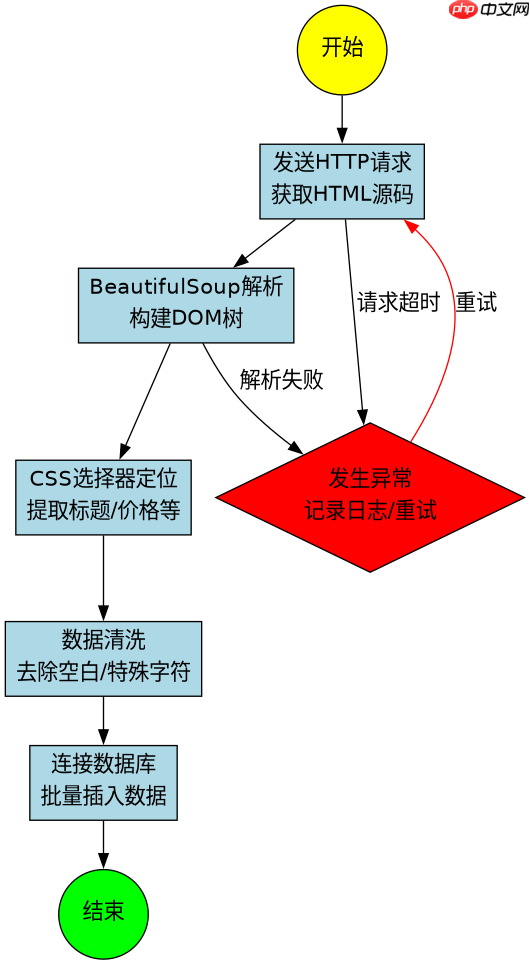
如何解析HTML结构并定位房产关键字段
解析HTML结构的关键在于识别页面中的CSS类名或标签层级,通常房产列表页包含多个

import requests
from bs4 import BeautifulSoup
import sqlite3

def parse_property_page(url):
    headers = {'User-Agent': 'Mozilla/5.0'}
    response = requests.get(url, headers=headers)
    response.encoding = 'utf-8'
    soup = BeautifulSoup(response.text, 'html.parser')

    # 假设房产列表在 class="list-item" 的 div 中
    items = soup.select('div.list-item')
    results = []
    for item in items:
        title_tag = item.select_one('h3.title')
        price_tag = item.select_one('span.price')
        if title_tag and price_tag:
            results.append({
                'title': title_tag.get_text(strip=True),
                'price': price_tag.get_text(strip=True)
            })
    return results

# 示例调用
# data = parse_property_page('http://example.com/houses')
上述代码展示了如何从单个页面提取结构化数据。实际应用中需遍历分页URL,并将结果暂存于内存列表。注意处理空值情况,防止因页面结构变化导致程序崩溃。提取的数据格式为字典列表,便于后续批量插入数据库。
立即学习“Python免费学习笔记(深入)”;

Nodriver是Undetected-Chromedriver的官方继承者,提供异步浏览器自动化功能,可直接与Chrome DevTools Protocol通信,无需Selenium或WebDriver依赖。专为规避反机器人系统(包括Cloudflare和Imperva)的隐蔽网络自动化而构建。
如何将提取的数据安全存入数据库
将数据存入数据库时,推荐使用SQLite进行轻量级存储,因其无需配置服务器且支持SQL标准。创建表结构时需定义主键以支持去重,插入数据时使用参数化查询防止SQL注入。对于大规模数据,可考虑使用事务提交提升性能,并在插入前检查重复记录。
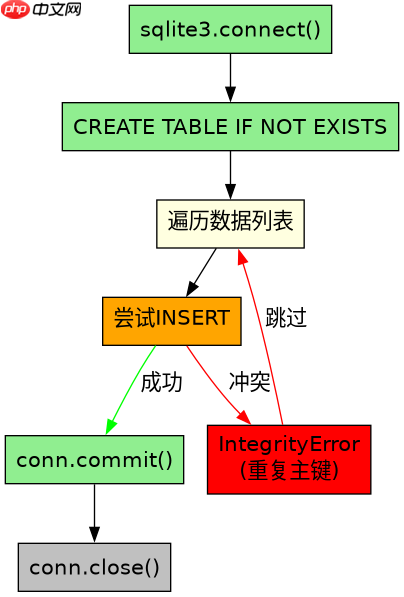
def save_to_db(data_list, db_path='properties.db'):
    conn = sqlite3.connect(db_path)
    cursor = conn.cursor()
    cursor.execute('''
        CREATE TABLE IF NOT EXISTS properties (
            id INTEGER PRIMARY KEY AUTOINCREMENT,
            title TEXT UNIQUE,
            price TEXT
        )
    ''')

    for item in data_list:
        try:
            cursor.execute(
                'INSERT INTO properties (title, price) VALUES (?, ?)',
                (item['title'], item['price'])
            )
        except sqlite3.IntegrityError:
            pass  # 忽略重复项

    conn.commit()
    conn.close()

# 结合前面的解析函数
# parsed_data = parse_property_page('http://example.com/houses')
# save_to_db(parsed_data)
该方案实现了从抓取到存储的完整闭环。在实际部署中,建议添加日志记录以便追踪失败请求,并设置重试机制应对网络波动。同时,可根据业务需求扩展字段,如添加地址、户型等信息,只需修改SQL语句和解析逻辑即可。
如何处理动态加载的房产信息
许多现代房产网站采用JavaScript动态加载内容,此时BeautifulSoup无法直接获取数据,因为初始HTML不包含完整DOM。解决方案是使用Selenium模拟浏览器行为,等待元素加载后再提取。或者分析API接口,直接请求JSON数据源,效率更高。若必须解析HTML,需结合Headless Chrome获取渲染后源码。
from selenium import webdriver
from selenium.webdriver.common.by import By
from selenium.webdriver.support.ui import WebDriverWait
from selenium.webdriver.support import expected_conditions as EC

def scrape_dynamic_page(url):
    driver = webdriver.Chrome()
    driver.get(url)

    # 等待特定元素出现
    wait = WebDriverWait(driver, 10)
    wait.until(EC.presence_of_element_located((By.CSS_SELECTOR, 'div.list-item')))

    html = driver.page_source
    soup = BeautifulSoup(html, 'html.parser')
    items = soup.select('div.list-item')

    results = []
    for item in items:
        title = item.select_one('h3.title').get_text(strip=True)
        price = item.select_one('span.price').get_text(strip=True)
        results.append({'title': title, 'price': price})

    driver.quit()
    return results
此方法适用于反爬策略较弱的场景。对于高并发需求,建议优先逆向工程API,减少资源消耗。无论采用何种方式,均需遵守robots.txt协议,合理控制请求频率,避免被封禁IP。