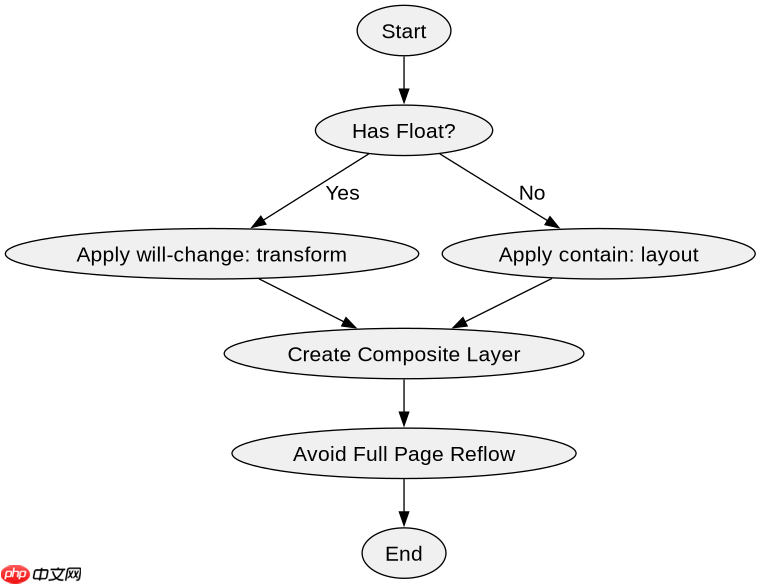
使用 will-change: transform 或 contain: layout style 可以规避由 float 引起的 gpu 重绘开销。将浮动元素包裹在设置了这些属性的容器中,浏览器会将其提升为独立的合成层,从而避免触发整个文档流的重新布局。

float 导致重排的具体机制是什么
float 元素脱离正常文档流,会导致后续块级元素发生重排(Reflow),进而引发昂贵的重绘(Repaint)和合成操作。通过 CSS 属性隔离这种影响,可以减少不必要的计算。
<div class="container">
  <div class="floated-element" style="float: left; width: 100px; height: 100px; background: red;"></div>
  <div class="content">
    <p>This text wraps around the floated element.</p><p><span>立即学习</span>“<a href="https://pan.quark.cn/s/cb6835dc7db1" style="text-decoration: underline !important; color: blue; font-weight: bolder;" rel="nofollow" target="_blank">前端免费学习笔记(深入)</a>”;</p>
    <p>More content here to demonstrate reflow.</p><div class="aritcle_card flexRow">
                                                        <div class="artcardd flexRow">
                                                                <a class="aritcle_card_img" href="/xiazai/skill13837" title="htmlq 命令行 HTML 内容提取器,支持 CSS 选择器"><img
                                                                                src="https://img.php.cn/upload/skill/001/246/273/6adaf20d3191a227.jpg" alt="htmlq 命令行 HTML 内容提取器,支持 CSS 选择器" ></a>
                                                                <div class="aritcle_card_info flexColumn">
                                                                        <a href="/xiazai/skill13837" title="htmlq 命令行 HTML 内容提取器,支持 CSS 选择器">htmlq 命令行 HTML 内容提取器,支持 CSS 选择器</a>
                                                                        <p>htmlq 是一个命令行工具,使用 CSS 选择器从 HTML 中提取内容,相当于 jq 的 HTML 版本。该工具使用 Rust 编写,允许你通过 CSS 选择器将 HTML 管道化,直接从终端提取文本、属性和结构化内容。</p>
                                                                </div>
                                                                <a href="/xiazai/skill13837" title="htmlq 命令行 HTML 内容提取器,支持 CSS 选择器" class="aritcle_card_btn flexRow flexcenter"><b></b><span>下载</span> </a>
                                                        </div>
                                                </div>
  </div>
</div>
如何验证优化后的性能提升
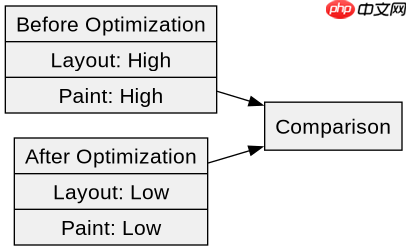
在 Chrome DevTools 的 Performance 面板中录制页面加载或交互过程,观察 "Layout" 和 "Paint" 阶段的耗时。对比优化前后的火焰图,确认重排时间是否显著降低。
<style>
.container {
  will-change: transform;
}
.floated-element {
  float: left;
  width: 100px;
  height: 100px;
  background: red;
}
.content {
  contain: layout style;
}
</style>
<div class="container">
  <div class="floated-element"></div>
  <div class="content">
    <p>This text wraps around the floated element.</p><p><span>立即学习</span>“<a href="https://pan.quark.cn/s/cb6835dc7db1" style="text-decoration: underline !important; color: blue; font-weight: bolder;" rel="nofollow" target="_blank">前端免费学习笔记(深入)</a>”;</p>
    <p>More content here to demonstrate reflow.</p>
  </div>
</div>