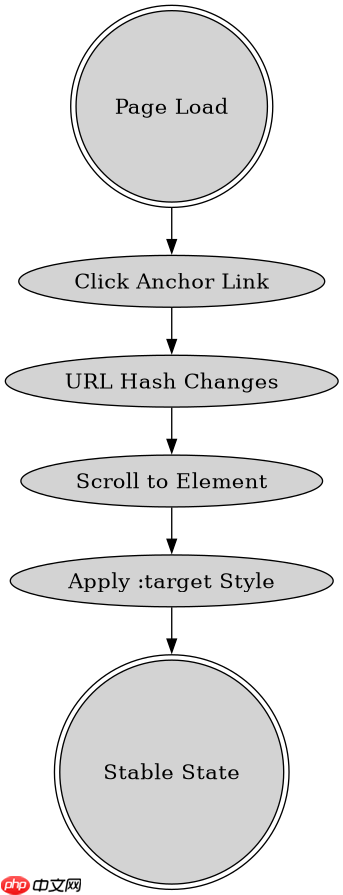
浏览器url哈希值发生变化是因为css伪类:target的定义机制强制要求当前文档的片段标识符(fragment identifier)必须与目标元素的id匹配,这触发了浏览器的导航逻辑。当用户点击带有#id链接或脚本修改window.location.hash时,浏览器会更新地址栏并重新计算样式上下文,此时:target生效。这一过程是浏览器原生行为,旨在提供视觉反馈和页面内导航状态。

点击锚点链接如何触发:target状态
点击包含哈希值的<a></a>标签会直接改变URL,进而激活:target。这是最基础的交互方式,无需JavaScript介入。浏览器解析链接后,滚动至对应元素并应用相关样式。
<!DOCTYPE html>
<html lang="en">
<head>
    <meta charset="UTF-8">
    <title>Target Demo</ /title>
    <style>
        .box {
            padding: 20px;
            margin: 10px 0;
            border: 1px solid #ccc;
            background-color: white;
        }
        /* 当URL哈希匹配该元素ID时,背景变红 */
        .box:target {
            background-color: lightblue;
            border-color: blue;
        }
    </style>
</head>
<body>
    <a href="#section1">Go to Section 1</a>
    <a href="#section2">Go to Section 2</a>

    <div id="section1" class="box">
        Section 1 Content
    </div>

    <div id="section2" class="box">
        Section 2 Content
    </div>
</body>
</html>
预期结果:初始状态下两个盒子均为白色背景。点击“Go to Section 1”后,URL变为#section1,第一个盒子背景变为浅蓝色。点击“Go to Section 2”后,URL变为#section2,第二个盒子变为浅蓝色,第一个恢复白色。
立即学习“前端免费学习笔记(深入)”;
JavaScript修改hash对:target的影响
通过JavaScript动态修改window.location.hash同样会触发:target状态的切换。这种方式常用于单页应用(SPA)中实现无刷新导航或面板切换。修改属性后,浏览器立即更新URL并重新评估样式,使得:target选择器能够响应程序化的导航行为。


核心 vibe-browser 使用指南。在运行任何 vibe-browser 命令前,请务必先阅读本文档。涵盖快照与引用(snapshot-and-ref)工作流、页面导航、元素交互(点击、填充、输入、选择)、文本与数据提取、截图、标签页管理、表单与身份认证处理、内容等待机制,以及常见失败场景的排查方法。支持 macOS、Linux 和 Windows 平台上的 Chrome、Chromium、Brave 和 Edge 浏览器。当用户要求执行以下操作时,请使用 vibe-browser:访问网站、填写表
<!DOCTYPE html>
<html lang="en">
<head>
    <meta charset="UTF-8">
    <title>JS Target Demo</ /title>
    <style>
        .panel {
            display: none;
            padding: 20px;
            border: 1px solid #ddd;
            margin-top: 10px;
        }
        /* 仅当ID匹配当前哈希时显示 */
        .panel:target {
            display: block;
            background-color: #f0f0f0;
        }
        nav a {
            margin-right: 15px;
            text-decoration: none;
            color: blue;
        }
    </style>
</head>
<body>
    <nav>
        <a href="#home">Home</a>
        <a href="#about">About</a>
        <a href="#contact">Contact</a>
    </nav>

    <div id="home" class="panel">
        <h2>Home</h2>
        <p>Welcome to the home page.</p>
    </div>

    <div id="about" class="panel">
        <h2>About</h2>
        <p>Information about us.</p>
    </div>

    <div id="contact" class="panel">
        <h2>Contact</h2>
        <p>Get in touch with us.</p>
    </div>

    <script>
        // 可选:拦截默认跳转行为,仅用JS控制
        document.querySelectorAll('nav a').forEach(link => {
            link.addEventListener('click', (e) => {
                e.preventDefault();
                const targetId = link.getAttribute('href').substring(1);
                window.location.hash = targetId;
            });
        });
    </script>
</body>
</html>预期结果:页面加载时所有面板隐藏。点击“About”链接,URL变为#about,About面板显示且背景变灰。点击“Contact”,URL变为#contact,Contact面板显示,其他隐藏。此示例展示了如何利用:target实现纯CSS的面板切换,配合JS控制URL状态。
清除URL哈希如何移除:target状态
将URL哈希设置为空字符串或移除哈希部分,会导致当前元素失去:target状态。这在需要重置视图或关闭模态框时非常有用。通过设置window.location.hash = ''或window.history.pushState(),可以清除高亮或显示状态,使页面回到默认样式。
<!DOCTYPE html>
<html lang="en">
<head>
    <meta charset="UTF-8">
    <title>Clear Target Demo</ /title>
    <style>
        .modal {
            display: none;
            position: fixed;
            top: 50%;
            left: 50%;
            transform: translate(-50%, -50%);
            padding: 20px;
            background: white;
            border: 2px solid red;
            box-shadow: 0 4px 6px rgba(0,0,0,0.1);
        }
        .modal:target {
            display: block;
        }
        .close-btn {
            display: block;
            margin-top: 10px;
            cursor: pointer;
            color: blue;
        }
    </style>
</head>
<body>
    <a href="#modal">Open Modal</a>

    <div id="modal" class="modal">
        <p>This is a modal triggered by :target.</p>
        <a href="#" class="close-btn">Close</a>
    </div>

    <script>
        document.querySelector('.close-btn').addEventListener('click', (e) => {
            e.preventDefault();
            // 清除哈希,移除:target状态
            window.location.hash = '';
        });
    </script>
</body>
</html>
预期结果:点击“Open Modal”后,URL变为#modal,模态框显示。点击“Close”链接,URL哈希被清空,模态框消失。这验证了:target状态与URL哈希的直接绑定关系,清除哈希即解除状态。